
marcod74886142
Participant
August 14, 2020
Question

Lightroom Classic stuck in syncing 1 image

  • August 14, 2020
  • 3 replies
  • 3582 views

Since a week Lightroom Classic keeps syncing 1 image but nothing happens. All my imported Raw's that are placed in a certain album designated to sync with LR CC / Mobile are not syncing anymore because of that 1 image. 
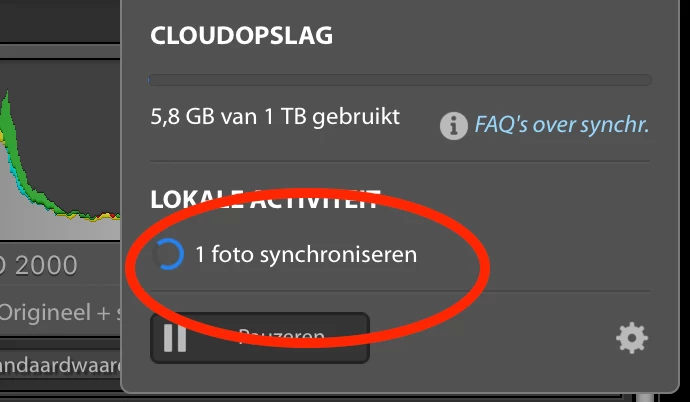
 

In the settingsscreen there are no image pending for syncing. 

 

If have tried a lot off solution here other the de-installing or deleting and renaming my catalog. Nothing is helping. I need my smart previews of the rawfiles to sync thit adobe cloud/LR CC. What can i do to solve this, or Adobe...what are you doing to fic this bug, because as i see, a lot of your customers have this problem. 


This topic has been closed for replies.

3 replies

marcod74886142
Participant
August 25, 2020

Problem Solved. After i tried the solution offered bij Nikunj.m LR Classic stopped syncing at all.  But i solved the problem as follows.


  1. I duplicated the catalog and renamed it. 
  2. I gave al the *.IrData files in the duplicated catalog the same name as the catalog itself
  3. I deleted the ....Sync.IrData file
  4. I opened the duplicated the catalog in Lightroom Classic and syncing started
  5. i deleted the old catalog.


I tried to delete the sync.irdata file of the original Catalog first but that did not help. That's why i duplicated the catalog. This turned out the be solution.


Hope this solution helps for others with the same problem. Good luck!

Participant
March 6, 2023

I have a similar problem. I use cloud version of LR on iPad, android & my Windows 10 laptop. I can see all the recently uploaded pictures across all 3 devices. I then made some changes to photos on my Android device. These changes were synced to my iPad but my laptop shows sync pending and nothing updates. Except, on my laptop if I delete a photo it is immediately deleted in both iOS and android (so there is some kind of connection being made. How can I resolve this?


nikunj.m
Legend
August 14, 2020

Hi,


We're sorry about the trouble with Lightroom Classic. Would you mind sharing the version of Lightroom you are using along with your computers operating system version?


Please go to Lightroom.adobe.com and check if you see a category labelled Sync issues to the left and if there are any images under that. If there is, please check if you are able to identify the image and edit the image as suggested by 99jon.


Let us know if it helps!

Regards,

Nikunj

marcod74886142
Participant
August 15, 2020

Thx. Like 99Jon said. I did see a file with problems. I deleted it and LR Classic stopt syncing. Unfortunedly it doesn't start to sync the albums (with thunderbolt) that we stuck also because of that one image. Is does not sync at all. 


Lightroom version 9.3

Mac OS 10.15.3 

99jon
Legend
August 14, 2020

Can you identify the photo that is stuck? Try changing the metadata in Lightroom Classic which may force an upload e.g. add or change a star rating, add a keyword, or amend the date/time etc. Also ensure the collection has the thunderbolt icon.

marcod74886142
Participant
August 15, 2020

Thx. I did see a file with problems. I deleted it and LR Classic stopt syncing. Unfortunedly it doesn't start to sync the albums (with thunderbolt) that we stuck also because of that one image. Is does not sync at all.