



Lightroom Classic "synchronize" rejects duplicate photos
Using Lightroom Classic 15.1 on Windows 11 25H2.
I have a folder with an JPG image in Lightroom. Using the "Show in Explorer" function, I used Windows Explorer to make two copies of the photo. I then returned to Lightroom Classic, selected the folder and chose "Synchronize Folder" from the context menu.
LR says there are two new photos in the folder:
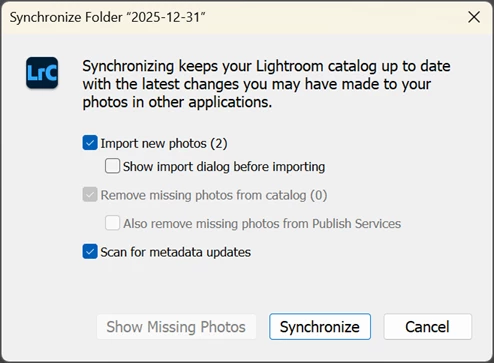
but after I clicked "Synchronize", the it said no photos were added.
I found that I have to click "Show import dialog before importing" and then the two copied photos show up as duplicates in the thumbnails list, and the "Don't import duplicate photos" option was checked. Unchecking the option and selecting the new duplicates allowed me to import.
From that point forward, I'm able to import duplicate photos even if I leave "Show import dialog before importing" unchecked so I synchronize without the import dialog. The last setting seems to stick. The state of the import "Don't import duplicates" is not the same setting that you get when you press the Import button. It appears to be stored independently, behind the scenes by Synchronize.
This is especially confusing since LR "synchronize" told me it was importing (2) new photos (see above), but didn't import anything as they were duplicates (but LR didn't tell me they werre duplicates). I think that's the bug. If there are duplicates in the folder that are already in the catalog that will be ignored, I think Lightroom should say so in the dialog box instead of silently skipping them. Or, better yet, add the "skip duplicates" checkbox to the "synchronize" dialog box to make it obvious.
I ran into this because I synchronize my Lightroom folder, which lives on my desktop computer, from my laptop over the network and I could not figure out why a synchronize operation wasn't picking up some photos. It turned out that they were duplicates of other photos already in the catalog but I wasn't seeing the import dialog with Synchronize. This was very confusing until I figured out Lightroom was ignoring them as duplicates but not telling me it was doing that.

 AdChoices