


Participant
May 9, 2025
Answered

Lightroom Classic with random colors

  • May 9, 2025
  • 2 replies
  • 322 views

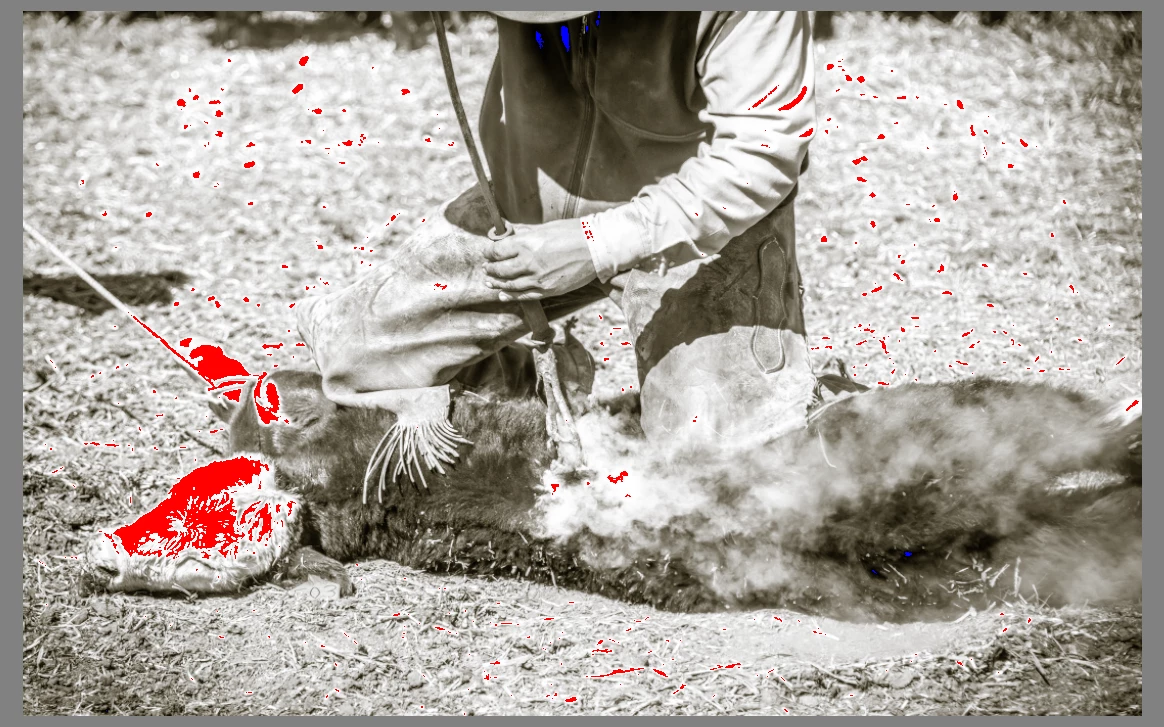
After the last update, any raw files in Lightroom appear with random colors when using presets. When I export to Photoshop, the photo looks normal. 


My example is a photo that I applied a sepia edit to and it shows these red and green spots. It looks normal in Photoshop. The 2nd photo is after it has been exported to Photoshop.


Nothing else has changed -- same monitor, same camera, same edits and it doesn't do it with all presets and it never carries over to Photoshop.



[Mod: Moved from the Photoshop forum ]

 

Correct answer JohanElzenga

Clipping warning is also enabled for black pixels (blue). There are only a few, but they do show as well.


2 replies

Participant
August 4, 2025

Lightroom Classic can sometimes display random or unexpected colors due to issues like incorrect color profiles, GPU incompatibility, or monitor calibration errors. This can make edited photos look different from the original or vary across devices. For designers, photographers, or anyone doing precise visual work—such as creating consistent backgrounds for product photos—these color shifts can be frustrating. Ensuring your display is properly calibrated, updating Lightroom and GPU drivers, and using the correct color space (like sRGB for web) can help. Accurate color management is essential, especially when working with tools that rely on precise background or object color consistency.

AxelMatt
Community Expert
Community Expert
May 9, 2025

The red aeras in you pictures are over exposed and the clipping warnings are enabled. 

see here: Gelöst: How to display the over exposed areas in red ? - Adobe Community - 7035239


My System: Intel i7-8700K - 64GB RAM - NVidia Geforce RTX 3060 - Windows 11 Pro 25H2 -- LR-Classic 15 - Photoshop 27 - Nik Collection 8 - PureRAW 6 - Topaz Photo AI
JohanElzenga
Community Expert
JohanElzengaCommunity ExpertCorrect answer
Community Expert
May 9, 2025

Clipping warning is also enabled for black pixels (blue). There are only a few, but they do show as well.


-- Johan W. Elzenga