
Participant
October 10, 2023
Answered

Lightroom Classic won't launch

  • October 10, 2023
  • 2 replies
  • 762 views

Hi there. My Lightroom Classic won't open, and I could really need some help to solve the issue. 


Some background information:

I've used Lightroom a lot, which means I have around 6k photos imported with different presets stored. Yesterday, I tried to locate some of my pictures that were missing from my external hard drive because I had made some changes to the folder structure outside of Lightroom. I'm not sure how to synchronize the new folder structure to find my pictures again, so I tried to open a specific catalog or something like that.


Now, when I try to open Lightroom, a notification appears on my screen:
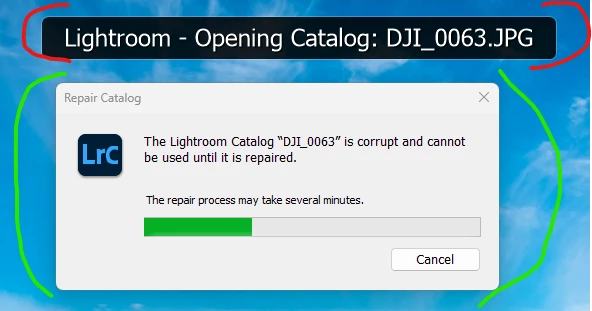
The box marked in red stays on my screen, while the "repair catalog" option marked in green disappears. However, the app won't open at all.


I would prefer the app to open even if some photos are missing than the app not working at all. How can I fix this? Any help would be much appreciated.


Thanks in advance. 


This topic has been closed for replies.
Correct answer dj_paige
quote

Not quite sure what I did there, but I believe I "right-clicked" and chose some option here. 🙂


By @Felix30235879sfer


The whole purpose of this forum is for people to help other people. The above really doesn't help anyone. Is there any chance you could provide more information about what you did?

2 replies

Participant
October 11, 2023

I didn't quite understand that guide @dj_paige. But I actually managed to fix the problem. What I did was: 


1. Found the picture in my new map structure on my external hard drive, and opened it with LrC. 

2. In the import vindow that came up (Add), I could refresh and restructure the whole map structure of the external hard drive by clicking on the source. Not quite sure what I did there, but I believe I "right-clicked" and chose some option here. 


Anyway, this fixed my second problem. Thanks! 🙂

dj_paigeCorrect answer
Legend
October 11, 2023
quote

Not quite sure what I did there, but I believe I "right-clicked" and chose some option here. 🙂


By @Felix30235879sfer


The whole purpose of this forum is for people to help other people. The above really doesn't help anyone. Is there any chance you could provide more information about what you did?

Participant
October 10, 2023

So, I managed to open Lightroom Classic again by clicking 'Cancel' during the repair process and opening the old catalog. I still have the problem that the folder structure shown within Lightroom under 'Library' is completely different from the structure set up on my external hard drive.


Is there any way to synchronize this?

Legend
October 10, 2023
quote

I still have the problem that the folder structure shown within Lightroom under 'Library' is completely different from the structure set up on my external hard drive.


By @Felix30235879sfer


Please read this document. See Figure 4 in particular for help with re-connecting LrC to the new location of the photos.

www.computer-darkroom.com/lr2_find_folder/find-folder.htm