
Lightroom Classic won't open back-up catalogue
UPDATE
I feel rather silly now. Just realised that I was directly trying to open a zipped folder without unzipping. I'll leave this post here though in the event that it helps someone else.
My Windows 10 computer died recently. It had two storage disks in Raid 1 (so perfect duplicates of each other). On those storage disks I backed up the LR Classic catalogue and everything seems to have been salvaged. My new Windows 11 PC doesn't have Raid but I have successfully copied everything from the old raid drive to the new (single) SSD.
However when I try to open the back up catalogue from LR Classic it doesn't appear at all. When I double click from Windows explorer I get ...
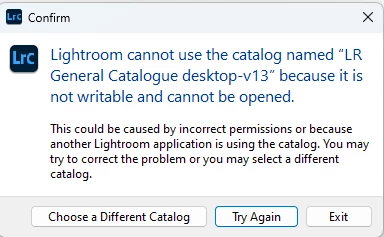
Of course I have ensure that all the files are accessible and I've run LR Classic as Administrator. But nothing I do seems to make a difference. Anyone out there have a solution please?


 AdChoices