andyl16804564
Participant
December 29, 2017
Question

Lightroom crashes at startup
  • December 29, 2017
  • 3 replies
  • 5448 views

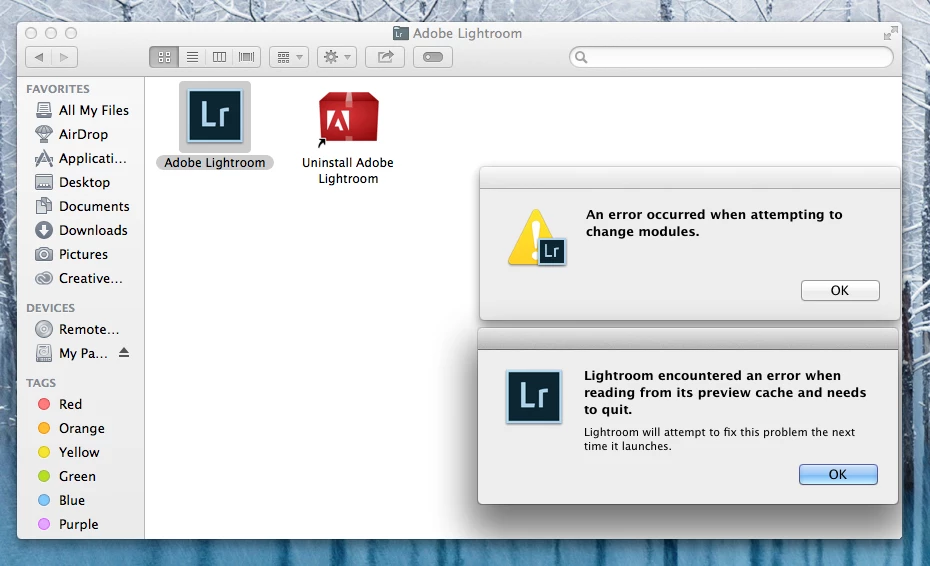
Immediately after the latest update 6.14, Lightroom classic CC crashes after showing the splash screen. After the crash report has been sent i have two error messages, any help would be appreciated ( OS X 10.9.5).

    This topic has been closed for replies.

    3 replies

    Participant
    May 30, 2018

    hello,

    I just need some help in similar case. I hava installed LR 6.14 on my mcbookpro in last April, and i am faced with a lot of crash.

    - selecting a catalog at opening LR : i have to delete *.lock files from catalog repository and reboot my mac to open a catalog eventhough LR crash during initialisation this never happened with LR 5.7

    - Using  instagram plugin  to publish picture leads in cracsh of LR in all cases (i got to deinstall the plugin) this never happened with LR 5.7

    - reading my sd card to import pictures, leads in a crash of LR (not everytime) but lr crashes during browse of the SD card tree this never happened with LR 5.7

    - sometimes LR crash also when I try to send a picture to external editor (Nik Collection or Affinity Photo) this never happened with LR 5.7

    To me it looks like there is a mistake in rights access. I tried to reinstall LR 2 times, deinstall completely my last version of LR (5.7) and install LR 6.14 again but sames pb occured.

    i am a very desappointed for that case and do not really see any solution to use LR in a comfortable way ..

    many thanks for your help

    Olivier

    Just Shoot Me
    Legend
    December 29, 2017

    LR 6.14 does not work with OS X 10.9.5

    You'll need to uninstall LR then from the link below download both the Application installer and the 6.6.1 update then Never run Check for updates again.

    Download Photoshop Lightroom

    ** Lightroom CC 2015.1/Lightroom 6.1 and earlier versions are supported on Mac OS X v10.8. Lightroom CC 2015.6.1/Lightroom 6.6.1 and earlier are supported on Mac OS X v10.9. Lightroom CC 2015.6.12/Lightroom 6.12 and earlier are supported on Mac OS X v10.10.

    You may also consider upgrading OS X to 10.13.x High Sierra.

    Participant
    December 31, 2017

    Hello, thank's for the fix! I can now open LR successfully but a new problem arose. LR mobile would no longer sync. I knew that LR 6.13 was working perfect before I updated to 6.14 so I reinstalled the 6.13 and all works fine. So I guess that's the end of the road for users of Mavericks 10.9.5 users - no more updates.

    Thanks all! Thank god for this community!!!

    Craig.

    Just Shoot Me
    Legend
    December 31, 2017

    Actually if you are running OS X 10.9.5 then the last update for LR 6 that is supposed to work correctly on that version of OS X is 6.6.1.

    If you say 6.13/2015.13 is running OK then I guess keep using it.

    Lightroom Classic CC system requirements

    ** Lightroom CC 2015.1/Lightroom 6.1 and earlier versions are supported on Mac OS X v10.8. Lightroom CC 2015.6.1/Lightroom 6.6.1 and earlier are supported on Mac OS X v10.9. Lightroom CC 2015.6.12/Lightroom 6.12 and earlier are supported on Mac OS X v10.10.

    Ian Lyons
    Community Expert
    Community Expert
    December 29, 2017

    If you haven't already tried then please try resetting your Lr preference as described in Method 1 at How to set Lightroom Classic CC preferences