Participant
October 20, 2019
Question

Lightroom Darstellung defekt

  • October 20, 2019
  • 3 replies
  • 607 views

Dear all,

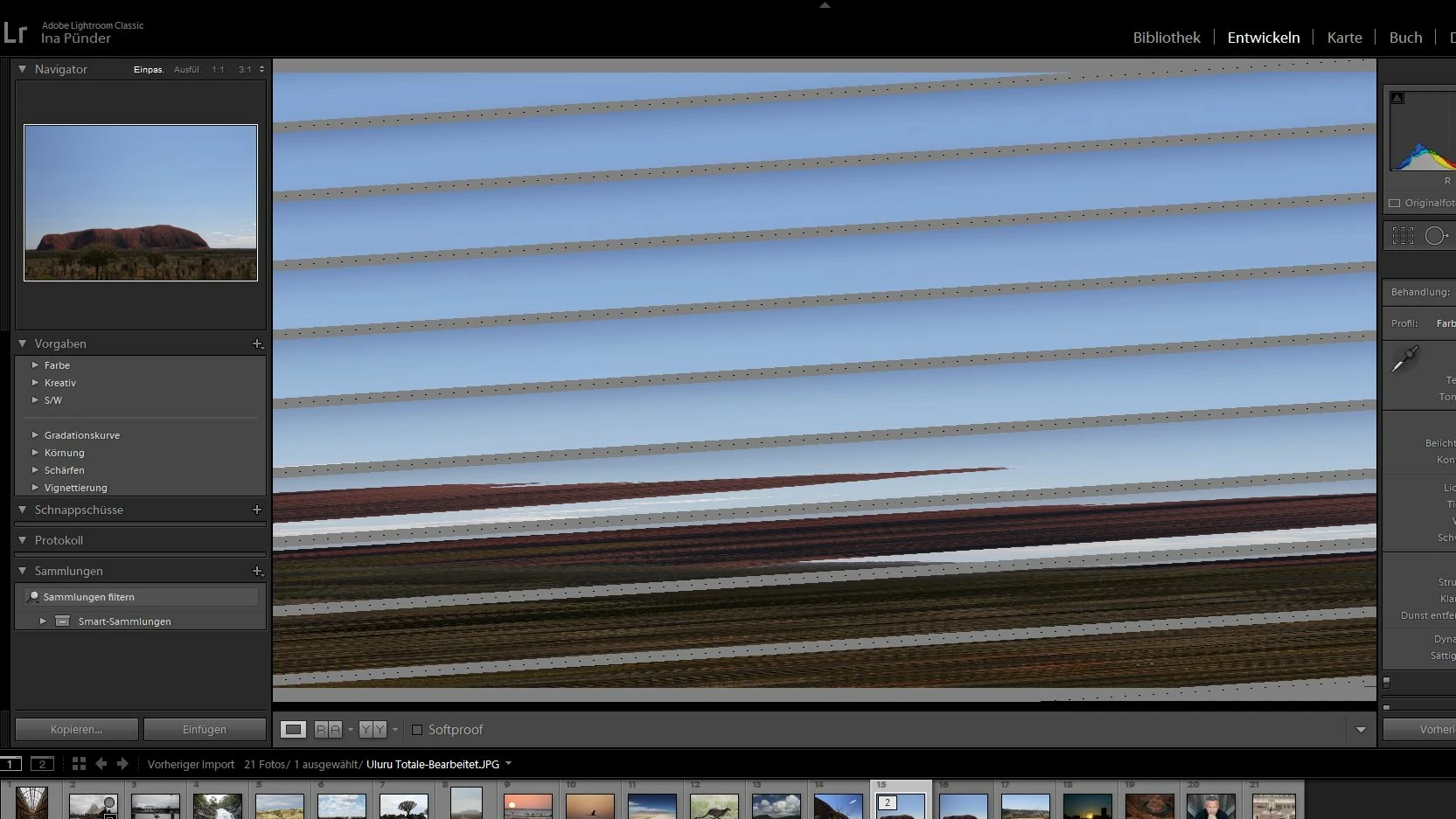
 since yesterday I have an issue with Lightroom Classic (latest version). I can import my pictures and can see them without errors. When I move from the bibliothk to the working area, I see them in the navigator without problems, but in the working space they are defect (see screenshot below german version) - no matter if they are RAW or JPG. I have started the computer new, I have deinstalled and newly installed Lightroom, I have opened a new catalogue. When I move to PS from LR, I can work with the photos without errors. I have no graphic problems with any other program.

Has anyone an idea what the problem could be?


Thank you very much for your support and best regards, Ina


Hallo zusammen,


ich kann seit gestern in Lightroom meine Bilder in der Bibliothek importieren und bekomme alles fehlerfrei angezeigt. Unter entwickeln sehe ich die Vorschau im Navigator auch fehlerfrei. Im Bearbeitungsfenster ist das Bild kaputt (siehe Screenshot). Es ist das gleiche Problem bei JPG oder RAW. Ich habe ienen neuen Katalog geöffnet und die Bilder neu importiert. keine Änderung. Den Rechner habe ich runter und rauf gefahren. Ich habe LR deinstalliert und wieder installiert. Rechte Maustaste auf das Photo und Bearbeiten in ... Photoshop funktioniert auch ohen Probleme. Alle Programme sind auf dem neusten Stand. Auch andere Programme zeigten keinen Fehler in irgendwelchen Darstellungen.


Hat jemand eine Idee woran das liegen könnte?


Vielen Dank für Eure Hilfe und viele Grüße, Ina
    This topic has been closed for replies.

    3 replies

    42desAuthor
    Participant
    October 24, 2019

    Hi David,


    thank you very much! It worked! You made my day 🙂


    Thanks, Ina

    bymerveekimci
    Participant
    January 23, 2022

    Hi Ina ich habe das gleiche PRoblem gerade 


    habe ständig defekte bilder 


    habe gerade die seite geöffnet die als Hilfe dienen soll

    In Preferences, in the Performance tab. Uncheck use GPU for display (acceleration)

    https://helpx.adobe.com/lightroom-classic/kb/lightroom-gpu-faq.html


    Konnte es aber nicht ganz nachvollziehen wie man diesen Fehler beheben kann


    GoldingD
    Legend
    October 21, 2019


    Hi David,
     
    thanks for your fast reply. Where can I turn off the GPU acceleration?
     
    Thanks and best regards, Ina


    In Preferences, in the Performance tab. Uncheck use GPU for display (acceleration)

    https://helpx.adobe.com/lightroom-classic/kb/lightroom-gpu-faq.html


    PLEASE USE THE REPLY FROM THE TOP POST WHEN REPLYING TO POSTS.
    Helps to show posts in date/time order, improves visibility (as not hidden in a reply to a reply), and is easier to use


    GoldingD
    Legend
    October 20, 2019

    Turn off use GPU acceleration


    42desAuthor
    Participant
    October 21, 2019

    Hi David,


    thanks for your fast reply. Where can I turn off the GPU acceleration?


    Thanks and best regards, Ina