
Inspiring
August 9, 2019
Answered

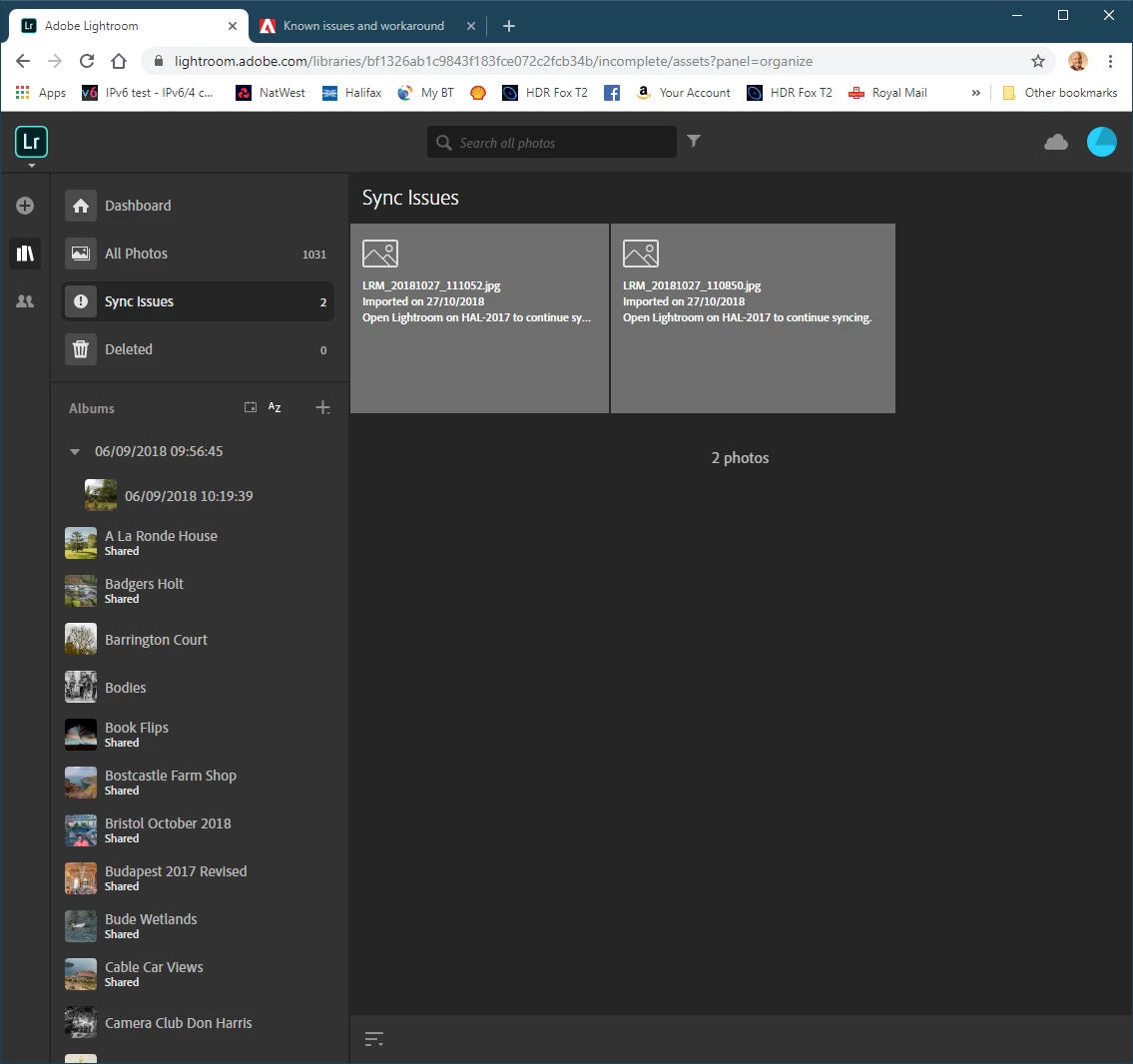
Lightroom Dashboard (lightroom.adobe.com) Sync Issues Reported Incorrectly

  • August 9, 2019
  • 1 reply
  • 833 views

My Lightroom Dashboard reports a couple of issues  - images that have not synced correctly.  i have removed the images from my catalog but the dashboard still says the same thing.  How do I get rid of these non existent issues, please?  Lightroom Classic Desktop does not report any sync errors.
This topic has been closed for replies.
Correct answer 99jon

I have identified the images and they were originally downloaded from Lightroom on my cellphone to my desktop, taken using the cellphone camera through Lightroom mobile.  I deleted them from Lightroom desktop as soon as I saw the error notification in lightroom.adobe.com in the hopes that the error would be eradicated but that did not happen.  Hence my query.  The images are not on my phone or my desktop, nor do they appear in the cloud but the error report persists, but only in the cloud web view.

Thanks for your interest!

Hugh


If they comprise part of the 140 deleted items (shown on the second screenshot) they should clear in time. But you can delete permanently from deleted items.

1 reply

Akash Sharma
Legend
August 9, 2019

Hi Hugh.letheren,

Sorry that Lightroom on the web is not syncing and showing sync errors. This might be happening because the images are not properly synced to the cloud.

Could you please go to Lightroom preferences -> Lightroom sync -> Hold alt/option key and click rebuild sync data.

This will rebuild the sync data and will refresh the syncing process.

Also, sign out of Lightroom Web and check back to see if that helps?

Let us know if that helps.

Thanks,

Akash

Inspiring
August 9, 2019

Thanks for the swift response.  I had already tried rebuilding sync data, which did not work.

I have now tried that again, coupled with signing out of Adobe, both Lightroom and Lightroom Web (lightoom.adobe.com) and then signing back in to both again.

I regret to report that this has made no difference!

Any more thoughts, please!

Thanks,

Hugh

Akash Sharma
Legend
August 12, 2019

After running Lightroom for few minutes and if it starts showing the pending sync count then please create a diagnostic log by holding down the Alt key and clicking the "Diagnostic Log" button in the same Lightroom Sync tab. Share that log with us via a Dropbox link(send me privately) so I can have someone from the Engineering team to look into it.

Thanks,

Akash