
Tomdunlap74
Participating Frequently
March 3, 2019
Answered

Lightroom does not import ratings from windows

  • March 3, 2019
  • 2 replies
  • 1224 views

I am using LR 8.2.  I have rated JPG photos in windows explorer using the 5 star system.  When I import the photos, most meta data is imported but ratings are not. I also tried to read meta data after importing the photos and still no ratings.  But if I change the ratings in windows explorer, LR indicates that meta data has been changed in the top right hand corner of the picture. When I click on the corner I have the option of importing the meta data from explorer or overwriting the  disk settings from those in the catalog. If I click on import, then the new rating is imported from explorer. If I click on overwrite, then the original rating from explorer is overwritten into the file i.e. the catalog did import the rating but it does not show up at the bottom of the picture or in the meta data on the right hand side of the screen. Also, if I export the picture as originally imported, the rating that I cannot see in LR are exported.

Can anyone tell me how I can view the ratings that are stored somewhere in the catalog?

Thanks
    This topic has been closed for replies.
    Correct answer johnrellis

    I observe different behavior. When I rate a photo in Windows 10 File Explorer and then import it into LR 8.2, the rating gets properly imported.

    Two initial troubleshooting steps:

    1. Do the menu command Help > System Info and copy/paste the first ten lines here.

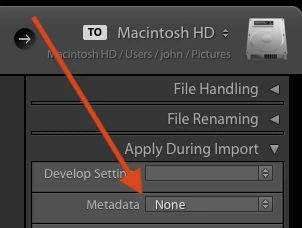
    2. In the Import window, make sure Apply During Import > Metadata is set to None:

    If it was set to something else, set it to None and retry the import.

    2 replies

    johnrellis
    johnrellisCorrect answer
    Legend
    March 3, 2019

    I observe different behavior. When I rate a photo in Windows 10 File Explorer and then import it into LR 8.2, the rating gets properly imported.

    Two initial troubleshooting steps:

    1. Do the menu command Help > System Info and copy/paste the first ten lines here.

    2. In the Import window, make sure Apply During Import > Metadata is set to None:

    If it was set to something else, set it to None and retry the import.

    johnrellis
    Legend
    March 3, 2019

    Also, in general, File Explorer won't always see ratings that you set in LR.  If you set a rating in LR on a photo that's never been rated by File Explorer, File Explorer will see it. But if you set a rating in LR on a photo that was rated by File Explorer, File Explorer won't see the new rating set by LR.

    This is because LR adheres to the Metadata Working Group industry standard but File Explorer does not (even though Microsoft was part of the committee that authored the standard).

    Just Shoot Me
    Legend
    March 3, 2019

    You would be better off, it would be easier, to use LR exclusively for this type of thing.