
blwegrzyn
Known Participant
March 12, 2017
Answered

Lightroom does not notice ACR Camera Raw changes to DNG

  • March 12, 2017
  • 2 replies
  • 1603 views

When I open DNG file in ACR and update it, lets say with new white balace, the light room does not show me a warning that meta data was changed.

Is there a way to get that warning back?  I can read new meta data and it works fine butt warning is missing.

Also, when I work on files in DNG in Lightroom , the Lightroom does not always save the metadata to DNG so Bridge can see the updates right away.

It seems like if there is too many changes within 1 minute Lightroom does not write to file and does not update the meta data.

If some time passes then Lightroom will update the meta data, but before that only catalog contains the changes, so if catolog would get corrupted changes would be lost. To overcome this I must force meta changes with command+S on the mac.  Is this normal or meta data should be updated immediately after new adjustment is performed?

I am experimenting between bridge and Lightroom so this is why i asked above questions.

Until i decide my workflow i want to make sure that metadata is nicely updated between two.

thx
    This topic has been closed for replies.
    Correct answer Todd Shaner

    blwegrzyn  wrote

    Again , my question is why Lightroom does not write changes to dig right away.

    Sometimes it does sometimes it does not, depending on the change and time when the change was made.

    Also, why Lightroom does not notice the file (metadata( was modified outside its own interface.

    The metadata update detection and 'Automatically write changes into XMP' is a background operation. I've found there can be a considerable delay in both detecting external metadata changes and writing XMP metadata with 'Automatically write changes into XMP' checked. This is especially true if you've used 'Sync' or Copy & Paste to apply Develop settings across a large number of files.  The only workaround I know of ( and use) is to manually synchronize the XMP data:

    1) After making edits to a DNG file in LR go to menu Photo> 'Update DNG Preview & Metadata.'

    2) After making further edits to the same DNG file in ACR go to LR menu Photo> Read Metadata from file.'

    If you've edited multiple DNG files inside LR you can quickly update their XMP metadata by switching to the Library module Grid view, select the edited files, and use menu Metadata> 'Update DNG Preview & Metadata.' This forces an immediate update of the XMP data in the selected DNG files.

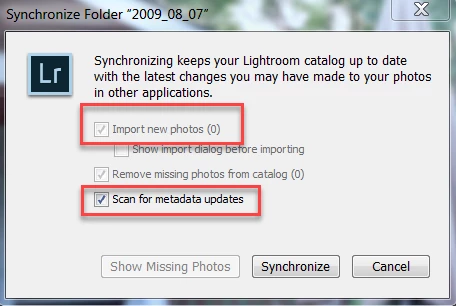
    You can also right-click on the containing folder and select 'Synchronize Folder.' This is useful after editing a number of files with Bridge/ACR. Just be aware that this will over-write all of the LR Develop settings, Keywords, etc. that haven't been previously written to XMP data from inside LR. You can choose not to import new photos that may be in the folder by unchecking 'Import new photos.'

    The devil is in the details of "when and how" to manually synchronize XMP data when editing in both LR and ACR.

    2 replies

    DdeGannes
    Community Expert
    Community Expert
    March 13, 2017

    Lightroom by default reads and writes to the Catalog file. You can select the option in Lightroom Preferences > Catalog settings to "Automatically write to xmp".

    Seee the screen capture. Also you need to be aware that Lightroom is designed as a complete stand alone application and does not use ACR Plugin for Photoshop. Each LR version has its own equivalent raw conversion engine as ACR Plugin. e.g LR 6.9 has the equivalent of ACR 9.9

    Regards, Denis: iMac 27” mid-2015, macOS 11.7.10 Big Sur; 2TB SSD, 24 GB Ram, GPU 2 GB; LrC 12.5,; Lr 6.5, PS 24.7,; ACR 15.5,; (also Laptop Win 11, ver 24H2, LrC 15.3; PS 27.0; ) Camera Oly OM-D E-M1.
    blwegrzyn
    blwegrzynAuthor
    Known Participant
    March 13, 2017

    I already have this setup.

    Again , my question is why Lightroom does not write changes to dig right away.

    Sometimes it does sometimes it does not, depending on the change and time when the change was made.

    Also, why Lightroom does not notice the file (metadata( was modified outside its own interface.

    DdeGannes
    Community Expert
    Community Expert
    March 13, 2017

    AFAIK when you make changes outside of Lightroom to .xmp these changes are not updated in Lightroom. You should be getting a mismatch warning when you visit the image files in Lightroom and offering you the option to update the info from the .xmp file or retain Lightroom's default info in the Catalog.

    As I said in my earlier post while working with Lightroom the default is to write to the Catalog File. The write to .xmp is a background function and does not happen immediately.

    Regards, Denis: iMac 27” mid-2015, macOS 11.7.10 Big Sur; 2TB SSD, 24 GB Ram, GPU 2 GB; LrC 12.5,; Lr 6.5, PS 24.7,; ACR 15.5,; (also Laptop Win 11, ver 24H2, LrC 15.3; PS 27.0; ) Camera Oly OM-D E-M1.
    Just Shoot Me
    Legend
    March 12, 2017

    In the preferences dialog there is a button to reset all warning dialogs. Click that.

    blwegrzyn
    blwegrzynAuthor
    Known Participant
    March 12, 2017

    i tried that and although file was changed and shows different timestamp Lightroom does not notice changes.

    Todd Shaner
    Legend
    March 12, 2017

    Inside Adobe Bridge go to Edit> Camera Raw Preferences and set as below: