jiritulach
Participating Frequently
September 17, 2017
Answered

Lightroom - Edit In > Photoshop - No dialog with "Edit original"

  • September 17, 2017
  • 3 replies
  • 8221 views

Hello everyone!

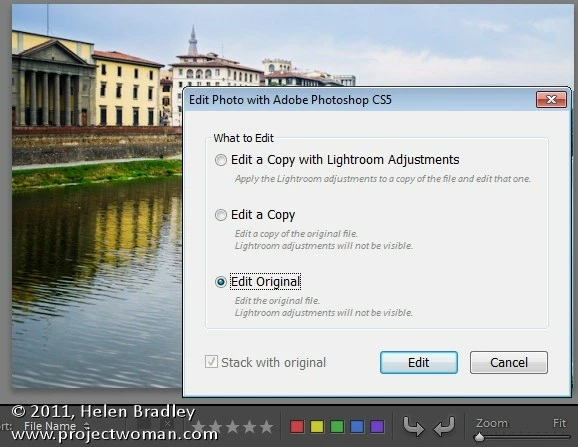
When I am working in Lightroom and I want to edit photo in Photoshop, I am not seeing dialog with "Edit original" option. Before yesterday this dialog was everytime showing. Is there any way fix it?

Thanks in advace.

I am not seeing this window:

This topic has been closed for replies.
Correct answer Vishu_Aggarwal

As stated byJimHess​ in earlier reply Lightroom does not give the 3 options (edit original, edit a copy, edit copy with adjustments) when you choose edit with photoshop for any of the Camera raw Format i.e. NEF, CRW, RAF, DNG etc.

Raw files opened from Lightroom to Photoshop to edited in photoshop are saved in TIFF or PSD format depending on the settings done in the preference settings of Lightroom in External editing tab. So your original raw file is always available in the Lightroom with tiff or psd file next to it with changes done in Photoshop.

This is clearly stated in the Reference/Help file of Lightroom and even in the Official training workbook by Adobe. - if you go to page number 76 - 78 in Adobe Lightroom Reference you can read more about it.

Here is the screenshot excerpt from Reference & Official training workbook of Lightroom -
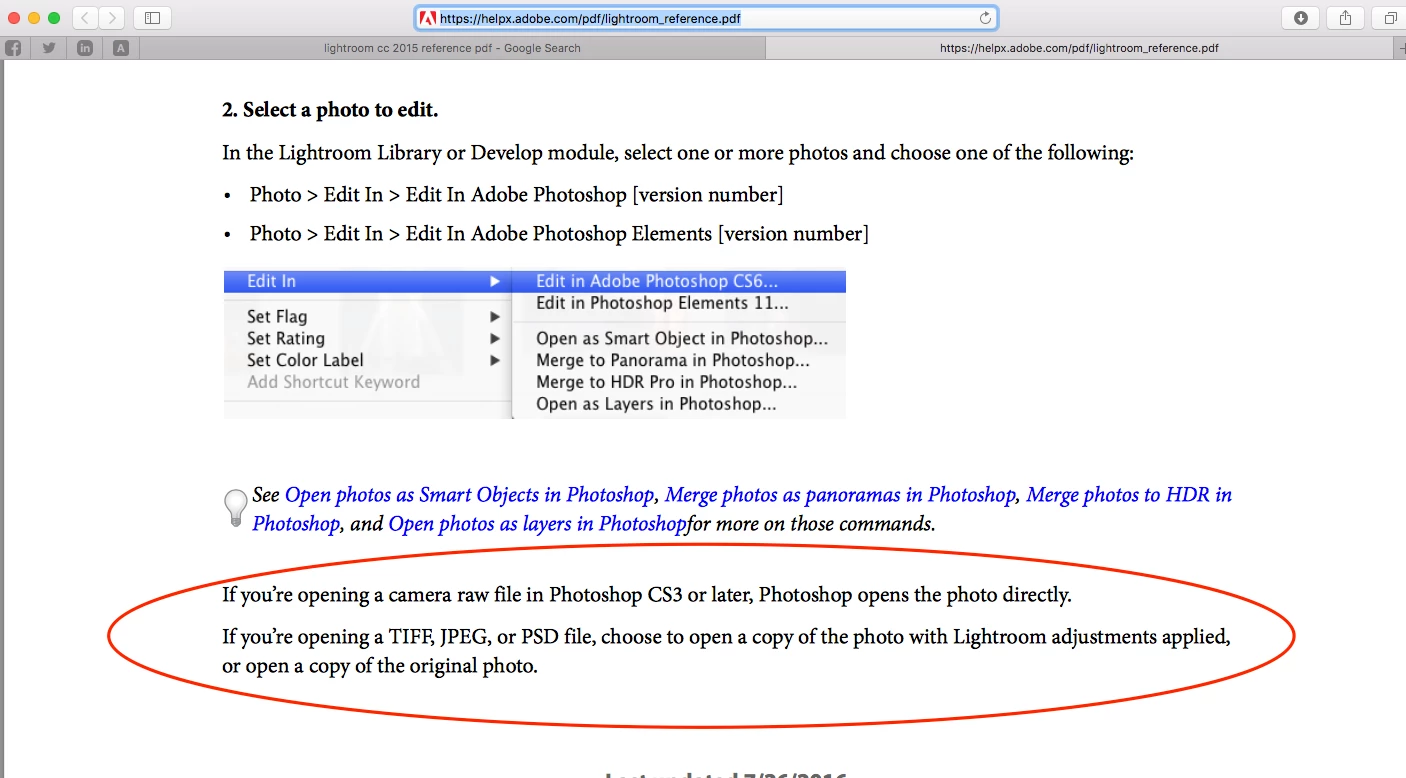
If you open any other file format i.e. tiff, psd, JEPG etc expect camera raw file format from Lightroom to Photoshop then its going to show you the option 3 options when you  choose edit in photoshop.

Same is stated in the official training workbook go Lightroom -

3 replies

Vishu_Aggarwal
Vishu_AggarwalCorrect answer
Participating Frequently
September 18, 2017

As stated byJimHess​ in earlier reply Lightroom does not give the 3 options (edit original, edit a copy, edit copy with adjustments) when you choose edit with photoshop for any of the Camera raw Format i.e. NEF, CRW, RAF, DNG etc.

Raw files opened from Lightroom to Photoshop to edited in photoshop are saved in TIFF or PSD format depending on the settings done in the preference settings of Lightroom in External editing tab. So your original raw file is always available in the Lightroom with tiff or psd file next to it with changes done in Photoshop.

This is clearly stated in the Reference/Help file of Lightroom and even in the Official training workbook by Adobe. - if you go to page number 76 - 78 in Adobe Lightroom Reference you can read more about it.

Here is the screenshot excerpt from Reference & Official training workbook of Lightroom -
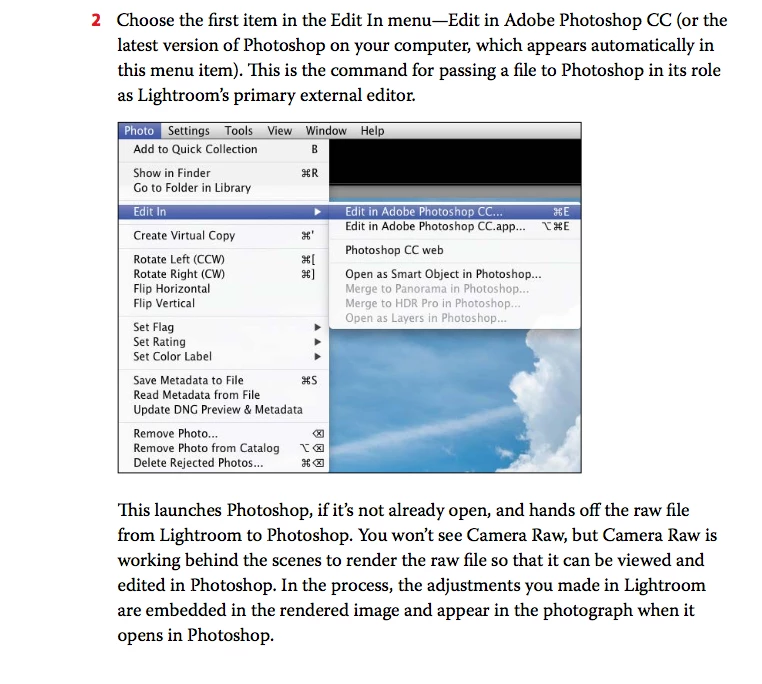
If you open any other file format i.e. tiff, psd, JEPG etc expect camera raw file format from Lightroom to Photoshop then its going to show you the option 3 options when you  choose edit in photoshop.

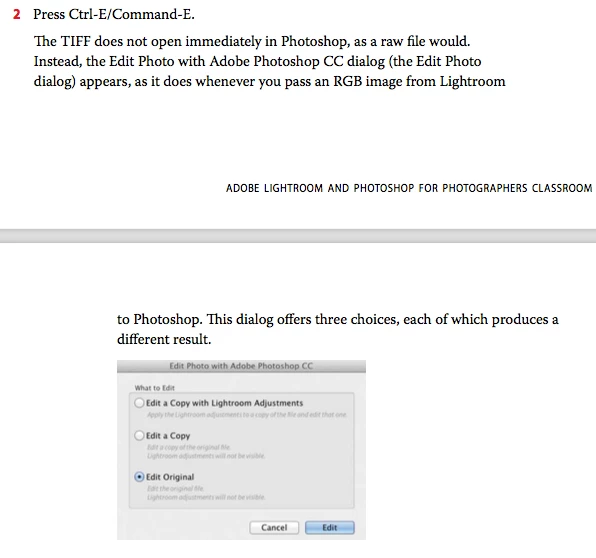
Same is stated in the official training workbook go Lightroom -
Vishu AggarwalAdobe Certified Instructor, Professional and Expert
jiritulach
Participating Frequently
September 18, 2017

Thank You so much!

Problem was in myself :-D

I set my camera on RAW. Now i set camera on TIFF format and Heureka! it works perfectly! :-)

Thaaaaanks!

Just Shoot Me
Legend
September 17, 2017

That dialog box only shows if you are sending a JPG, TIFF or PSD (or maybe even a PNG) file to PS. If you are sending a RAW to PS then as long as both LR and PS are using the same version of ACR you don't get that dialog box.

There isn't a way to fix it. Nothing is broken.

If it was happening before yesterday then sometime yesterday either your PS or LR (or both) got updated so they are now using the same version of ACR. Or before yesterday you were sending files other than RAW files and since yesterday you are sending RAW files to PS.

jiritulach
Participating Frequently
September 17, 2017

Thank You for answer. I have Nikon D800. I use NEF files. Is it some way, how edit "original file" in Photoshop? When I edit copy with lightroom adjustment, so when I returning to Lightroom, I have broken Lightroom presets on this photo. :-/

JP Hess
Inspiring
September 17, 2017

Photoshop, by itself without Camera Raw, cannot edit raw images. When you are using Lightroom, all of the raw editing is done in Lightroom and when you send the image to Photoshop is converted to a pixel-based image. The image that is returned from Photoshop is either a PSD or tiff image. If you want to edit that image further in Photoshop when you choose to do so you will have the choice to edit the original. But you will never have the option to edit the NEF file as the original file because Photoshop won't do it.

DdeGannes
Community Expert
Community Expert
September 17, 2017

If you are not seeing that dialog box what if any dialog box shows?

Regards, Denis: iMac 27” mid-2015, macOS 11.7.10 Big Sur; 2TB SSD, 24 GB Ram, GPU 2 GB; LrC 12.5,; Lr 6.5, PS 24.7,; ACR 15.5,; (also Laptop Win 11, ver 24H2, LrC 15.0.1, PS 27.0; ) Camera Oly OM-D E-M1.
jiritulach
Participating Frequently
September 17, 2017

I can not see the dialog box. I even have the "Reset all warning dialogs" option in "Preferences" inactive.