markophoto1
Inspiring
October 13, 2019
Answered

Lightroom editing colour completelly out of Sync if compared to exported JPG?

  • October 13, 2019
  • 4 replies
  • 955 views

Hi, one question for all the experts out there...

I have set my EIZO monitor to  "Native" gamut and calibrated it in ColorNavigator 7. so far so good... 

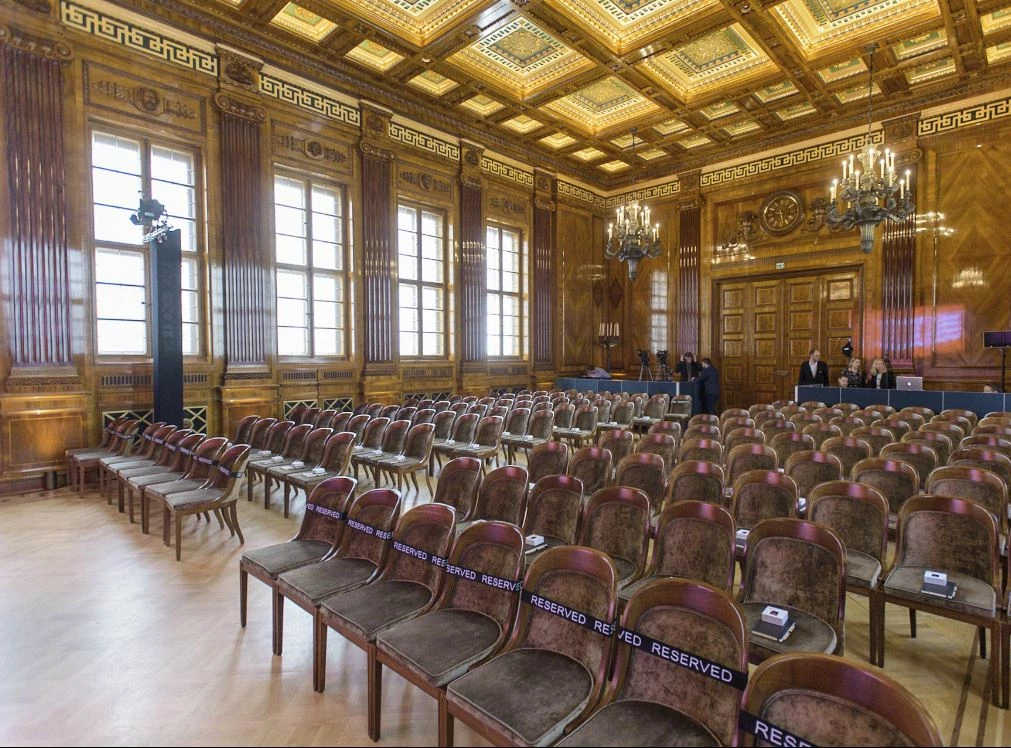
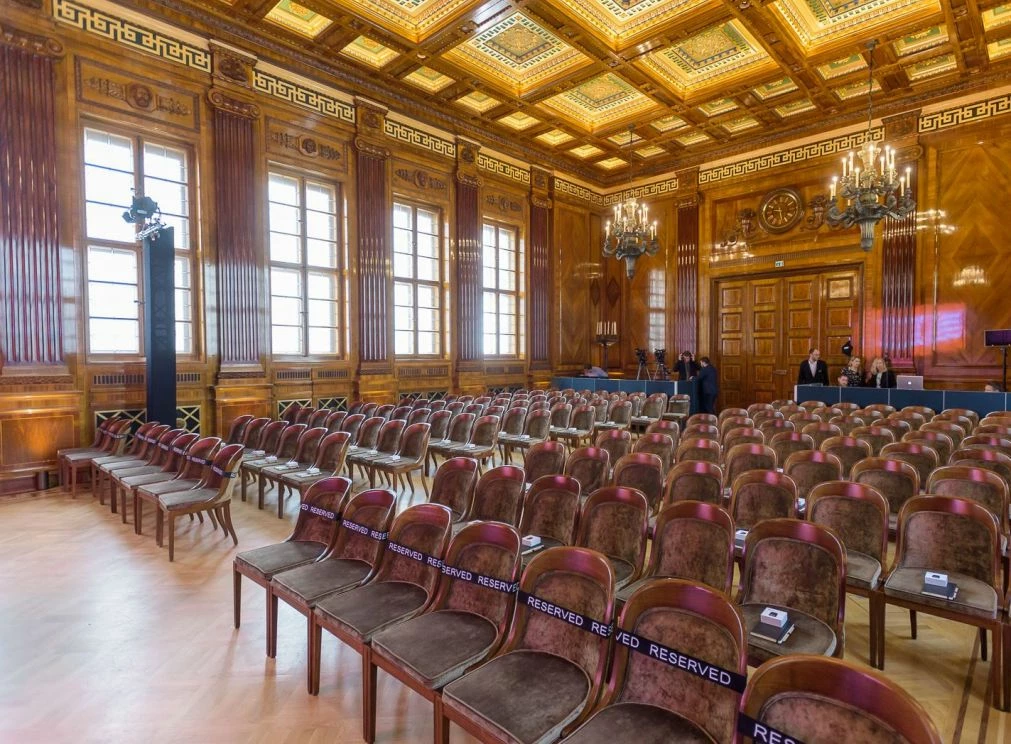
However when I import a RAW image into Lightroom the "editing" color is completely out of Sync if later on compared with exported JPG image? For reference I have attached two screenshots ie.

No 1. - As it is seen in Lightroom during editing

No2. Once it is exported as JPG with sRGB profile embedded


As you can see the (coluor) difference is huge.

One (stupid) question: If compared to the final export JPG photo... How can I make Lightroom displaying the same colour range also during photo editing? ....so I will be able to see the final (colour) resolut already during editing.


Thank you!


regards

Marko
    This topic has been closed for replies.
    Correct answer Per Berntsen

    You have a wide gamut monitor, which means that applications without color management will display images over saturated. So you have to use only color managed applications to view your work.


    If I look the attached file with IrfanView then I get the very same saturated (No. 2) image. Same thing in browser - there I see saturated image too. 

    Irfanview should display identically to Lightroom, as long as color management is turned on.

    But the Edge browser and Internet Explorer are not color managed, and will display over saturated.

    All other major browsers – Firefox, Chrome, Opera – are color managed, and should display correct colors.


    4 replies

    Per Berntsen
    Community Expert
    Community Expert
    October 13, 2019

    Lightroom and Photoshop are no doubt displaying correct colors.

    If you think the image is too dull, edit it to look the way you want it.

    As for Irfanview displaying differently, did you restart it after enabling color management?

    It could also be that it doesn't like the monitor profile, try to recalibrate, creating a version 2, gamma value based profile.

    The screenshot below is from Color Navigator 6. I don't have version 7, but I think the interface is a bit different.

    Another possibility is that there's a bug in Irfanview causing this, I think I may have come across something similar before.

    FWIW, I think FastStone is a much better image viewer. It's much more intuitive to use than Irfanview, and also has thumbnails built in.


    Per Berntsen
    Community Expert
    Community Expert
    October 13, 2019

    Chrome and Opera are color managed out of the box, and they also assign sRGB to untagged files and page elements.

    Firefox also has color management enabled by default, except that it doesn't assign sRGB to untagged files and page elements. The configuration you did enabled that as well.


    For some reason, Microsoft has never made their native applications color managed (except the Windows Photo Viewer, which is no longer available). This means that Edge, Internet Explorer, Photos and Paint will all display wrong colors, and particularly on a wide gamut monitor. 

    So just stop using them, there are plenty of good, free alternatives.


    markophoto1
    Inspiring
    October 13, 2019

    One more stupid question... Can you  please tell me how do you see this image if compared to those two I published before...

    Is it image No. 1 or Image No. 2 (saturated) 

    Thank you. 


    markophoto1
    Inspiring
    October 13, 2019

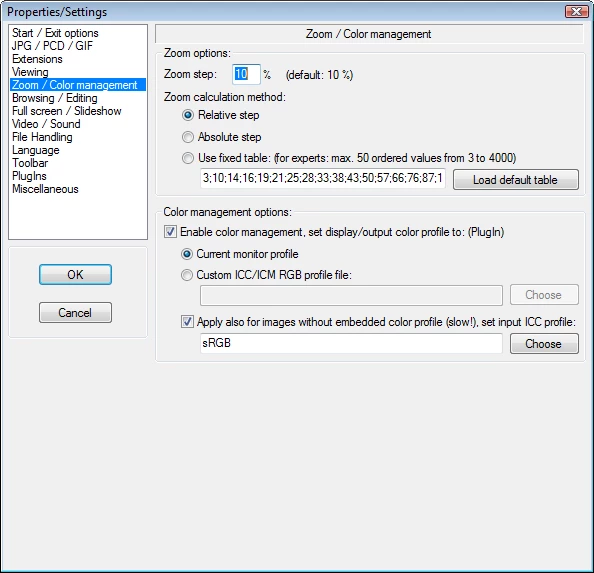
    This really p*sses me off! and this is why I really appreciate any practical advice from you guys! It is a real mystery... Both programs ie. IrfanView and FastStone have colour management enabled (see screenshots) BUT they display The same image DIFFERENTLY?? IrfanView = vivid; SatsStone and Lightroom/Photoshop programs = dull What is going on? Am I doing something wrong? All I did... I got a new bloody expensive monitor.... It looks like I have a problem with Lightroom and Photoshop not displaying colours correctly... Why?

    Per Berntsen
    Community Expert
    Per BerntsenCommunity ExpertCorrect answer
    Community Expert
    October 13, 2019

    You have a wide gamut monitor, which means that applications without color management will display images over saturated. So you have to use only color managed applications to view your work.


    If I look the attached file with IrfanView then I get the very same saturated (No. 2) image. Same thing in browser - there I see saturated image too. 

    Irfanview should display identically to Lightroom, as long as color management is turned on.

    But the Edge browser and Internet Explorer are not color managed, and will display over saturated.

    All other major browsers – Firefox, Chrome, Opera – are color managed, and should display correct colors.


    markophoto1
    Inspiring
    October 13, 2019

    Aghhh!!! THANK YOU! this did a trick! btw I have just figured out my Browsers are not Color managed??


    Why could that be?? 


    I have manually "colour managed" Firefox v 69 folowing these instructions

    https://cameratico.com/guides/firefox-color-management/

    This way my Monitor Colour profile is used for browser as well...


    I wonder how could be done for Chrome - I have version 77.

    JohanElzenga
    Community Expert
    Community Expert
    October 13, 2019

    How do you view the exported image? This difference is usually caused by viewing the JPEG in a non-color managed application. It is a myth that you will see the correct colors as long as your JPEG file is in sRGB. You won't, especially not on a monitor that is capable of showing more than sRGB. The only applications that show the correct colors are color-managed applications.

    -- Johan W. Elzenga
    markophoto1
    Inspiring
    October 13, 2019

    Thank you for your reply! This whole thing is really a mystery for me...?  If I look the attached file with IrfanView then I get the very same saturated (No. 2) image. Same thing in browser - there I see saturated image too. However image in the LR (not-saturated) matches the colours with exported JPG viewed in FastStone app?

    Who would understand that??