
Participant
April 23, 2023
Question

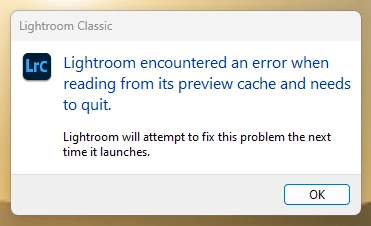
Lightroom encountered an error when reading from its preview cache and needs to quit
  • April 23, 2023
  • 3 replies
  • 1356 views

I've tried, deleting the preview cache folders and letting lightroom recreate (about 15 - 20 times). I've tried uninstalling and installing lightroom about 6 or 7 times. I've optimized the catalogue a number of times as well.  I cannot figure this issue out for the last two months and have only been able to use lightroom one photo at a time. I would be forever grateful if someone had other suggestions! The catalogue file that I am using here works flawlessly on a Mac. 


Thank you

This topic has been closed for replies.

3 replies

Nemaca
Participant
April 30, 2023

I just had this happen. It's LightRoom's fault.

The storage device is a flawless internal SSD. Tested.

RAM is not at fault. Tested.

Video card is not at fault. Tested.

Operating systems is not at fault.

My LR Catalogue is stored on the same nvme drive where LR is installed, no cloud backups on my machine.


Has anyone actually worked on this LR issue and come up with a solution?


dj_paige
Legend
April 30, 2023

You could still try moving the catalog to a different folder or different drive to see what happens.

Nemaca
Participant
April 30, 2023

I considered moving the Catalogue as you suggested, but ultimately decided against it. During my testing, I found that keeping Lightroom (LR) open was necessary to identify the problem while it was active. Moving the Catalogue would require closing LR, which could suggest a hardware issue - not ideal since I have reliable hardware and precise control over my software. Therefore, my last option was to allow LR to reload its processes, which successfully resolved the error. However, I am now concerned about future failures and the possibility of encountering random unknown errors. As a paying customer, I expect a reliable product and I'm seeking a solution from Adobe's side or someone knowledgeable like yourself.

dj_paige
Legend
April 24, 2023

If this keeps happening, then the most likely conclusion is that your hard disk is malfunctioning and needs to be replaced. Another possibility is if the catalog file and folder containing it are being mirrored to the cloud (like DropBox or OneDrive or similar).


Assuming that its not being mirrored to the cloud:


As a temporary alternative, if you can copy your catalog to a different disk and open the catalog on that different disk, that should work well. (As a less likely to be successful alternative, you could try creating a brand new folder on the same disk, copy the catalog to that folder, and then try opening this copy of the catalog). But really, replacing the hard disk is the way to go.

Sameer K
Community Manager
Community Manager
April 24, 2023

Hey @suritech, welcome to the Lightroom Community. We'll need more information to help you figure this out. Could you please share the system info of Lightroom Classic from Help > System info > Copy & paste into a text document > upload and share with us here?


Here are a few things you can check that can help identify the cause of this:

  • The catalog and related files are stored in a OneDrive or any other backup service-related folder, causing it to sync repeatedly.
  • The catalog and its related files are stored on a failing external drive that might fail due to regular reads & writes.


Try taking a backup of the catalog & keep the catalog on the internal drive & launch Lightroom Classic by double-clicking the backup catalog.


Let me know how it goes. Thanks!
Sameer K