


Participant
February 22, 2026
Question

Lightroom errors after win10 reinstall
  • February 22, 2026
  • 2 replies
  • 46 views

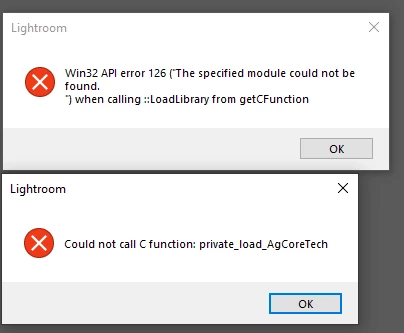
I recently reinstalled my win10 and i get these errors while opening lightroom. I know the support has ended for lightroom 6, but would like to still get some clarity how i would fix these since official download for LR6 is not supported anymore.and I still have the disk but its not the latest 6.8 version for it. I still have my windows.old files saved on backup if i need to dig up something to salvage, if something there would help solve it

These errors are what i get on app startup and also get lower one for when i try to load my catalog/backup catalog.

    2 replies

    AxelMatt
    Community Expert
    Community Expert
    February 22, 2026

    In addition to ​@dj_paige ‘s answer: Which versionj of Lightreoom do you have installed?

    You wrote “…  I still have the disk but its not the latest 6.8 version for it.” 

    Version 6.8 isn’t the latest version of Lightroom 6 It was version 6.14

    You can download LR 6.14 from this Internet Archive:

    Win: https://web.archive.org/web/20231220005239mp_/https://prdl-download.adobe.com/Lightroom/60BA1251F1BC...

    Please note that the downloads can take a minute or two to start and can proceed slowly, so be patient. I'll recommend to save the download files on an USB stick, hard drive or CD/DVD, but it isn't sure how long these links are available.

    My System: Intel i7-8700K - 64GB RAM - NVidia Geforce RTX 3060 - Windows 11 Pro 25H2 -- LR-Classic 15 - Photoshop 27 - Nik Collection 8 - PureRAW 6 - Topaz Photo AI
    dj_paige
    Legend
    February 22, 2026

    If you re-installed Windows 10, you then have to re-install Lr 6. Did you do that? You don’t mention it if you did.


    The only way to install Lr 6 is to use the offline activation method, see the post from ​@Eldiin at