Participant
February 2, 2019
Answered

Lightroom exporting incorrect size

  • February 2, 2019
  • 2 replies
  • 6441 views

So, I'm a real estate photographer, and one of our clients likes their images to be resized to 3414 x 2198 @ 300 ppi.

Whenever I set this in my export settings, it instead exports them as 3297 x 2198.  I don't have any problems with other export settings. I have tried doing this as a batch resizing in the image processor in Photoshop as well and still had the problem.

Currently, the only way I've been able to get around it was to individually resize each image in photoshop.

Anyone have any suggestions? I may be just missing something small and not realizing it.

Thanks for the help!
This topic has been closed for replies.
Correct answer Rob_Cullen

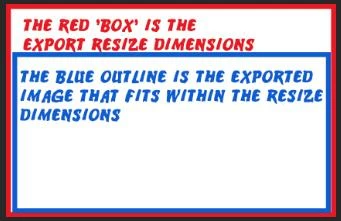
The Lightroom Export Re-size process imposes this upon us- The 'Dimensions" you set for Width and Height define a virtual BOX that the exported image must fit within.

Your problem arises when the photo's width and height are NOT in the same ratio as the Resize dimensions in the Export.

So in your example-

3414 x 2198  is the 'Resize Box'  that your image has to fit within.

Because your image ratio is not 3414:2198, the exported file is exported as 3297 x 2198

For example: A square image, if resized to dimensions W1024 x H768  will export as w768 x h768.

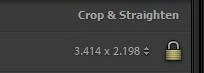
You need to crop your image if you want it to fit closely within you export dimensions.

Lightroom export resize is not an 'exact' science, unlike doing 'image Size' 'Crop' and 'Save' in programs like Photoshop.


2 replies

GoldingD
Legend
February 2, 2019

Ok, found on web

Resizing Images in Lightroom – Pretty Presets for Lightroom

And my previous point is not so far fetched. Especially if you want an exact size, mentioned in link

GoldingD
Legend
February 2, 2019

What if you first custom crop to 3297 by 2198. Not at a computer to experiment.

dcrachuigAuthor
Participant
February 2, 2019

Sorry, my wording may not have been clear.  I'm actually trying to get to 3414 x 2198 but it is exporting at 3297 x 2198 instead.

GoldingD
Legend
February 2, 2019

My bad, typed in wrong set of numbers, so crop to the numbers you want, then export once again to the numbers you want.