Participant
June 26, 2022
Question

Lightroom fails to load
  • June 26, 2022
  • 2 replies
  • 158 views


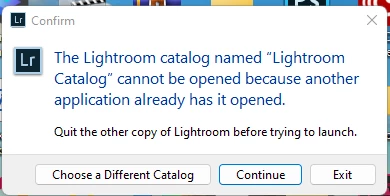
This dialog box appears upon attemptint to load Lightroom.  Attempting to choose a different catalog has no effect.  I DON'T have another copy running so there is nothing to quit.

    This topic is closed to new replies. Start a new post to keep the conversation going.

    2 replies

    Michael J. Hoffman
    Community Expert
    Community Expert
    June 26, 2022

    This is Lightroom Classic, so I will move this post to the other section for that program.


    You may want to look in your file browser at the location of your catalog file, and remove the file with your catalog name but enging with ".lock" - this may solve the problem. Sometimes that file (which is a signal that the database is open) is left stranded when there's a crash or unexpected exit of the program.


    The Lightroom Catalog cannot be opened - Adobe Help

    Participant
    June 28, 2022
    I have solved the problem by choosing a new catalog and depositing a file
    in it. The program now opens. Thanks for the suggestions though.