

RoK Inc. Media
Known Participant
December 15, 2021
Question

Lightroom folder sync problem !

  • December 15, 2021
  • 2 replies
  • 1192 views

Hi,

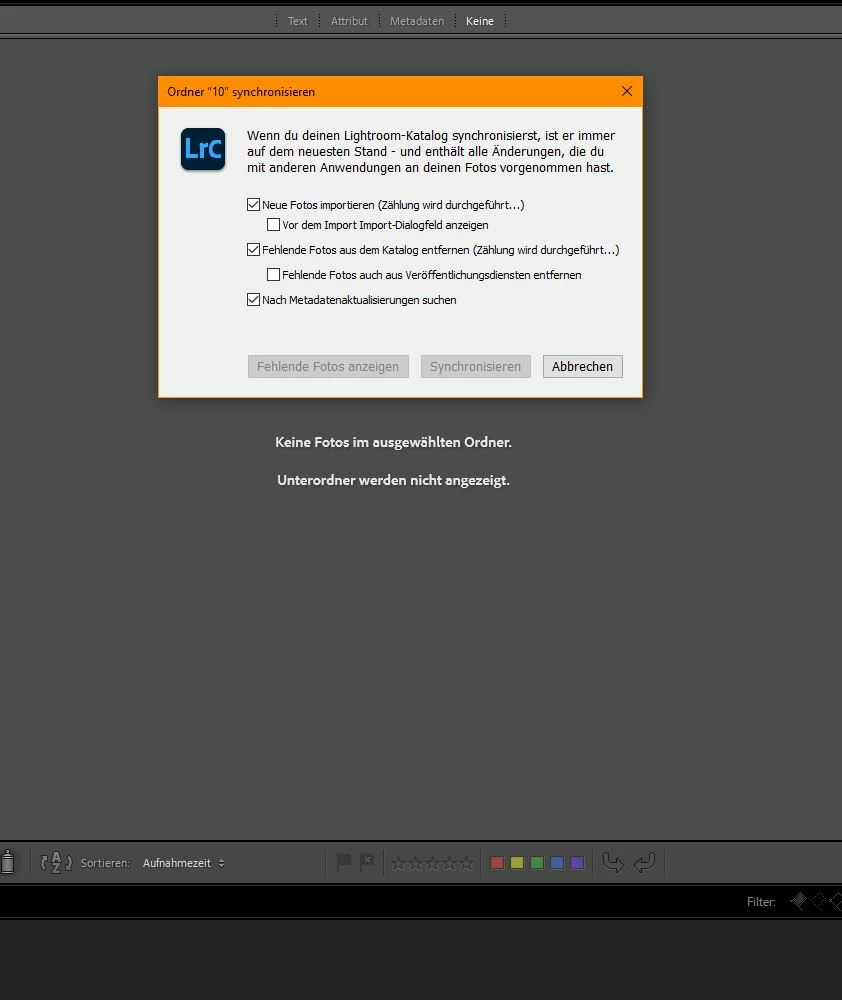
My LR Classic should synchronize my vacation folder. Something went wrong. Now the folder is still in my folder view, but LR no longer shows me any pictures. Instead it says: "No photos in the selected folder. Sub-folders are not displayed."

Clicking on "Synchronize folder" again results in the image syncing, but nothing happens.
What can I do?
I don't want all edits to be gone!
This topic has been closed for replies.

2 replies

Rob_Cullen
Community Expert
Community Expert
December 15, 2021

I don't want all edits to be gone!-  Do NOT use the [Synchronize Folder] command. Use [IMPORT] if there are files in a folder that are not in the Catalog.

Dangers of Synchronize Folder


Regards. My System: Windows-11, Lightroom-Classic 15.4.1, Photoshop 27.8, ACR 18.4, Lightroom 9.4, Lr-iOS 10.4.0, Bridge 16.0.3 .
RoK Inc. Media
Known Participant
December 16, 2021

Thanks for your answer Rob.
There are pics in the folder and LR knows that. LR showed every picture in the folder before my manual sync-stop... after that LR shows only the number of the pics in the folder.. Its definitively a import/sync problem... 

DdeGannes
Community Expert
Community Expert
December 16, 2021

At RoK Inc.

Rob posted a link which provides some tips to avoid problems with the “synchronize Folder” option. Did you review the article available at the link?


Regards, Denis: Laptop Win 11, ver 24H2, LrC 15.4 PS 27.8;
RoK Inc. Media
Known Participant
December 15, 2021

I find out that it is a problem with the ssd bc no picture is showen in any folder in that ssd. what can i do?
if i delete it and recoonect it, every step will be lost...

dj_paige
Legend
December 15, 2021

If you click on All Photographs (under Catalog on the left of the Library Module), turn off all filters and then search for one of these photos by file name, do you find it in Lightroom Classic?

RoK Inc. Media
Known Participant
December 15, 2021

thanks for your help.. yes its finding the pic.. 
but
right click and "show me in explorer" takes amazing long