


mckaelal4163204
Participant
November 6, 2019
Answered

Lightroom Has Encountered Problems Reading this Photo

  • November 6, 2019
  • 6 replies
  • 21530 views

Hi!

I have used LR for many years now and and well accustomed to troubleshooting when issues occur; however I can't seem to figure out what's going on here. Upon import, I keep getting the error message "Lightroom has encountered problems reading this photo. You will not be able to make adjustments to the photo." My RAW images are stored on my external hard drive and that is what I use to import photos. I just began having this issue right after I updated to the latest version of Lightroom Classic 9.0. Before updating I was not having this issue at all. I have tried restarting my computer and uninstalling and re-installing LR. I haven't moved any of my images, so it's not an issue of location. LR is able to locate my images. 

Please advise if anyone has had this issue before and how I can fix! It makes me think there's a bug with the new LR update since I wasn't previously having this issue.
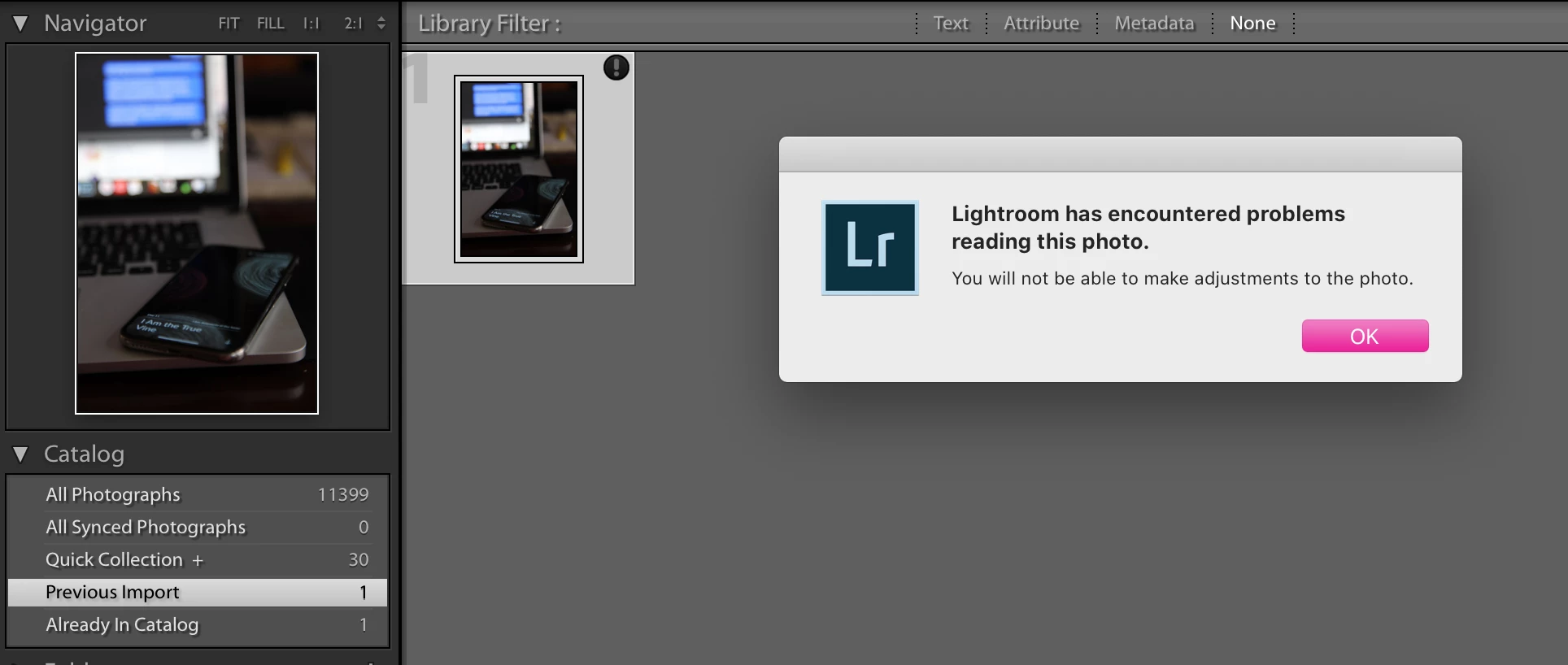
 

Thanks! 🙂

This topic has been closed for replies.
Correct answer GoldingD


If it's a corrupt file, can you tell me why it would be messed up on Lr9 update but not 8? That makes no sense! If it's corrupt because of the hard drive, it would be corrupt across all Lr versions...


When you first started LRC v9, it updated the catalog. That is it copied the old catalog and reworked it to work in the new LRC. This wrote data to your hard drive in different sectors than the previous data. So, some hard drive space occupied by the new copy of the catalog might just happen to fall on a failing but if drive.


However, the photos were not altered in any way, and still reside exactly where they he always been.


So, maybe a failing drive maybe not.


Oh great, a non answere.


6 replies

Inspiring
April 21, 2023

This has just started to appear as an 'exclamation mark warning' on pictures in the ribbon of images at the bottom during developing. I 'KNOW' that there is nothing wrong with my drives and the messages have only started to appear after the latest update.


They are seemingly random and don't appear to affect anything at all. I can still process the images and export the results, so I presume it is some bizarre tagging bug.


Is it possible to look into fixing it, as it's really annoying and just a little disquieting?

dj_paige
Legend
April 21, 2023

Please take one of these files and share it on Dropbox or other similar service, and then provide us the link.


Please look and see — CONFIRM — whether or not you have created Smart Previews for these files and are working on the smart previews. Stating that you never use Smart Previews would not be sufficient.


Your statement "I 'KNOW' that there is nothing wrong" is not meaningful without telling us HOW you know this. If you ran disk diagnostic software and the answer is that your disk is fine, that's proper evidence that the disk is fine. If you just observe that there are no problems, then I say you can't possibly know that way.

Inspiring
April 21, 2023

I won't be providing a file, because it is irrelevant. As usual, the implication of the reply is that I'm the first and only person in the entire world to ever have this issue, so there must be something wrong with what I'm doing.


I thought that I'd by-passed the full explanation of all the diagnostics I've run, but no, I have done a full disk check which is why I can state again, categorically, that there is no disc issue. If you're not going to believe people then perhaps avoid addressing their issues.

Participant
June 26, 2022

This has just happened to me for the first time ever. 

I discovered that CC was in the middle of a Lightroom update while I was in the middle of trying to shoot. 

I cancelled the update - problem is solved.

GoldingD
GoldingDCorrect answer
Legend
November 7, 2019


If it's a corrupt file, can you tell me why it would be messed up on Lr9 update but not 8? That makes no sense! If it's corrupt because of the hard drive, it would be corrupt across all Lr versions...


When you first started LRC v9, it updated the catalog. That is it copied the old catalog and reworked it to work in the new LRC. This wrote data to your hard drive in different sectors than the previous data. So, some hard drive space occupied by the new copy of the catalog might just happen to fall on a failing but if drive.


However, the photos were not altered in any way, and still reside exactly where they he always been.


So, maybe a failing drive maybe not.


Oh great, a non answere.


Rob_Cullen
Community Expert
Community Expert
November 6, 2019

The badge showing an exclamation mark in a dark circle is an indication that the file is corrupt and Lightroom cannot interpret the image data- as the error message suggests. (The embedded JPG preview may still appear OK in Lr)

Rather than being a Lightroom-Classic version problem, it is more likely to be an intermittant hardware failure- like a hard-drive starting to fail- which might explain how Lr can 'read' the file at times and not others. Or even a sector on the hard-drive failing.


It is suggested you run disk scan software to check the drive. If the drive is OK- replace the corrrupt file referenced in the Catalog by copying it from your backups and over-writing the corrupt file.

Regards. My System: Windows-11, Lightroom-Classic 15.1.1, Photoshop 27.3.1, ACR 18.1.1, Lightroom 9.0, Lr-iOS 10.4.0, Bridge 16.0.2 .
mckaelal4163204
Participant
November 7, 2019

If it's a corrupt file, can you tell me why it would be messed up on Lr9 update but not 8? That makes no sense! If it's corrupt because of the hard drive, it would be corrupt across all Lr versions...

Rob_Cullen
Community Expert
Community Expert
November 7, 2019

Yes- makes no sense! I agree. (and I admit to not being an expert on these topics)

I can only suggest the drive has an intermittant problem reading the file.

Can you open the file using Photoshop directly (not through Lightroom) and see if Adobe Camera Raw can read the file?

And have you tried copying and restoring the file from a backup?

Regards. My System: Windows-11, Lightroom-Classic 15.1.1, Photoshop 27.3.1, ACR 18.1.1, Lightroom 9.0, Lr-iOS 10.4.0, Bridge 16.0.2 .
Participant
November 6, 2019

I'm having the same issue! Freaking out because all of my images from a recent shoot are broken now in LR, but I still have the folder with all of the RAWs (also on a HD where I also put my LR catalogs). Does anyone know how to downgrade back to the old version of Lightroom?

mckaelal4163204
Participant
November 6, 2019

Glad I'm not the only one! So if you go into your creative cloud and click on the three dots, you will see a dropdown that gives you an option for older versions. I ended up reverting back to the 8.4.1 version.

mckaelal4163204
Participant
November 6, 2019

UPDATE: I just uninstalled Lr9 and reinstalled 8.4 and now its working fine.... looks like it's some bug with the new update on Adobe's end.