
Inspiring
June 8, 2021
Question

Lightroom is Completely Wonky

  • June 8, 2021
  • 8 replies
  • 1917 views

I'm sorry for the lack of specificity in the subject, but there's no other way to describe what's going on.


Surface Book II, Win 10 (up to date), nVidia GTX 1060 GPU, 16GB RAM.


When I mouse over folders in the Library module, all the dropdown arrows disappear. I can still open the folder, but I'm kind of guessing where the arrow location is. 


If I open a file in the Develop module, it opens in a small, pop-out screen (see attached screen grab) and not in the main window. 


I've tried uninstalling and reinstalling Lr. I've tried deleting the catalogue and recreating it.I've rebooted the laptop. Nothing works. 
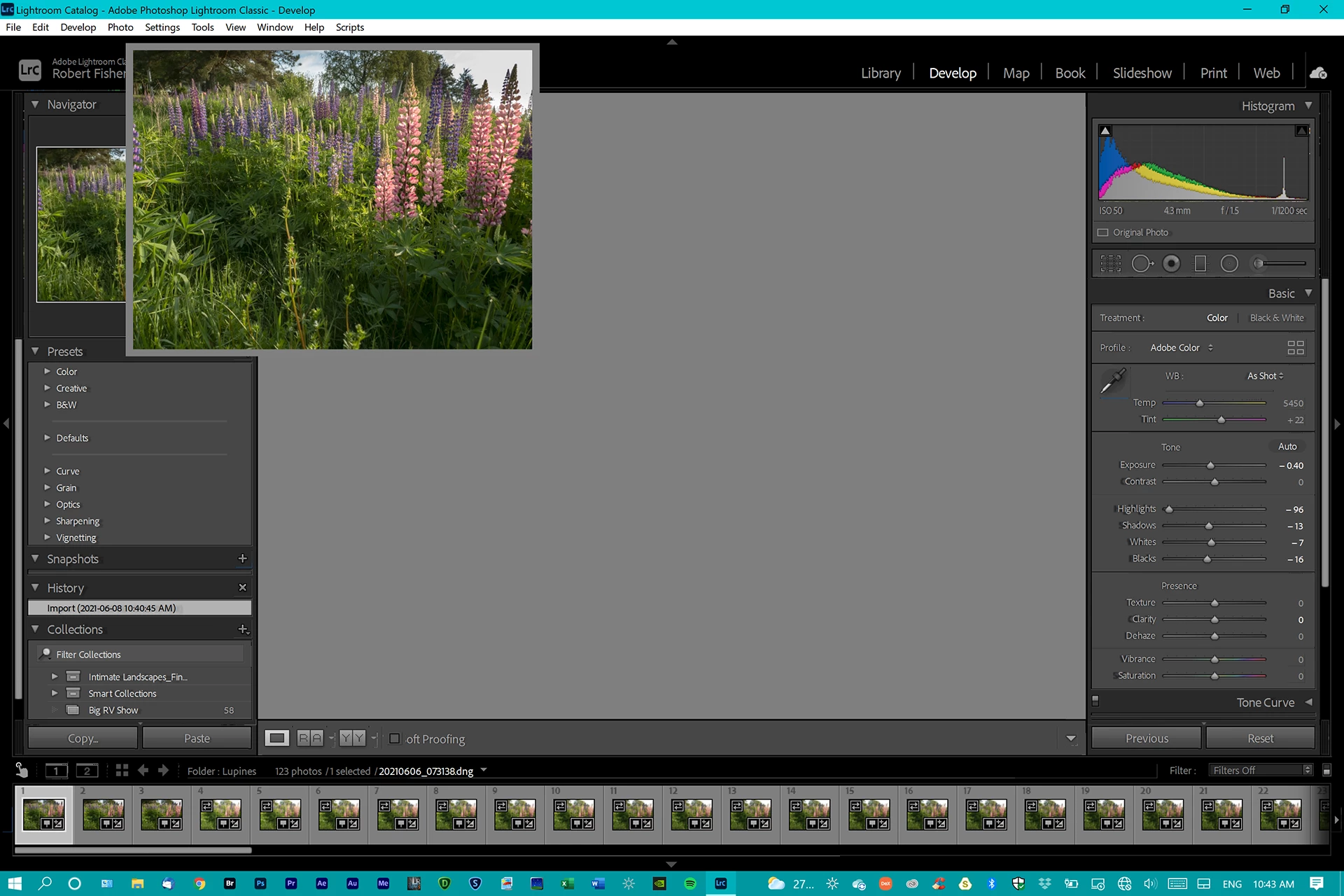
 

Any useful information is appreciated. 


Thank you.

This topic has been closed for replies.

8 replies

GoldingD
Legend
June 14, 2021

Time to contact Adobe.


PhotogCdaAuthor
Inspiring
June 14, 2021

Adobe doesn't support its products.

GoldingD
Legend
June 14, 2021
Copy link to clipboard
As noted earlier, the Preferences file got killed when I uninstalled Lr initially. I specifically chose that option when uninstalling. 

Time to be direct. NO NO NO

Resetting the preference file is NOT an option during installs, updates, upgrades, removal.

Reverting preference settings, removing settings, reverting to defaults, is not resetting the preference file

Resetting the preference file is Adobe speak for deleting the preference file.


dj_paige
Legend
June 14, 2021

Yes, @PhotogCda , as @GoldingD and I have pointed out, it is time for you to reset your preferences, no more excuses.

GoldingD
Legend
June 14, 2021


The one thing that seems odd here is the display resolution. The display is actually 3240x2160 and it is set at that in the Windows Settings.


and, have you tried removing your GPU driver, then installing a fresh new copy (select custom install type as to force a clean install)


https://support.robertsspaceindustries.com/hc/en-us/articles/360002285473-Nvidia-Graphic-Drivers-Install-and-Configure


PhotogCdaAuthor
Inspiring
June 14, 2021

I haven't because even when setting Lr to use the integrated card in the nVidia Control Panel the problem persists. 


Also as noted earlier, no other application is affected, which is another reason I don't believe it's a GPU issue.

PhotogCdaAuthor
Inspiring
June 14, 2021

Just for kicks & giggles, I have now completely uninstalled & reinstalled the nVidia drivers. Zero difference. 

GoldingD
Legend
June 14, 2021
The one thing that seems odd here is the display resolution. The display is actually 3240x2160 and it is set at that in the Windows Settings.

So, a  bit of odd behavior. So, inquiry, have you tried resetting that preference file as recommended by dj_paige?


PhotogCdaAuthor
Inspiring
June 14, 2021

As noted earlier, the Preferences file got killed when I uninstalled Lr initially. I specifically chose that option when uninstalling. 

dj_paige
Legend
June 14, 2021

So reading through, it appears that you still have not reset your preferences, even though this might take you about 2 minutes or less. Just because you deleted the preference file when you uninstalled does not mean the preference file is correct when these issues began.


But its up to you ... delete the preferences and convince us all that its not preference (or possibly learn that it is the preferences), or leave the issue hanging ...


GoldingD
Legend
June 13, 2021

Please post your System Information as Lightroom Classic (LrC) reports it. In LrC click on Help, then System Info, then Copy. Paste that information into a reply. Please present all information from first line down to and including Plug-in Info. Info after Plug-in info can be cut as that is just so much dead space to us non-Techs.


PhotogCdaAuthor
Inspiring
June 14, 2021

Lightroom Classic version: 10.3 [ 202105281559-8dc50eb4 ]
License: Creative Cloud
Language setting: en
Operating system: Windows 10 - Business Edition
Version: 10.0.19043
Application architecture: x64
System architecture: x64
Logical processor count: 8
Processor speed: 2.1GHz
SqLite Version: 3.34.0
Built-in memory: 16301.0 MB
Real memory available to Lightroom: 16301.0 MB
Real memory used by Lightroom: 913.0 MB (5.6%)
Virtual memory used by Lightroom: 1075.4 MB
GDI objects count: 659
USER objects count: 2412
Process handles count: 1778
Memory cache size: 36.9MB
Internal Camera Raw version: 13.3 [ 807 ]
Maximum thread count used by Camera Raw: 5
Camera Raw SIMD optimization: SSE2,AVX,AVX2
Camera Raw virtual memory: 35MB / 8150MB (0%)
Camera Raw real memory: 36MB / 16301MB (0%)
System DPI setting: 96 DPI
Desktop composition enabled: Yes
Displays: 1) 1620x1080
Input types: Multitouch: Yes, Integrated touch: Yes, Integrated pen: Yes, External touch: No, External pen: No, Keyboard: Yes

Graphics Processor Info:
DirectX: NVIDIA GeForce GTX 1060 (27.21.14.6677)


Application folder: C:\Program Files\Adobe\Adobe Lightroom Classic
Library Path: C:\Lightroom\Lightroom\Lightroom Catalog.lrcat
Settings Folder: C:\Users\fishe\AppData\Roaming\Adobe\Lightroom

--

The one thing that seems odd here is the display resolution. The display is actually 3240x2160 and it is set at that in the Windows Settings.

GoldingD
Legend
June 13, 2021
set Lr to use the integrated GPU in the nVidia Control Panel. 

That sounds wrong, All Desktop computers have an integrated video control, and a Discrete  Processor, that GPU often being a card.


Laptops. the better ones, also have both Integrated video control, and a  Discrete

 GPU, both in the form of a set of chips on the motherboard.


If you only have an integrated video control, LrC will not take advantage of that. Usually.


Probably a matter of semantics.


So, an inquiry, what is your rig? a desktop or a laptop?

And separate request to follow.

GoldingD
Legend
June 13, 2021
The Preferences file got killed when I uninstalled, so that shouldn't be the issue.

I think that is wrong. The preference file can and does survive uninstalls, and can survive updates. Unless you manually remove it, and delete trash.


dj_paige
Legend
June 8, 2021

My first thought is that this is a problem with Graphics driver. Try turning it off in Lightroom Classic (Preferences->Performance->Use Graphics Processor should be set to OFF). Alternatively, you can try re-installing the graphics driver/update it to a more recent version/roll back to an earlier version.

PhotogCdaAuthor
Inspiring
June 8, 2021

Thanks. That partially solves the problem.


The image opens properly in the Develop module. However, the dropdown arrows still disappear when I scroll over in the Library module and there are some other odd things going on around the edges of the screen (see attached).


dj_paige
Legend
June 8, 2021

The only other suggestion I have is to reset your Preference file

https://www.lightroomqueen.com/how-do-i-reset-lightrooms-preferences/