


Inspiring
April 1, 2022
Answered

Lightroom is incompatible with Leica M8 DNG
  • April 1, 2022
  • 14 replies
  • 1497 views

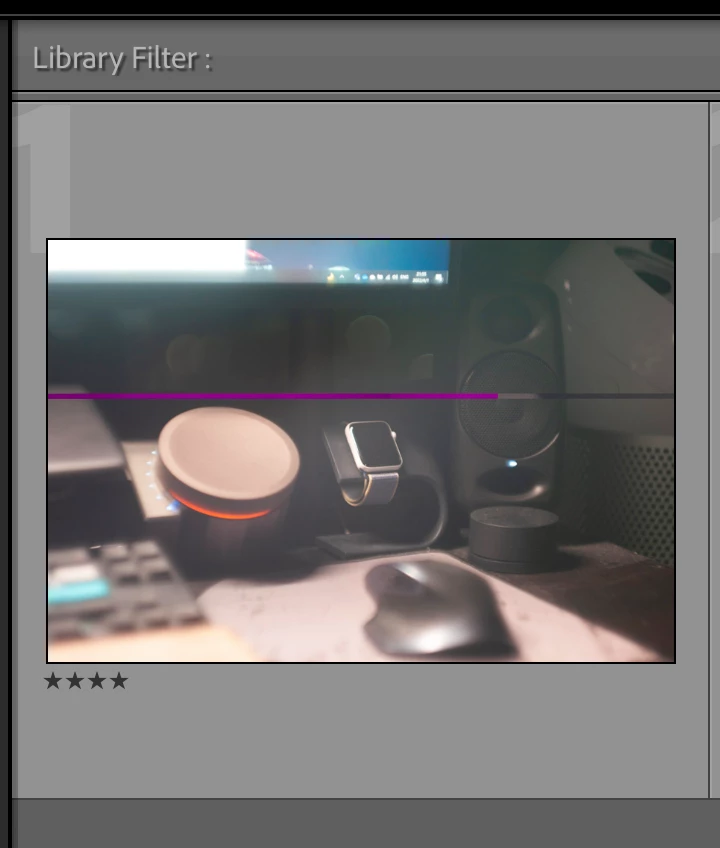
When imported, there will always be a pink line. The DNG is not damaged, it can be displayed correctly on macOS built-in photo preview application or any other device.


Sometimes restarting Lightroom will solve the issue, at 'Develop' page the full DNG can be loaded correctly, but in preview, the pink line still exists.


In addition, Photoshop with Camera Raw 14.x also has this issue, but in Photoshop the full DNG can be loaded correctly.


Does anyone manage to solve this problem? Is this the problem with my settings or bug with Lightroom? Many thanks!


This topic is closed to new replies. Start a new post to keep the conversation going.
Correct answer 硕然23861258iuyv

PROBLEM SOLVED. It was the problem with my USB-C SD Card Reader. I cannot imagine the reason behind, but when I inserted the SD card to my Thunderbolt 3 Dock and imported all the photos, the weird problem just disappear, everthing was back to normal. Thank you for all the replies!

14 replies

硕然23861258iuyvAuthorCorrect answer
Inspiring
April 4, 2022

PROBLEM SOLVED. It was the problem with my USB-C SD Card Reader. I cannot imagine the reason behind, but when I inserted the SD card to my Thunderbolt 3 Dock and imported all the photos, the weird problem just disappear, everthing was back to normal. Thank you for all the replies!

johnrellis
Legend
April 2, 2022

"The DNG is not damaged, it can be displayed correctly on macOS built-in photo preview application or any other device."


The DNG files could be corrupted.  When Mac Preview (and nearly every other photo viewer) displays a DNG, it's displaying a JPEG preview embedded in the DNG, whereas LR renders the image from the raw data in the DNG.


To rule out this possibility, go to All Photographs and do Library > Validate DNG Files.


Inspiring
April 2, 2022

Thanks for your explaination. I took some photos today, this time I found in LR directory, some of the imported DNGs are damaged too (Mac Preview displays the pink line), however, when I copied all DNGs from SD card and directly pasted them into LR import directory (replace the DNGs imported by LR), those pink lines disappear (sometimes flashes once then disappear), output files are normal. I followed your suggestion, LR said the photos are not validated.

TheDigitalDog
Inspiring
April 1, 2022

If there is a bug, it's how Leica is writing or handling the Adobe DNG (not following their spec).

Or perhaps a GPU issue. Try disabling GPU in preferences, do you still see this?

Author “Color Management for Photographers" & "Photoshop CC Color Management/pluralsight"
Inspiring
April 2, 2022

After restarting LR the full loaded DNG is normal, but the small preview still have the pink line. I just disabled GPU in preferences, took 3 photos and imported them, 2 of them are normal, only 1 have the weird line, and this time that actual file (imported to my Mac) also have that pink line. Maybe it's the problem with the old format of RAW file, since the M8 is really out of date, haven't use it for years. 

TheDigitalDog
Inspiring
April 2, 2022

Did you try reconverting them in LR with a newer DNG version? 

You don't see the line in Develop?

Author “Color Management for Photographers" & "Photoshop CC Color Management/pluralsight"
KR Seals
Community Expert
Community Expert
April 1, 2022

Lightroom Classic Version number?

Ken Seals - Nikon Z 9, Z 8, 14mm-800mm. Computer Win 11 Pro, I7-14700K, 64GB, RTX3070TI. Travel machine: 2021 MacBook Pro M1 MAX 64GB. All Adobe apps.
Inspiring
April 1, 2022

11.2 release, camera raw 14.2

KR Seals
Community Expert
Community Expert
April 1, 2022

I'm in agreement with Digital Dog below. There is something nonstandard about the DNGs causing them to appear corrupted in LrC and ACR.

Ken Seals - Nikon Z 9, Z 8, 14mm-800mm. Computer Win 11 Pro, I7-14700K, 64GB, RTX3070TI. Travel machine: 2021 MacBook Pro M1 MAX 64GB. All Adobe apps.