
Participant
February 25, 2022
Question

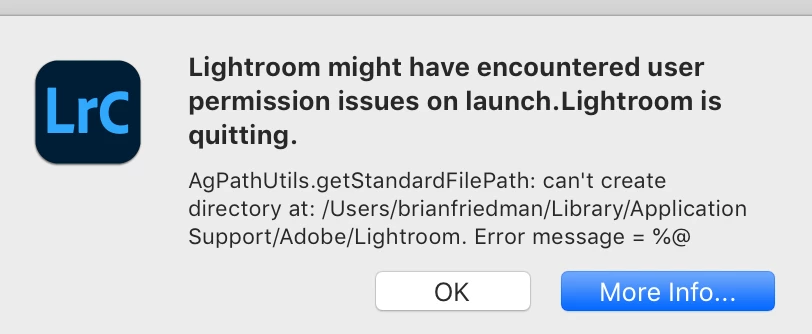
"Lightroom might have encountered user permissions issue on launch"

  • February 25, 2022
  • 1 reply
  • 334 views


Monterery 12.2.1

LR Classic 11.2

I am getting this error message and I can't figure out how to correct it!  Please see attached screenshot.  I appreciate any insight! I've tried un and re-installing and it still occurs.


Appreciate any and all insight into this!  Thank you.
This topic is closed to new replies. Start a new post to keep the conversation going.

1 reply

Sameer K
Community Manager
Community Manager
February 25, 2022

Hi Kaela,


Thanks for reaching out. We are sorry about the trouble with Lightroom Classic. We are here to help! 


Could you please confirm the exact version of  Lightroom Classic along with the specific macOS version? Have you tried any troubleshooting steps?


Bellow steps will help ensure Lightroom Classic has required permissions to access storage of your macOS machine by following these steps:

  1.  Go to the System Preferences for your Mac, then Security and Privacy, then select the Privacy tab.  
  2. Then select Accessibility from the list to the left & check if Lightroom Classic is added to the list with a checkmark in front of it.  
  3. If Lightroom Classic is not a part of the list, please add it by unlocking the window first using the lock at the bottom left, then clicking the + Icon & navigating to the Applications folder.  
  4. Also, grant permissions to Lightroom Classic under Full disk access found in the same list as Accessibility. As shown below for Lightroom Classic.

5. Once done, restart the Mac & check if it helps Lightroom Classic access the macOS storage.


We hope this helps.

Thanks

Sameer K