My old laptop was set up to use OneDrive for the photos and catalog. However, I want to set up my new laptop to use an external drive for the photos, put the catalog on the laptop SSD and let OneDrive hold the backups.
After several attempts to make this happen, I am at a standstill. I have copied the photos from OneDrive to the external drive, I have placed the catalog and backups as noted above. However, Lightroom still goes to OneDrive.
How do I get it to get the photos from the external drive and ignore OneDrive?
Correct answer Conrad_C
…use an external drive for the photos, put the catalog on the laptop SSD and let OneDrive hold the backups…
…I have copied the photos from OneDrive to the external drive, I have placed the catalog and backups as noted above.
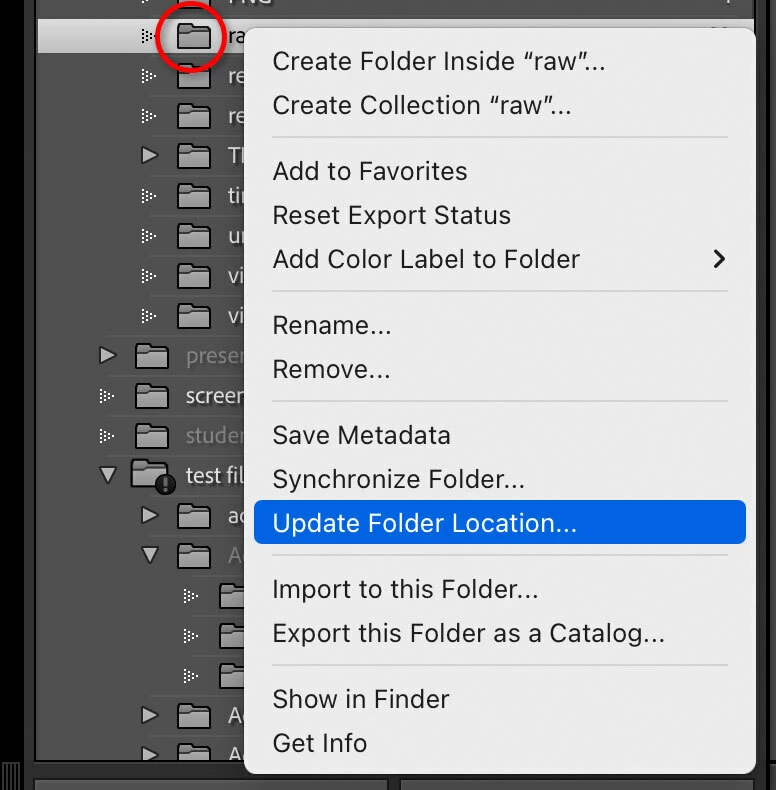
One thing that’s not stated there…at any point, was the top level folder (or folders) in the Folders panel reassigned to your external drive using the context menu command Update Folder Location or Find Missing Folder? You should only have to relink top level folders; Lightroom Classic should be able to auto-relink files in subfolders. So if there is only one parent folder at the top, relink that and you’re done.
If that hasn’t been done, that is what would tell the catalog to look on the external drive for the originals.
You may still see network activity because the catalog folder is synced by OneDrive. Every time OneDrive notices that anything in the catalog folder has changed, such as the catalog database (.lrcat file), the previews ( …Previews.lrdata file), or the rendered pixels cache (.lrcat-data file), OneDrive will sync the file that changed. Note that those files can grow to many gigabytes in size, so make sure frequent syncing of them will not overrun any data caps that your Internet service provider may have.
I think I have resolved the issue with the advice from Conrad_C.
As information, OneDrive is a cloud-based storage system that syncs regularly with local storage, downloading file to the local device when requested. This saves storage on the local device, while treating the file as if stored locally.
In this case, the new laptop did not have any of the files stored locally, so when LRC launched it had to download any files that it needed from OneDrive.
…use an external drive for the photos, put the catalog on the laptop SSD and let OneDrive hold the backups…
…I have copied the photos from OneDrive to the external drive, I have placed the catalog and backups as noted above.
One thing that’s not stated there…at any point, was the top level folder (or folders) in the Folders panel reassigned to your external drive using the context menu command Update Folder Location or Find Missing Folder? You should only have to relink top level folders; Lightroom Classic should be able to auto-relink files in subfolders. So if there is only one parent folder at the top, relink that and you’re done.
If that hasn’t been done, that is what would tell the catalog to look on the external drive for the originals.
You may still see network activity because the catalog folder is synced by OneDrive. Every time OneDrive notices that anything in the catalog folder has changed, such as the catalog database (.lrcat file), the previews ( …Previews.lrdata file), or the rendered pixels cache (.lrcat-data file), OneDrive will sync the file that changed. Note that those files can grow to many gigabytes in size, so make sure frequent syncing of them will not overrun any data caps that your Internet service provider may have.
When I click on the LR catalog I copied to my computer, i begins downloading from my personal directory on the laptop, which is synced to OneDrive. The external drive does not appear.



 AdChoices