



HY3
Participant
May 30, 2026
Answered

Lightroom Preset cannot be applied

  • May 30, 2026
  • 1 reply
  • 55 views

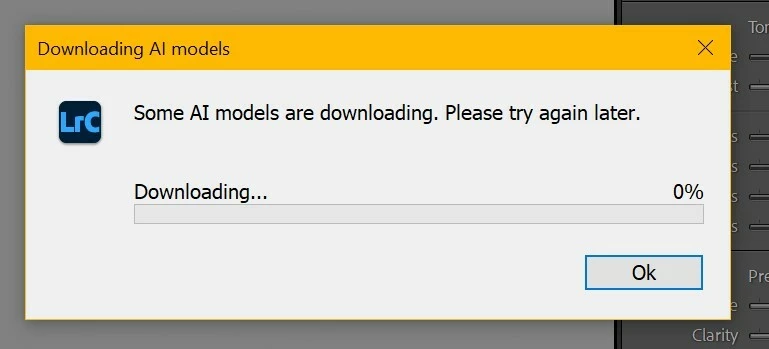
Whenever I try to apply a preset, any preset, this message pops up. 

“Downloading AI Models

Some AI Models are downloading. Please try again later.”

There’s nothing wrong with my internet, or disk space or anything really. It literally just started happening after an update I did (v15.3.1). I’ve uninstalled, reinstalled a few times, same thing. I can’t apply any preset, but lightroom can still function properly as normal. Can anyone help?

 

    Correct answer Sameer K

    Hey, @HY3. Welcome to the Lightroom Classic Community. Sorry for the delay in reaching your post.

    I'll help you figure this out. Please share the system info from Lightroom Classic from Help > System info > Copy and paste into a text document > Upload and attach here. 


    Where do you keep your Lightroom Classic catalog? Please try this and let me know how it goes. 

    1 - Uninstall Lightroom Classic from the Creative Cloud desktop app. 

    2 - Restart the machine. 

    3 - Install Lightroom Classic again

    4 - Make sure you either Launch Lightroom Classic from the Creative Cloud desktop app, or

    5 - Go to the Lightroom installation folder, C drive > Program Files > Adobe > Lightroom Classic > Lightroom.exe > right-click Run as Administrator and check if the issue exists. 


    Let me know how it goes. Thanks!
    Sameer K
    (Type '@' and type my name to mention me when you reply)

    1 reply

    Sameer K
    Community Manager
    Sameer KCommunity ManagerCorrect answer
    Community Manager
    June 8, 2026

    Hey, @HY3. Welcome to the Lightroom Classic Community. Sorry for the delay in reaching your post.

    I'll help you figure this out. Please share the system info from Lightroom Classic from Help > System info > Copy and paste into a text document > Upload and attach here. 


    Where do you keep your Lightroom Classic catalog? Please try this and let me know how it goes. 

    1 - Uninstall Lightroom Classic from the Creative Cloud desktop app. 

    2 - Restart the machine. 

    3 - Install Lightroom Classic again

    4 - Make sure you either Launch Lightroom Classic from the Creative Cloud desktop app, or

    5 - Go to the Lightroom installation folder, C drive > Program Files > Adobe > Lightroom Classic > Lightroom.exe > right-click Run as Administrator and check if the issue exists. 


    Let me know how it goes. Thanks!
    Sameer K
    (Type '@' and type my name to mention me when you reply)