


alasdair_2476
Known Participant
April 10, 2026
Question

Lightroom reflection remover tool failing on MacBook Pro

  • April 10, 2026
  • 4 replies
  • 73 views

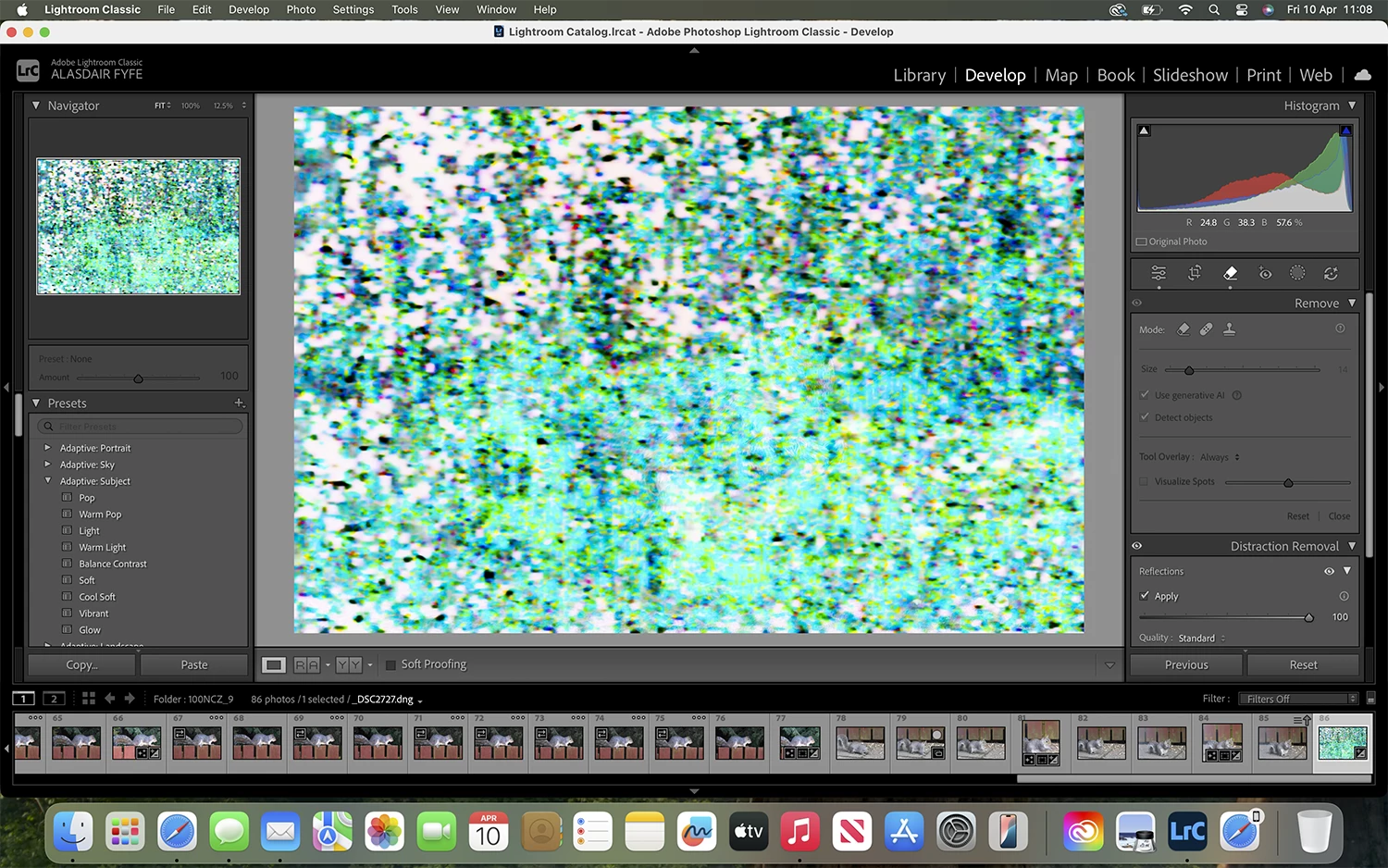
Using the reflection removal tool in Lightroom or Photoshop fails on my MacBook Pro. The result I get are below in image. I presume this is a GPU issue and probably due to the MacBook age and not powerful. what MacBooks are compatible or Mac Studio with the Adobe Lightroom/Photoshop reflection tool?
 

    4 replies

    johnrellis
    Legend
    April 10, 2026

    @alasdair_2476 Graphics Intel UHD Graphics 630 1536 MB

    That graphics processor doesn’t meet LR’s minimum system requirements, which require at least 2000 MB of GPU memory:

    https://helpx.adobe.com/lightroom-classic/system-requirements.html


    Further, Adobe highly recommends GPUs with Passmark scores of at least 2000:

    https://helpx.adobe.com/lightroom-classic/kb/lightroom-gpu-faq.html


    while the Intel UHD Graphics 630 has a score of just 615. LR’s AI commands (AI masking, Denoise, Remove, Reflections) rely on the GPU much more than the rest of LR, so your GPU is particularly unsuited to LR AI.

    alasdair_2476
    Known Participant
    April 11, 2026

    Thank you

    Conrad_C
    Community Expert
    Community Expert
    April 10, 2026

    It might not be the age of your Mac overall, but reflection removal is very dependent on the power and compatibility of the GPU specifically. The Intel MacBook Pros of that era have a GPU that many users have reported problems with for some of the latest GPU-dependent features such as reflection removal.


    You shouldn’t have any problem running reflection removal on any Apple Silicon Mac going back to the 2020 M1. What’s nice about the current M5 generation is that the M5 GPU is far more powerful than what was in Intel Macs or the M1, so the newest features like reflection removal and Denoise finish much more quickly, although they still aren’t instant. 

    dj_paige
    Legend
    April 10, 2026

    It would be helpful if you showed us the image BEFORE you tried to remove the reflection.

    gary_sc
    Community Expert
    Community Expert
    April 10, 2026

    Hi, ​@alasdair_2476, well, yes, that doesn’t look good. 

    Can you please share what year you bought your MacBook Pro and what OS you are using. Is it an Intell or one of the newer M-series? 

    I’m using a Mac Studio, M1, 64 GB ram and am not having anything like what you are seeing.

    alasdair_2476
    Known Participant
    April 10, 2026

    I bought my MacBook Pro 2018 


    gary_sc
    Community Expert
    Community Expert
    April 10, 2026

    Yeah, I think it’s time to treat yourself to a new computer. Pretty much anything you get will be sufficient, but I do recommend that you get as much ram as you can afford. The ram in Macs, nowadays, is shared between processing and image demands, and swaps as needed. 

    The good news is that a new M-series Mac will open up a whole bunch of new features that the Intel is too old for. 

    Good luck and enjoy.