


Participant
June 23, 2025
Answered

Lightroom user script on macOS makes screen black only when launched with shortcut

  • June 23, 2025
  • 1 reply
  • 211 views

I have a very simple user script in Lightroom. It decreases exposure by 0.05.


local LrDevelopController = import "LrDevelopController"
local value = LrDevelopController.getValue("Exposure")
LrDevelopController.setValue("Exposure", value - 0.05)


When I call the script by clicking in the User script menu, it gets applied instantly.
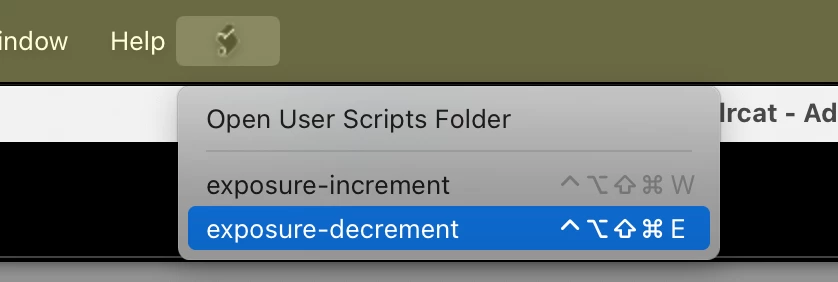


In macOS "Settings > Keyboard > Keyboard Shortcut > App Shortcuts > Adobe Lightroom Classic", I setup a dedicated keyboard shortcut ("ctrl+opt+command+shift+E" but it could be anything). When I call the same user script via its shortcut in the Develop module, the photo (not the UI) goes black for more or less 1 second before being displayed with the adjustment.


Can you please help me fix this?


Machine:
Macbook M2 Pro

Sequoia 15.5 (but issue was already present months ago)

RAM 16Gb

Lightroom Classic 14.3.1 (but issue was already present months ago)

Correct answer johnrellis

I observe the same thing on my LR 14.4 / Mac OS 15.5.


Some experimentation shows that it's the use of Opt causing the problem. All these combinations cause the black screen:


Opt Ctrl Cmd Shift E

Opt Cmd Shift E

Opt Shift E

Opt E


But leaving off Opt, they don't black the screen, e.g. Ctrl Cmd Shift E.


I doubt that Adobe will acknowledge this as a bug, much less fix it. LR's handling of shortcuts, both built-in and applied by System Settings, is very fragile.

1 reply

johnrellis
johnrellisCorrect answer
Legend
June 24, 2025

I observe the same thing on my LR 14.4 / Mac OS 15.5.


Some experimentation shows that it's the use of Opt causing the problem. All these combinations cause the black screen:


Opt Ctrl Cmd Shift E

Opt Cmd Shift E

Opt Shift E

Opt E


But leaving off Opt, they don't black the screen, e.g. Ctrl Cmd Shift E.


I doubt that Adobe will acknowledge this as a bug, much less fix it. LR's handling of shortcuts, both built-in and applied by System Settings, is very fragile.

Participant
June 24, 2025

Thank you very much, you are a life-saver! Very simple fix, but couldn't find it anywhere!