
Participant
July 8, 2023
Answered

Lightroom v.12.4 - Application Hang while specifying export

  • July 8, 2023
  • 2 replies
  • 270 views

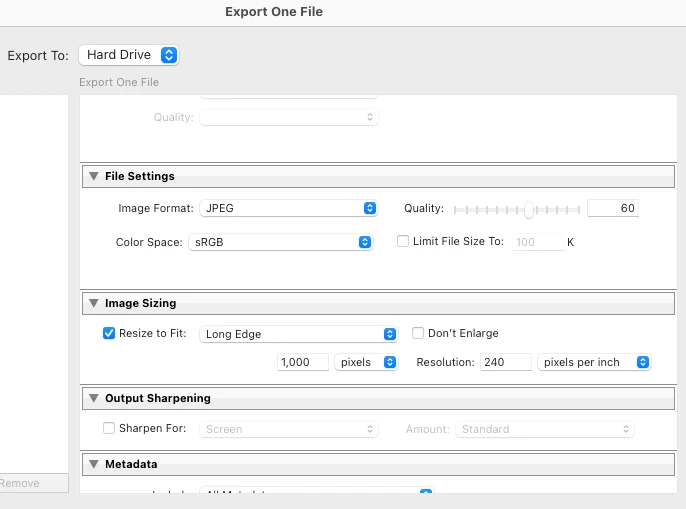
Exporting file using the export dialogue - specifying file type as JPG, then specifying resize and long edge.  On clicking on the pixels box I get the spinning ball which doesn't appear to clear... repeatable and frustrating. 


Mac is decent spec (Mac Studio 2) running OS 13.4.1
 

This topic has been closed for replies.
Correct answer David30960596rnh8

Hi, there wasn't a crash dialogue, lightroom became unresponsive, with a spinning ball.  After several minutes I force quit Lightroom.  I've attached a recording... Thanks for your help... 

2 replies

Participant
July 9, 2023

Ok, looks like I've sorted...

Reinstall didn't work, neither did disabling plug-ins.  Checked folder permissions and this didn't solve.

After searching online I restored preferences and this seemed to work, so looks like they had become corrupt.


https://helpx.adobe.com/uk/lightroom-classic/help/setting-preferences-lightroom.html

Rikk Flohr_Photography
Community Manager
July 9, 2023

Thanks for reporting back. That helps others!

Rikk Flohr: Adobe Photography Org
Rikk Flohr_Photography
Community Manager
July 8, 2023

We’ve reviewed the email address you use with this forum and find no crash reports in our system.


Did you see a crash dialog?

Do you use a different email address when filling out the crash report?

Was the crash dialog Adobe’s?  Apple’s?


Rikk Flohr: Adobe Photography Org
David30960596rnh8AuthorCorrect answer
Participant
July 8, 2023

Hi, there wasn't a crash dialogue, lightroom became unresponsive, with a spinning ball.  After several minutes I force quit Lightroom.  I've attached a recording... Thanks for your help...