
stefanf58290378
Known Participant
September 6, 2022
Answered

LightRoom while off line

  • September 6, 2022
  • 17 replies
  • 2640 views

I'm a travel photo and videographer and often spend a few weeks in remote locations. I had now several instances where Lightroom would not work because I had no Internet, and it could not validate my license. This is very annoying as I'm paying for the software, and I'm restricted to where I'm geographically using it.


I would hope there is a way around it?
This topic has been closed for replies.
Correct answer JohanElzenga

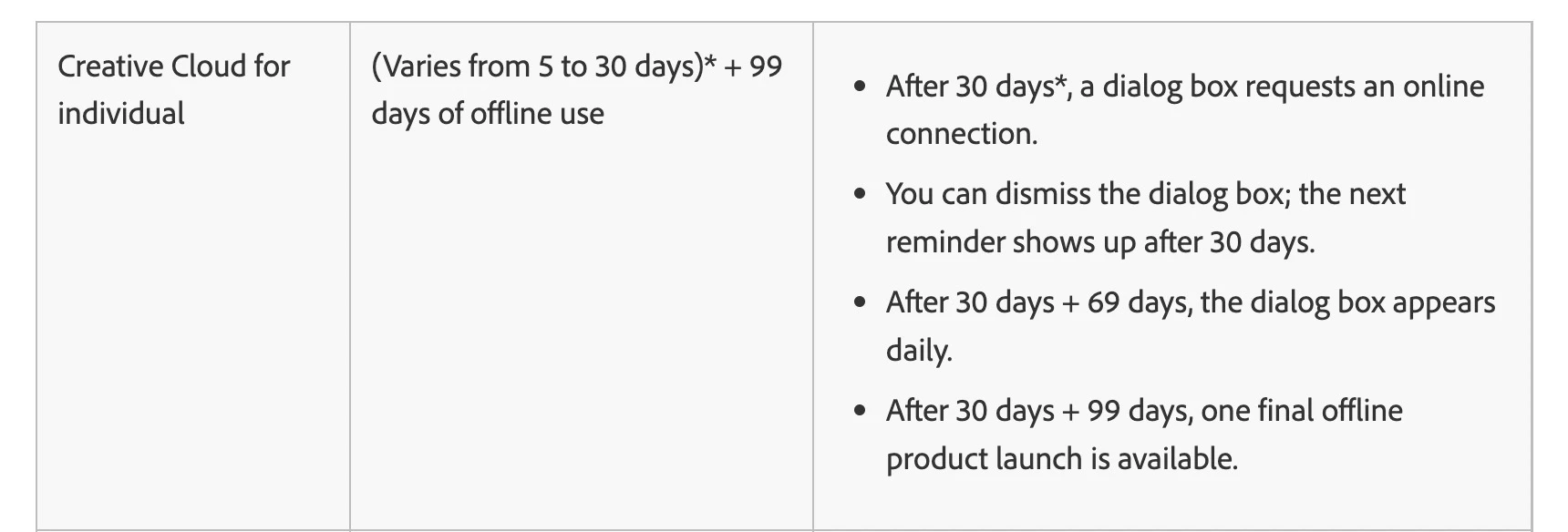
Even with my subscription paid monthly, I should have 60 days of use which would be sufficient but that's not how it works unfortunately


@stefanf58290378 wrote:

Even with my subscription paid monthly, I should have 60 days of use which would be sufficient but that's not how it works unfortunately


It looks like there might be a problem with this Adobe information page. At least until recently, the above quoted schedule only applied if you pay yearly. If you pay monthly, then the grace period was only one month in total. The page used to clearly explain these differences, but now the info about monthly payments is gone. So either Adobe changed this (but maybe the system still uses the old periods), or Adobe removed the info about monthly payment by mistake.


17 replies

stefanf58290378
Known Participant
September 6, 2022

I just called Adobes 1800 number and after having me in the queue for 30 mins the line disconnects, quite a poor customer support experience 

GoldingD
Legend
September 6, 2022

Oh, and on that trip, you signed out then signed in on the laptop correct? Not the stay at home desktop.


And you just stated update, not signed out/signed in. Very different process. 

GoldingD
Legend
September 6, 2022

You are referring to Lightroom Classic, correct? Not that cloud based Lightroom? What version?

stefanf58290378
Known Participant
September 6, 2022

yea to be honest, I should not have to before a trip I have thousands of other things to sort and Adobe is the only software I need to do this for. On the last trip, I updated everything before and then after two weeks could not use the software anymore because no internet.


GoldingD
Legend
September 6, 2022

Four weeks should be manageable. I have no idea how to determine when my copy last checked in with Adobe to validate the subscription. But consider signing out the signing in right before you go on travel, on that travel laptop that is. Doing so should restart the clock so to speak on validation for that device.

stefanf58290378
Known Participant
September 6, 2022

no, I don't sign out I can use Adobe on my Desktop at home and on my Laptop and I'm always signed in.

I just want to use the software when I needed it. My Laptop is not always used but only when travelling I can be 4 weeks without meaningful internet, and Adobe is the only software that causes this issue. 


GoldingD
Legend
September 6, 2022

First up, your copy of the Adobe Creative Cloud Desktop App. Do you leave it as signed in? Signing out deactivated the apps. Signing back on checks the Adobe Servers for your subscription, and if it validates, it then activates the apps. So do not sign out. That is not all the Adobe Creative Cloud Desktop does, but that bit relates, perhaps to your issue.

https://helpx.adobe.com/creative-cloud/help/manage-apps-services-desktop.html


Second off, if signed in, great, but how long will you be without internet? And add to that, how long since your subscription was checked and approved (validated)/ This validation occurs  on a regular basis, every 30 days, but a grace period exists in case of internet issues, depending upon if you pay monthly (as in 12 timed a year) or annually the period of time for the grace time if unable differs. One trick is to intentionally sign out then sign in just before the trip as to force the accreditation.


https://helpx.adobe.com/creative-cloud/kb/internet-connection-creative-cloud-apps.html


Third up, and I have no experience with this, you can contact Adobe over a phone line. Not sure what they do.

/edit/ above sentence turned out to be wrong.