
Lightroom will not export image to the "Same folder as original"
I am having trouble with exporting some images, getting an error box with the message:
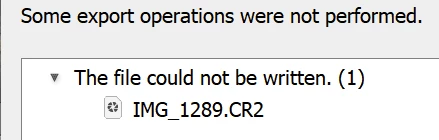
I believe I have narrowed it down to trying to export to using the "Same folder as original image" option (with the target being renamed and/or of a differnt file type).
It works as expected whenever exporting to a Specific Folder whether that is a different folder, or the same one. I get a different message if exporting to a file which already exists. I get the same error on different source file types.
It is a problem because I am trying to create a preset which uses the Same Folder option, and is not tied to a specific destination.
This is on a fully updated Windows 11, and Lightroom Classic version 14.2.
Please advise.
Tony Maynard-Smith.
PS. For some time I have been getting a message about failing to write metadata, when performing a panorama or HDR merge. It has similarities in that the process is trying to write to the source folder, and is conceivably related.


 AdChoices