ians86193080
Participant
March 26, 2015
Answered

lightroom will not read sony ARW files

  • March 26, 2015
  • 13 replies
  • 235298 views

I understood the latest version of Lightroom supported the recent Sony A7 series, whose RAW files are Sony's own ARW files. I have the latest Lightroom but it will not read these files.

    This topic has been closed for replies.
    Correct answer JP Hess

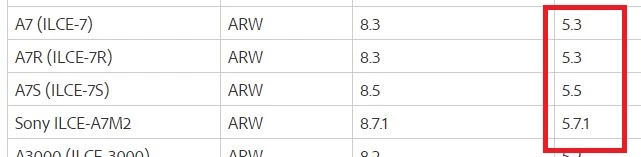
    Here is a list of the Sony A7 series cameras that Lightroom supports, and the version of Lightroom required. The Lightroom versions are in the highlighted area.

    If you are certain you have the appropriate version of Lightroom installed, then provide more information. Can your operating system browser see the raw files? Have they been downloaded to your hard drive? What operating system are you using? What is the exact version of Lightroom?

    13 replies

    ericd87384758
    Participant
    March 17, 2016

    Is there a release date for the newer version of Lightroom that will support the newer ARW files? I have the same problem with Sony Alpha 7 II.

    Community Expert
    March 17, 2016

    Have you tried the update that came out today?

    martinw24967940
    Participant
    April 1, 2017

    Yes. Still not working for my A7ii arw files

    Participant
    March 11, 2016

    I have lightroom CC and am trying to import arw files from a sony a6300.  Its not recognizing the format of the files.  I am running the latest mac OS El Capitan.

    I did have an older version of lightroom however that was fully removed.  The files are brand new so its nothing to do with cache of the thumbnails.

    Any help would be appreciated.

    dj_paige
    Legend
    March 11, 2016

    What does it mean when you say "not recognizing"? What happens? What do you see? What is the exact unedited word-for-word error message? Give us the details.

    Participant
    March 11, 2016

    "some import operations were not performed"  "the files cannot be opened by lightroom." - this is followed by a list of arw files that were not imported

    Thanks for your help!

    JP Hess
    JP HessCorrect answer
    Inspiring
    March 26, 2015

    Here is a list of the Sony A7 series cameras that Lightroom supports, and the version of Lightroom required. The Lightroom versions are in the highlighted area.

    If you are certain you have the appropriate version of Lightroom installed, then provide more information. Can your operating system browser see the raw files? Have they been downloaded to your hard drive? What operating system are you using? What is the exact version of Lightroom?

    ians86193080
    Participant
    March 26, 2015

    My Sony is the latest A7 Mark 2 and when I "check for updates" it tells me there are none so presumably I have the latest version? DXO has no problems with ARW files and I am using Windows 7 64bit

    JP Hess
    Inspiring
    March 26, 2015

    At the bottom of the Lightroom help menu it will indicate what version of Lightroom you have installed. If you are using the creative cloud, it may be necessary for you to sign out of the application manager and sign back in again before you will see the update to Lightroom 5.7.1. That is what I had to do.