Participant
February 1, 2017
Answered

Lightroom won't import photos, loses them when card is ejected

  • February 1, 2017
  • 2 replies
  • 1530 views

Hi,

I've searched online but of the many problems people have with importing and losing photos I can't find the exact issue I have described anywhere.

I imported a bunch of photos to Lightroom. A while later I developed some. A while after that, I went back, and the photos were all marked missing.

I followed the instructions online to locate missing photos. The last location Lightroom gives for the files is the memory card. But when I insert the memory card and try to import the files from there, everything is greyed out.

I don't understand how the only location for the photos can be the memory card, yet Lightroom can claim they don't need importing. If they don't need importing then I should be able to work on them without the memory card inserted. I've read various threads about how people typically encounter problems because they moved their files outside of Lightroom but I can assure you I have only been working in Lightroom. What's going on?
This topic has been closed for replies.
Correct answer Per Berntsen

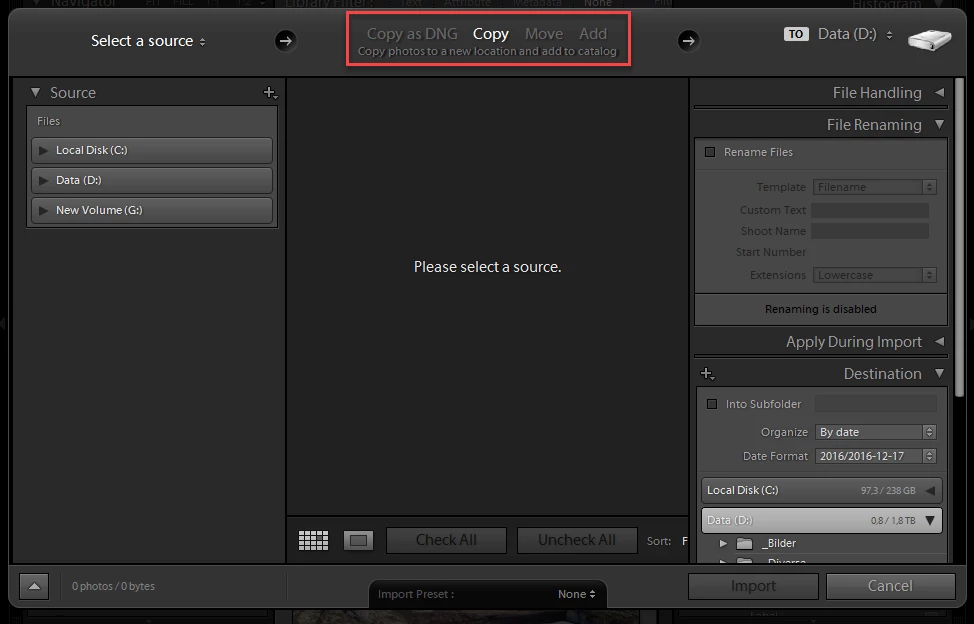
You have probably used the ADD option in the import dialog, which will reference the camera card.

First, disconnect the camera, then select the photos in Library, press Delete, and choose Remove

Then connect the camera and use the COPY option, and copy the photos to a folder of your choice.

2 replies

Just Shoot Me
Legend
February 2, 2017

Although LR is not supposed to do this you imported the images by selecting the Add option which just Adds the images to the LR catalog file, a Database file. You should of selected Copy. By default LR normally doesn't allow you to select Add when importing from a memory card.

You can't Reimport them because they are already in the LR catalog.

You will need to Copy them from the memory card to a folder of your choosing on your hard drive then use the Find Missing Files to locate them in the folder you copied them to.

Per Berntsen
Community Expert
Per BerntsenCommunity ExpertCorrect answer
Community Expert
February 1, 2017

You have probably used the ADD option in the import dialog, which will reference the camera card.

First, disconnect the camera, then select the photos in Library, press Delete, and choose Remove

Then connect the camera and use the COPY option, and copy the photos to a folder of your choice.

malcsp76Author
Participant
February 11, 2017

I thought I had replied to thank you for this helpful advice: it seems I hadn't. Thank you!

Theresa J
Community Expert
Community Expert
February 11, 2017

This is strange behavior because as JustShootMe said, LR is not supposed to be able to import images directly from a memory card. It is supposed to automatically switch to the Copy method, and then by default it will copy those images to your Pictures folder. I'm curious what kind of memory card you are using, and how are you connecting it to your computer?