janekp44056533
Inspiring
August 26, 2026
Question

Login

  • August 26, 2026
  • 11 replies
  • 97 views
A login window pops up every time I open the program. Please fix this issue, as it is incredibly annoying.

 

    11 replies

    Legend
    August 27, 2026

    This has happened to me after I inserted a hot-swappable hard drive into my PC to do a backup. The Adobe Creative Cloud licensing system seems to ‘think’ that changing/adding an extra internal hard drive means the entire computer has been changed. It’s a bit ridiculous to have the criteria so strict. External USB hard drives are fine, but it seems, not internal hard drives.


    janekp44056533
    Inspiring
    August 26, 2026
    Why on earth is the community handling this instead of the software developer?! I tried to find a way to contact them to report the issue, but I couldn't find one. In my opinion, it’s a slap in the face to the users!
    dj_paige
    Legend
    August 26, 2026

    You cannot directly contact the LrC software developers. You can file a bug report, but as discussed, it is really unlikely this is a bug.

    So you can try the ideas that people suggest here. Or not, its up to you.

    Califdan2
    Inspiring
    August 26, 2026

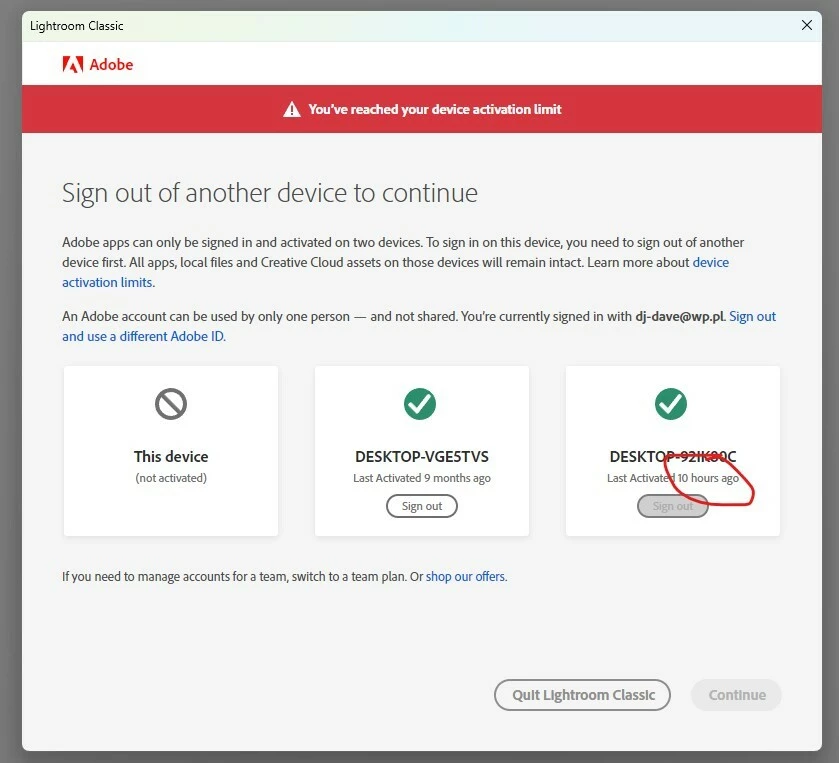
    With a personal (non enterprise) subscription, you can only have 2 computers logged in at a time You are trying to have 3.   It looks like you haven’t used “DESKTOP-VGESTVS” for over 9 months.  I suspec it was an old computer that was replaced by “DESKTOP-092H90C”.  You need to click the “Sign out” button on the middle icon in your screen shot.  

    janekp44056533
    Inspiring
    August 26, 2026

    This is the same computer.

    dj_paige
    Legend
    August 26, 2026

    Click on Sign out under DESKTOP-VGESTVS in that message and see what happens

    janekp44056533
    Inspiring
    August 26, 2026
    The problem has existed for years and still hasn't been fixed?! THIS IS A JOKE!
    dj_paige
    Legend
    August 26, 2026

    I think ​@JohanElzenga has already answered this. The problem is on your computer, not in LrC.

    JohanElzenga
    Community Expert
    Community Expert
    August 26, 2026

    There are scattered reports about this issue over the years. It looks like the same computer is seen as a new computer each time for some strange reason, which possibly means something locally on your computer causes this. If you Google on this message, you’ll find discussions going back as long as ago as 2018. Have you tried logging out on the other computer in this dialog?

    -- Johan W. Elzenga