
connoryb68732993
Participant
November 3, 2020
Answered

Looking for a way to adjust all Sliders at the same time to adjust overall edit strength?

  • November 3, 2020
  • 4 replies
  • 547 views

I swear I watched a video recently where the editor showed a key command for moving any Slider & it adjusted all the sliders. As in the strength of the overall edit. As in all sliders moved out or in exponetially to make the whole edit stronger or weaker. Maybe it was in Lightroom CC, not Classic? Does this make sense? Does this exist? Am I crazy? Help!
This topic has been closed for replies.
Correct answer dj_paige

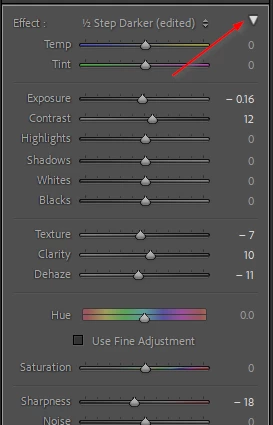
In the adjustment brush and graduated filter, there is such a tool that allows you to move sliders individually, and then vary the amount of all of them simultaneously. To get to this, you either brush or use a graduated filter, move the sliders individually, and then click on the triangle to the far right of the word Effect.

4 replies

johnrellis
Legend
November 3, 2020

You might check out the Relative Adjustment and  Fader plugins, which can move all the sliders the same relative amount.


[Use the blue reply button under the first post to ensure replies sort properly.]

dj_paige
dj_paigeCorrect answer
Legend
November 3, 2020

In the adjustment brush and graduated filter, there is such a tool that allows you to move sliders individually, and then vary the amount of all of them simultaneously. To get to this, you either brush or use a graduated filter, move the sliders individually, and then click on the triangle to the far right of the word Effect.

gary_sc
Community Expert
Community Expert
November 3, 2020

Maybe he tapped the Auto button (which moves most of the sliders to help the user get most of the way to what the user might want) but there's no key command for Auto.

JohanElzenga
Community Expert
Community Expert
November 3, 2020

No, that does not make sense. I have never heard of such a key command.


-- Johan W. Elzenga