

Lossy DNG converted files missing embedded jpeg previews since around version 13.0?
I am using Lightroom Classic 13.3 and Windows 11. Let's say I convert a 22 MB raw file to lossy dng with Lightroom Classic using these settings:
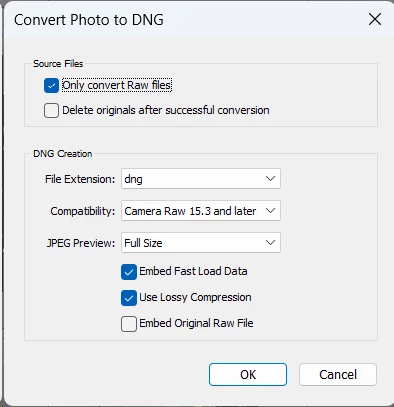
• If compatibility is set to Camera Raw 15.3 or later, the resulting file will be around 5 MB and will not display the corresponding image thumbnail (just a generic icon) when viewed from Windows file explorer (tested both with Win11 and Win10). Also, it will not open in any image viewer.
• If compatibility is set to any other previous version (14.0 or older), then the resulting file will be around 10 MB, it will display the corresponding image thumbnail in Windows file explorer and will open in any image viewer (which will show the embedded jpeg preview in full size). This was the normal result for years, up until some version between 12.0 and 13.0 when (apparently) something changed.
I am not sure when this started happening exactly, but I think it was with some version between 12.0 and 13.0. I convert files to lossy dng on a regular basis, but I just noticed recently that the files I converted during the last months were abnormally smaller (if compared to the ones from previous years), missing their thumbnails (in Win file explorer) and impossible to open with any image viewer. After some investigation, I realized that, at some point, the conversions stopped including the Full Size preview (or so it seems), even though I always set it to Full size.
Am I missing something? Is it something on my end? (I don't think so because I have done tests on two computers, but... who knows). If more info is needed, please let me know.
Thanks if anyone can comment on this.


 AdChoices