Participant
October 29, 2020
Answered

lr的径向滤镜缺少参数问题

  • October 29, 2020
  • 2 replies
  • 388 views

我使用的是win10-lr2020-9.3版本

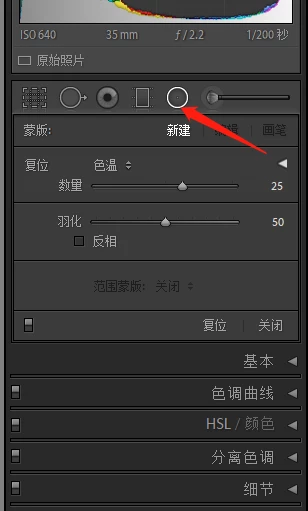
选择径向滤镜功能之后下面没有具体调整的参数(点开之后只能调节复位中的一项参数)
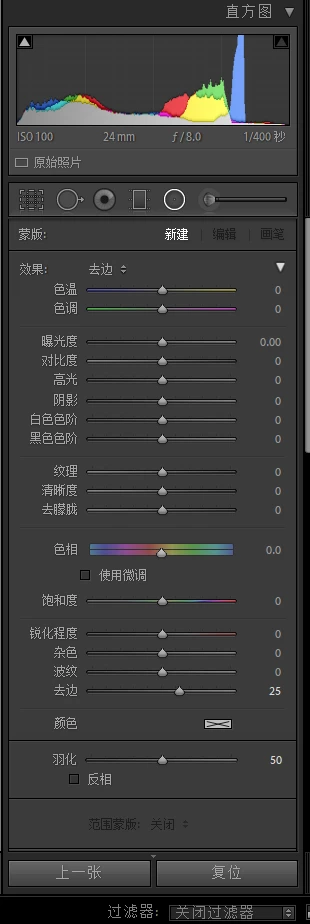
这张来自我朋友的截图(径向滤镜):
This topic has been closed for replies.
Correct answer Just Shoot Me

Click the Triangle to the Right that is pointing to the left. It will change to pointing Down and Expand the adjustment panel.

2 replies

Community Expert
October 29, 2020

As I see in your screenshot you have collapse the sliders for the radial filter. Please click on the little triangle on the right. Marked in my screenshot.


My System: Intel i7-8700K - 64GB RAM - NVidia Geforce RTX 3060 - Windows 11 Pro 25H2 -- LR-Classic 15 - Photoshop 27 - Nik Collection 9 - PureRAW 6 - Topaz Photo AI
JOceanAuthor
Participant
October 29, 2020

问题已经解决了 谢谢您

Just Shoot Me
Just Shoot MeCorrect answer
Legend
October 29, 2020

Click the Triangle to the Right that is pointing to the left. It will change to pointing Down and Expand the adjustment panel.

JOceanAuthor
Participant
October 29, 2020

谢谢您
