Jonski_NZ
Participant
November 13, 2017
Answered

LR 6.0 - where to from here?

  • November 13, 2017
  • 1 reply
  • 322 views

I had LR 6.0 (the desktop version) installed on an old Windows 10 PC which has been replaced. For a year I could not get LR running on the new PC - it would not open my existing catalogs. I spent ages on forums and gave up. My photography stopped as well - I had nowhere to process my images.

I resolved the issue by starting a new catalog. Of course, I lost all my old work which I'm not happy about. I ran an import, which along with thumbnail/preview generation etc. took several days. I got there. But I went to open it yesterday and it froze on open. My computer wanted to do software updates so I let it - and discovered that Microsoft upgraded my Win10 OS to Creator's Update. LR still freezes on open.

I want to run the Adobe software update, but it appears that the update software is sneakily trying to push me to the CC Subscription model.
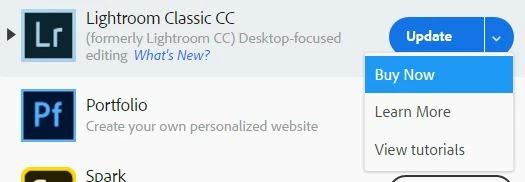
I don't want this as I am not going to progress my photography any further for a long time. I can't afford a subscription and I have paid for a perpetual license which I expect to keep working - even though it will eventually become outdated. I don't want future support for it, I just want what I paid for to run.

So what do I do from here? Can I run the Lightroom Classic CC update and keep using the perpetual license I paid for? I understand that from December this is out of support - I don't mind, as long as it works with no further alterations. But what do I do now?

    This topic has been closed for replies.
    Correct answer F. McLion

    If you don't want a subscription don't install Classic CC.

    Keep working with your LR6 - it will continue to work. It will stop getting updates by the beginning of 2018.

    You can always download from here: Download Photoshop Lightroom

    If it is not running as expected, we should take care of that.

    First, try if it helps to reset the preferences: http://lightroom-blog.com/2015/05/23/resetting-preferences-in-lightroom-cc6/

    1 reply

    F. McLion
    Community Expert
    F. McLionCommunity ExpertCorrect answer
    Community Expert
    November 13, 2017

    If you don't want a subscription don't install Classic CC.

    Keep working with your LR6 - it will continue to work. It will stop getting updates by the beginning of 2018.

    You can always download from here: Download Photoshop Lightroom

    If it is not running as expected, we should take care of that.

    First, try if it helps to reset the preferences: http://lightroom-blog.com/2015/05/23/resetting-preferences-in-lightroom-cc6/

    --- Got your issue resolved? Please label the response as 'Correct Answer' to help your fellow community members find a solution to similar problems. ---
    Jonski_NZ
    Jonski_NZAuthor
    Participant
    November 14, 2017

    Thanks for the suggestion about a reset- it appears to have worked. One last question- will pressing Update on the screenshot above cause me to get the subscription version of LR, or just bring me to 6.14 (or whatever the latest is)?

    Just Shoot Me
    Legend
    November 14, 2017

    If you are using LR 6, the stand alone version, do NOT use the Creative Cloud Desktop App.

    Do all your updating from the link provided in this link.

    Download Photoshop Lightroom

    that link is also in the post by F. McLion