John Ironside
Participant
July 18, 2020
Answered

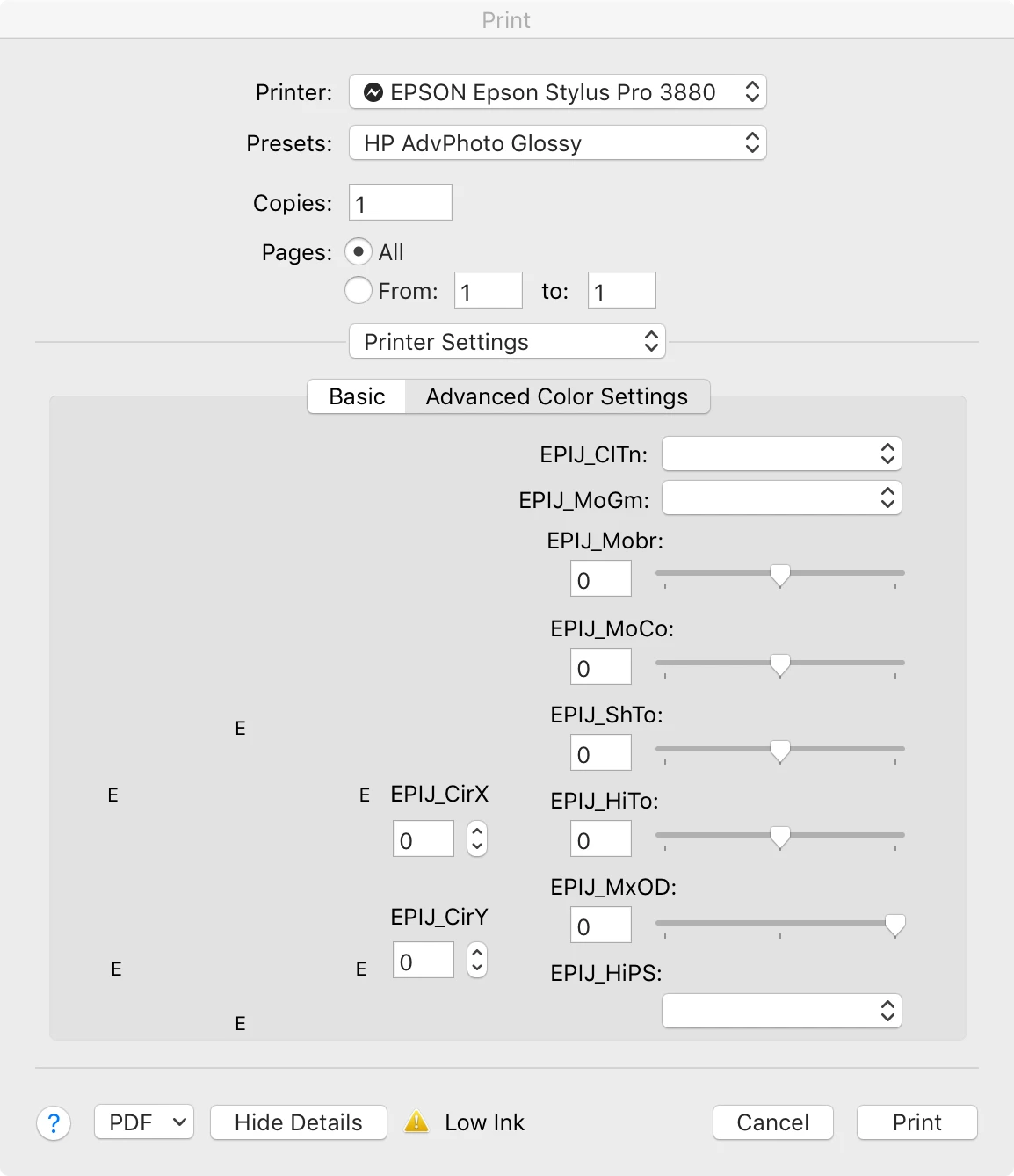
LR 9.3 Printer Settings dialog scrambled under MacOS 10.13.6

  • July 18, 2020
  • 1 reply
  • 296 views

I've just added the manufacturer's ICC profile for a new-to-me Hannemuhle photo paper for Epson 3880. Changing the Printer Settings in the Print module to suit the paper, I got a scrambled dialog box with unresponsive drop-down arrows. Image attached. Any ideas, please? 

This topic has been closed for replies.
Correct answer TheDigitalDog

That driver looks wrong to me, perhaps the Apple Gutenprint version which you don't want. 

Do the Epson Enema and install both drivers (from Epson) again: 
1.Delete all instances of Epson printers from System Preferences>Print & Fax.

2.Then go to /Library/Printers and toss the whole Epson folder.

3.Toss LFP Remote Panel (IF you are using this utility for your printer).

4.Then reinstall drivers from Epson and never Apple.

 
When you go back to Print & Fax to add the printer, on 10.X I had to wait almost a minute before the IP version of the printer showed up, whereas the Bonjour one shows up right away. Then add the IP instance of the printer. This is for printers on a network.
Then re-install LFP Remote Panel if you use it with this printer.
NOTE: IF you have more than one Epson printer, you need to install the driver in the order of their release! Older then newer or you run into issues (eg, install 4800 before you’d install 3880).
 
Lastly, in LR, never use a Preset as you have above for HP. This is all saved within a Print Template so that dropdown should always be set to Default Settings. 

 

1 reply

TheDigitalDog
TheDigitalDogCorrect answer
Inspiring
July 18, 2020

That driver looks wrong to me, perhaps the Apple Gutenprint version which you don't want. 

Do the Epson Enema and install both drivers (from Epson) again: 
1.Delete all instances of Epson printers from System Preferences>Print & Fax.

2.Then go to /Library/Printers and toss the whole Epson folder.

3.Toss LFP Remote Panel (IF you are using this utility for your printer).

4.Then reinstall drivers from Epson and never Apple.

 
When you go back to Print & Fax to add the printer, on 10.X I had to wait almost a minute before the IP version of the printer showed up, whereas the Bonjour one shows up right away. Then add the IP instance of the printer. This is for printers on a network.
Then re-install LFP Remote Panel if you use it with this printer.
NOTE: IF you have more than one Epson printer, you need to install the driver in the order of their release! Older then newer or you run into issues (eg, install 4800 before you’d install 3880).
 
Lastly, in LR, never use a Preset as you have above for HP. This is all saved within a Print Template so that dropdown should always be set to Default Settings. 


Author “Color Management for Photographers" & "Photoshop CC Color Management/pluralsight"
John Ironside
Participant
August 18, 2020

Thank you. Worked a treat.