louisd79464044
Inspiring
December 5, 2018
Answered

LR CC Classic cannot use cloud in full?

  • December 5, 2018
  • 2 replies
  • 545 views

When working in LR classic cc catalogs are synchronised with LR CC. However, when looking at the synchronisation status in LR CC it shows that when synchronised from out of LR CC Classic it is always the size of a smart preview only.

I cannot find a way to change the setting to full size.
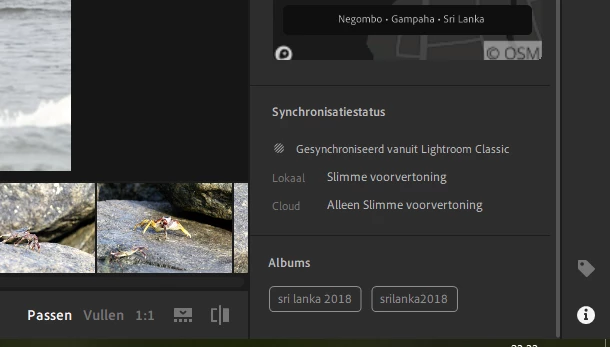
On top of that the settings in LR CC Classic  do not seem to allow the synchronisation with the cloud storage space, meaning you get extra space used on your hard drive for any communication with LR CC
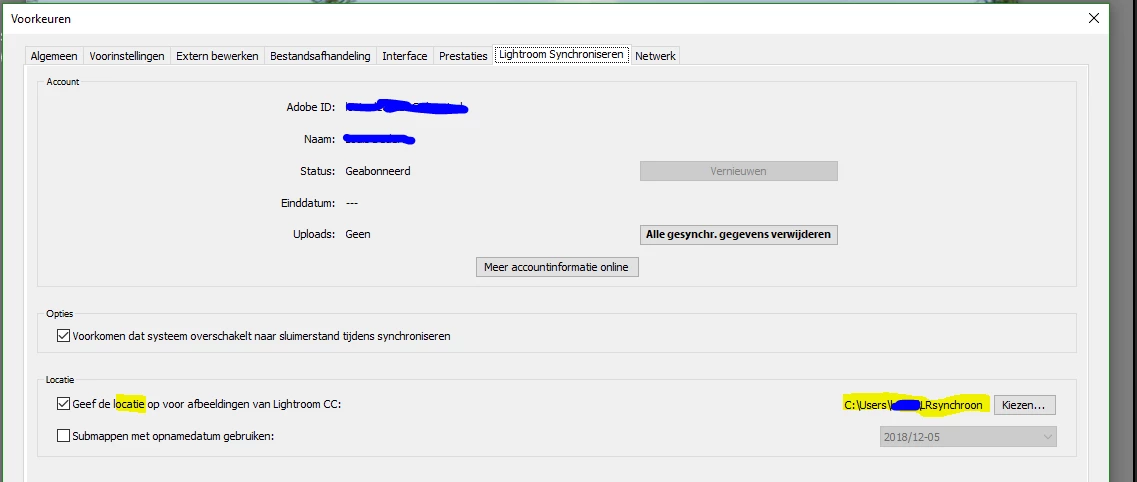
Or am I wrong?

    This topic has been closed for replies.
    Correct answer Rob_Cullen

    As I understand the 'Cloud'-

    Lightroom-Classic will only sync 'Smart Previews' up to the Cloud. They do NOT use any space of the standard 20Gb allocated. They are editable in Lr-Mobile and Lr-CC, but you are still editing a Smart Preview (Long dimension 2048 pixels) and downloading from the Cloud only provides photos of maximum 2048px long edge.

    If you Import new files into Lightroom-CC then they DO download to Lightroom-Classic in Full-size, and they DO use their full-size space in the 20Gb allocated.

    You cannot (currently. Maybe in future?) sync full-size files from LR-Classic up to the 'Cloud'.

    2 replies

    louisd79464044
    Inspiring
    December 7, 2018

    Reading the above there is a way to use LR-classic and LR-CC without the cloud.

    When making catalogs in LR-Classic, the pictures are visible in LR-CC an can even be edited from out of LR-CC, although these are only smart previews.

    When working in LR-Classic with the original full size pictures and external XMP files, LR-CC will synchronise with the XMP-file. That means that the edit history will show the edit on LR-CC as  'From LR-mobile' and LR Classic will show the result of editing in LR CC as is.

    Advantage: features of LR Classic (history, and more) and also the opportunities of LR CC.

    Rob_Cullen
    Community Expert
    Rob_CullenCommunity ExpertCorrect answer
    Community Expert
    December 6, 2018

    As I understand the 'Cloud'-

    Lightroom-Classic will only sync 'Smart Previews' up to the Cloud. They do NOT use any space of the standard 20Gb allocated. They are editable in Lr-Mobile and Lr-CC, but you are still editing a Smart Preview (Long dimension 2048 pixels) and downloading from the Cloud only provides photos of maximum 2048px long edge.

    If you Import new files into Lightroom-CC then they DO download to Lightroom-Classic in Full-size, and they DO use their full-size space in the 20Gb allocated.

    You cannot (currently. Maybe in future?) sync full-size files from LR-Classic up to the 'Cloud'.

    Regards. My System: Windows-11, Lightroom-Classic 15.3, Photoshop 27.5, ACR 18.3, Lightroom 9.3, Lr-iOS 10.4.0, Bridge 16.0.3 .