BAB48
Participant
April 9, 2018
Answered

LR Classic CC 7.3 Not Saving Develop Presets to lrtemplate format

  • April 9, 2018
  • 3 replies
  • 1279 views

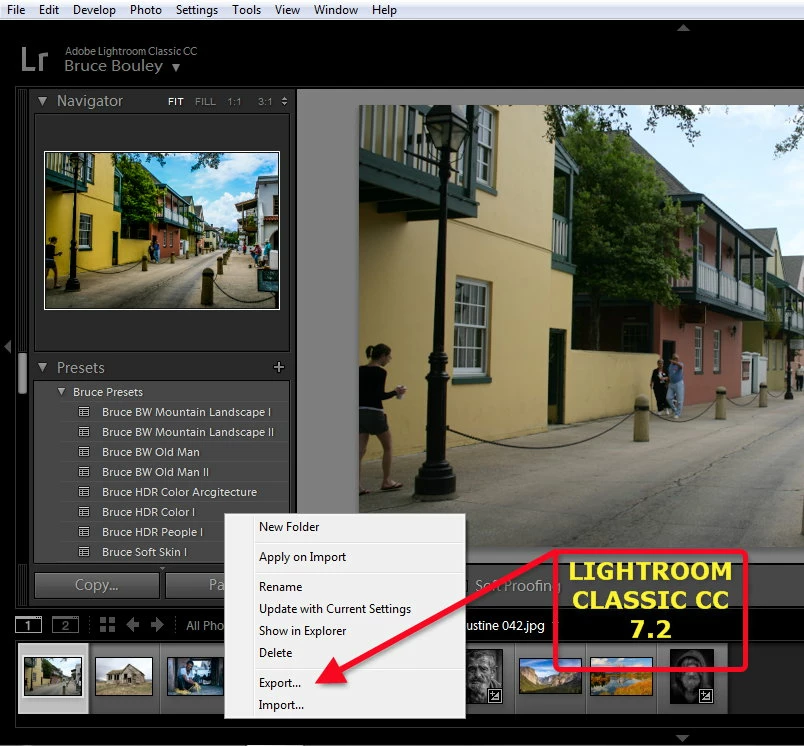
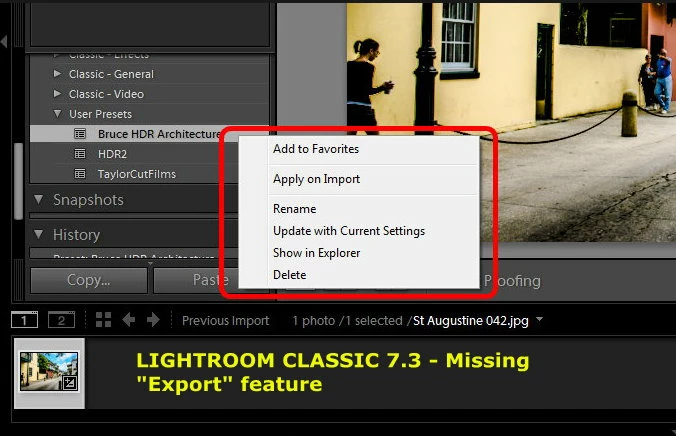
I recently updated my LR Classic CC 7.2 to 7.3. I created a few new develop presets for my images and when I right clicked on the newly created preset to "Export" it the "Export" feature was missing (See image included in this post). I then went to I ten went to "Preferences ---> Presets ---> Show Lightroom Presets Folder..." and to the "Develop Presets ---> User Presets" folder, where the new presets should be stored as an "lrtemplate" and there was nothing in the folder.

The new LR Classic CC 7.3 update only stores the new saved presets as an "XMP" file and not the "lrtemplate" and not in the "User Presets" folder. I had to reinstall LR Classic CC 7.2 to be able to get my Presets to save as an "lrtemplate".

Is this a bug and was this done intentionally? If this is the new wave of LR to eliminate the "lrtemplate" preset then how do we go about sharing the mew "XMP" Develop presets we create with older versions of LR? Is there no way in LR Classic CC 7.3 to "Export" a new user preset to an "lrtemplate"?

Thank you
This topic has been closed for replies.
Correct answer Just Shoot Me

BAB48  wrote

Is this a bug and was this done intentionally? If this is the new wave of LR to eliminate the "lrtemplate" preset then how do we go about sharing the mew "XMP" Develop presets we create with older versions of LR? Is there no way in LR Classic CC 7.3 to "Export" a new user preset to an "lrtemplate"?

Thank you
Well you don't. Older versions of LR can't use some of the newer feature that have been included since LR CC 2015 was released. Not even LR 6 had the newer feature added after the initial release.

So these new preset you might create in LR C CC V7.x won't translate the newer feature back to older versions.

If you are asking about LR CC 2015 or LR C CC V7.x then you have a subscription and you should update those older versions of LR to the most current version.

If it is so important to duplicate a preset you might create in LR C CC V7 then you will need to open that older version of LR and try to duplicate it in that version.

After thinking about it I don't see the point of this question.

Older version of LR can't open a newer version catalog. If you were to send a file to someone that was using an older version of LR first it would either have to be from an older camera that was supported in that older version or a DNG file or a TIFF that would include all the edits you had made. So why is it important to have that older version of LR use New Presets you just created?

3 replies

Just Shoot Me
Just Shoot MeCorrect answer
Legend
April 9, 2018

BAB48  wrote

Is this a bug and was this done intentionally? If this is the new wave of LR to eliminate the "lrtemplate" preset then how do we go about sharing the mew "XMP" Develop presets we create with older versions of LR? Is there no way in LR Classic CC 7.3 to "Export" a new user preset to an "lrtemplate"?

Thank you

Well you don't. Older versions of LR can't use some of the newer feature that have been included since LR CC 2015 was released. Not even LR 6 had the newer feature added after the initial release.

So these new preset you might create in LR C CC V7.x won't translate the newer feature back to older versions.

If you are asking about LR CC 2015 or LR C CC V7.x then you have a subscription and you should update those older versions of LR to the most current version.

If it is so important to duplicate a preset you might create in LR C CC V7 then you will need to open that older version of LR and try to duplicate it in that version.

After thinking about it I don't see the point of this question.

Older version of LR can't open a newer version catalog. If you were to send a file to someone that was using an older version of LR first it would either have to be from an older camera that was supported in that older version or a DNG file or a TIFF that would include all the edits you had made. So why is it important to have that older version of LR use New Presets you just created?

Community Expert
April 9, 2018

"Is this a bug and was this done intentionally? "

-->  My understanding is that it was done intentionally.

"...how do we go about sharing the mew "XMP" Develop presets we create with older versions of LR? "  

-->  You should be able to right click on a preset folder in Lightroom and choose Import. You can import and install them just like you always could. Lightroom will convert them to XMP files.

"Is there no way in LR Classic CC 7.3 to "Export" a new user preset to an "lrtemplate"?"

--> I have not found that.  I think the idea is to share presets as XMP files. 

BAB48
BAB48Author
Participant
April 9, 2018

Thank you....Greatly appreciated...Was looking all over the Adobe site and on the internet for the explanation on why the presets are now XMP and not lrtemplate. Your explanation was great and now understood. Regards...

Ian Lyons
Community Expert
Community Expert
April 9, 2018

It's intentional, Lr 7.3 converts existing presets to XMP, and all new presets will be saved as XMP. As such, any created by Lr are useable in Camera Raw and vice versa.

Your old lrtemplate presets are retained but have a ~ character placed at beginning

BAB48
BAB48Author
Participant
April 9, 2018

Thank you very much greatly appreciated....Understood.