
Participant
August 4, 2018
Answered

LR Classic cc fails to show LR icon on makbook dock; just generic icon
  • August 4, 2018
  • 1 reply
  • 534 views

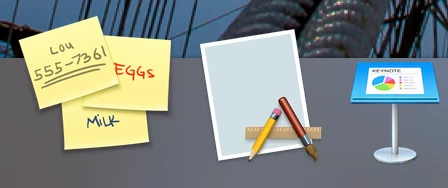
I just moved from an older MacBook Pro to a new, 2018 MacBook Pro running High Sierra OS. LR icon now shows up as the generic application with pencils and blank paper, as shown above.

I do have the latest, updated version of LR.

Ideas? Answers?

This topic has been closed for replies.
Correct answer Ian Lyons

Did you install the application using the Adobe CC installer or use the Apple migration tool? Either  way it's probably best that you remove the application then reinstall using the Adobe CC App

1 reply

Ian Lyons
Community Expert
Ian LyonsCommunity ExpertCorrect answer
Community Expert
August 4, 2018

Did you install the application using the Adobe CC installer or use the Apple migration tool? Either  way it's probably best that you remove the application then reinstall using the Adobe CC App

Participant
August 4, 2018

I used migration tool. Will try uninstall and reinstall new.

Participant
August 4, 2018

that solved it.