Participant
June 9, 2021
解決済み

Lr classic-color labels do not appear in film strip

  • June 9, 2021
  • 返信数 3.
  • 1859 ビュー

I have  the  latest  LR Classic. I have an  imac running Catalina  10.15.7.  When i apply a colr label to a picture it does not show that color on my film strip.  Other  ratings appear but not color labels.

See attached- All should  show red labels
このトピックへの返信は締め切られました。
解決に役立った回答 Ian Lyons

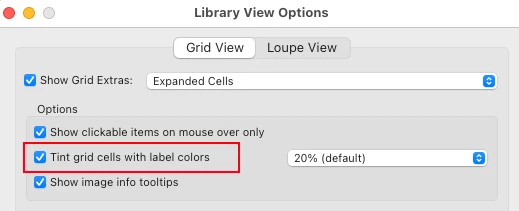
Colour labels in filmstrip shown as an edge tint rather than a badge. You can switch this on in View Options 'Tint grid cells with label colours'. Be aware that enabling this option also enables the edge tint on image cells in grid view.


返信数 3

Ian Lyons
Community Expert
Ian LyonsCommunity Expert解決!
Community Expert
June 11, 2021

Colour labels in filmstrip shown as an edge tint rather than a badge. You can switch this on in View Options 'Tint grid cells with label colours'. Be aware that enabling this option also enables the edge tint on image cells in grid view.


Participant
June 11, 2021

thanks it worked

GoldingD
Legend
June 11, 2021

Need to see, probably, a full screen shot, not just one area. 


Participant
June 11, 2021
Ian Lyons
Community Expert
Community Expert
June 11, 2021

See the response I provided earlier

Participant
June 9, 2021

In the latest lightroom classic, my  color labels do not show in the  film strip.  I have catalina 10.15.7 on my  imac  All of the  pictures in the  enclosed atachment are labeled  red but how  no color


Akash Sharma
Legend
June 11, 2021

Hi there,


Sorry that the color labels in Lightroom Classic are not showing up in the filmstrip.


Would you mind restoring Lightroom Classic app preferences to default and let us know if the issue still persists?


Please refer this article for step by step instructions: https://helpx.adobe.com/lightroom/help/setting-preferences-lightroom.html#restore_preferences_to_default_settings


Thanks,

Akash