
Known Participant
June 28, 2023
Answered

LR classic does not see changes made by photoshop edit in develop module

  • June 28, 2023
  • 3 replies
  • 294 views
 

Using the latest LR classic 12.4 and PS on windows 10.  I notice the following problems:


Inside LR, right click and edit with photoshop, choose edit original image (image in jpeg format)

In PS, made some edits, save and close

In LR, library mode everything looks fine

Switch to develop mode, the PS edits are gone if the image is in landscape orientation.  If the image is in portrait orientation, it turns into landscape (?!)

Try to reload meta data, change GPU settings, but nothing helps

The only way is to remove image from LR, and re import from disk, but all LR edits are gone, not an acceptable solution


This was not an issue before LR 12.4.  I have been using this process to make changed directly onto images and I expect those changes to show up LR correctly.


Believe this is a bug, anyone from Adobe willing to take a look?
This topic is closed to new replies. Start a new post to keep the conversation going.
Correct answer Per Berntsen

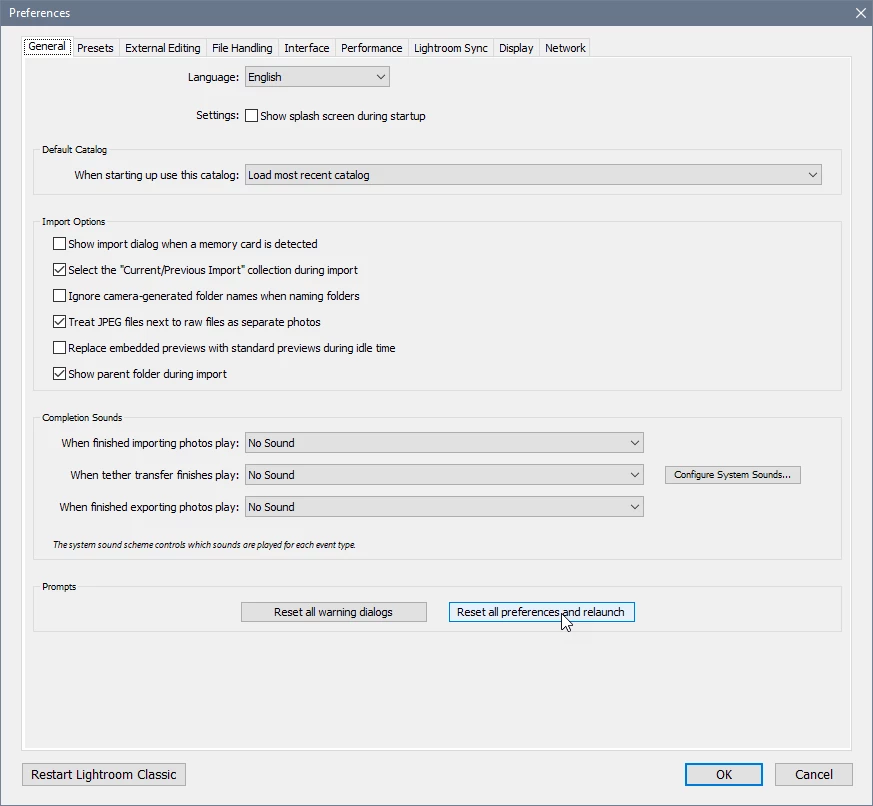
Try resetting the preferences.

Go to Edit > Preferences > General.

Press the Alt key, and a button for resetting preferences will appear.


3 replies

Per Berntsen
Community Expert
Per BerntsenCommunity ExpertCorrect answer
Community Expert
June 28, 2023

Try resetting the preferences.

Go to Edit > Preferences > General.

Press the Alt key, and a button for resetting preferences will appear.


Known Participant
July 6, 2023

This fixes it, thank you!!

kglad
Community Expert
Community Expert
June 28, 2023

in the future, to find the best place to post your message, use the list here, https://community.adobe.com/


p.s. i don't think the adobe website, and forums in particular, are easy to navigate, so don't spend a lot of time searching that forum list. do your best and we'll move the post if it helps you get responses.


<moved from using the community bugs>