VT808
Participant
June 27, 2018
Answered

LR classic Endless "syncing photos"

  • June 27, 2018
  • 2 replies
  • 378 views

Moved catalog to a new external HD and imported it to LR CC classic and it's taking forever to sync. Had to force quite it a couple times cause it wasn't syncing photos anymore.  Started with about 8000 photos it went down to 200 and now back up to 400.  Then it's the random up and down in the count.  I should of stayed with my stand alone version....FML
    This topic has been closed for replies.
    Correct answer Akash Sharma

    Hi VT808,

    Sorry about the delayed response and that you're having problems syncing images from Lightroom Classic CC.

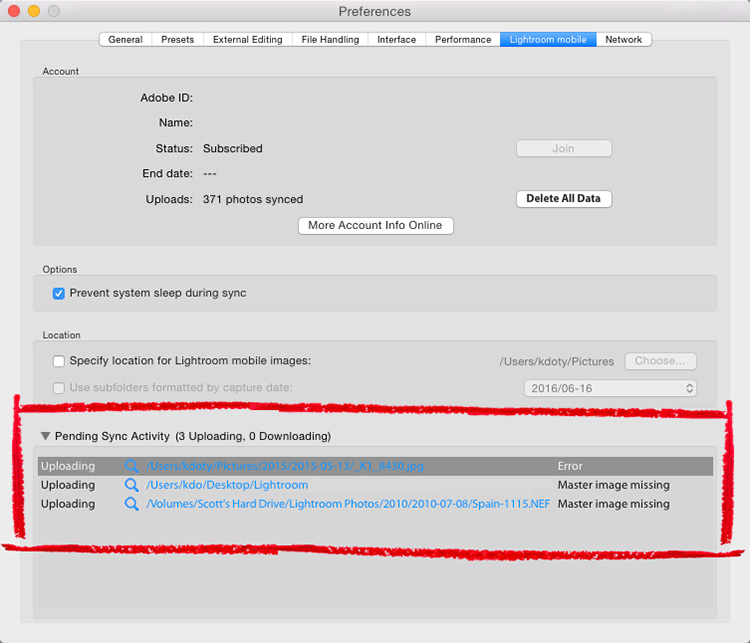
    How long have the images been syncing from Lightroom Classic CC? The best way to check whether there are sync errors in the Lightroom sync preferences. Navigate to Lightroom Preferences> Lightroom mobile> "Sync activity" section and check if you're getting error related to the images being synced.

    Image result for sync errors lightroom classic

    Let us know how it goes.

    Thanks,

    Akash

    2 replies

    Akash Sharma
    Legend
    July 11, 2018
    Akash Sharma
    Akash SharmaCorrect answer
    Legend
    July 11, 2018

    Hi VT808,

    Sorry about the delayed response and that you're having problems syncing images from Lightroom Classic CC.

    How long have the images been syncing from Lightroom Classic CC? The best way to check whether there are sync errors in the Lightroom sync preferences. Navigate to Lightroom Preferences> Lightroom mobile> "Sync activity" section and check if you're getting error related to the images being synced.

    Image result for sync errors lightroom classic

    Let us know how it goes.

    Thanks,

    Akash