
Participating Frequently
October 23, 2025
Answered

LR Classic ignores Edit in PS 2025 File Format

  • October 23, 2025
  • 1 reply
  • 118 views

Previously, I had this preference to Tif but yesterday I changed it to PSD.
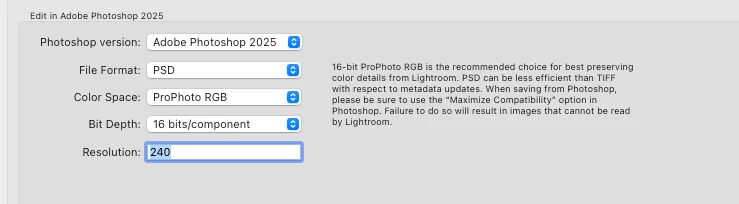
 

However, even though I've restarted both Lightroom Class and Photoshop several times, when I choos a tif image and Edit in Adobe Photoshop 2025 - top item,

Then Edit a Copy
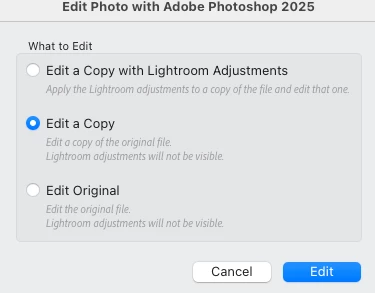
It copies the image as a tif again and opens that in PS.

Correct answer AxelMatt

If I understand you correctly, the image in Lightroom is a TIF file which you try to edit in Photoshop. 

I have check this on my machine and if I use the "Edit a Copy" option I already get a TIF even though I also set PSD in the setings for editing in Photoshop.

If I use the "Edit a Copy with Lightroom Adjustments" I get a PSD as result.


I think this is a normal behavior because if you use "Edit a Copy" a copy of the original image file will be create first and then it's open in Photoshop. Editings wre saved to this file. There's no format change to PSD.


Try to send the appropriate image to PS by using the "Edit a Copy with Lightroom Adjustments" setting and see what happens.


1 reply

AxelMatt
Community Expert
AxelMattCommunity ExpertCorrect answer
Community Expert
October 23, 2025

If I understand you correctly, the image in Lightroom is a TIF file which you try to edit in Photoshop. 

I have check this on my machine and if I use the "Edit a Copy" option I already get a TIF even though I also set PSD in the setings for editing in Photoshop.

If I use the "Edit a Copy with Lightroom Adjustments" I get a PSD as result.


I think this is a normal behavior because if you use "Edit a Copy" a copy of the original image file will be create first and then it's open in Photoshop. Editings wre saved to this file. There's no format change to PSD.


Try to send the appropriate image to PS by using the "Edit a Copy with Lightroom Adjustments" setting and see what happens.


My System: Intel i7-8700K - 64GB RAM - NVidia Geforce RTX 3060 - Windows 11 Pro 25H2 -- LR-Classic 15 - Photoshop 27 - Nik Collection 8 - PureRAW 6 - Topaz Photo AI
Participating Frequently
October 23, 2025

Indeed you are right. I was initially alarmed as when using that solution, LR / PS doesn't create the .psd file until saved in PS (unless there's an arbatory delay) and I was concerned that it PS was editing my original .tif. Note, I hadn't considered this 'answer' or menu option as I don't actually make adjustments in LR - I only use it for catalogueing final editted images.


Thank you.