Known Participant
June 3, 2026
Answered

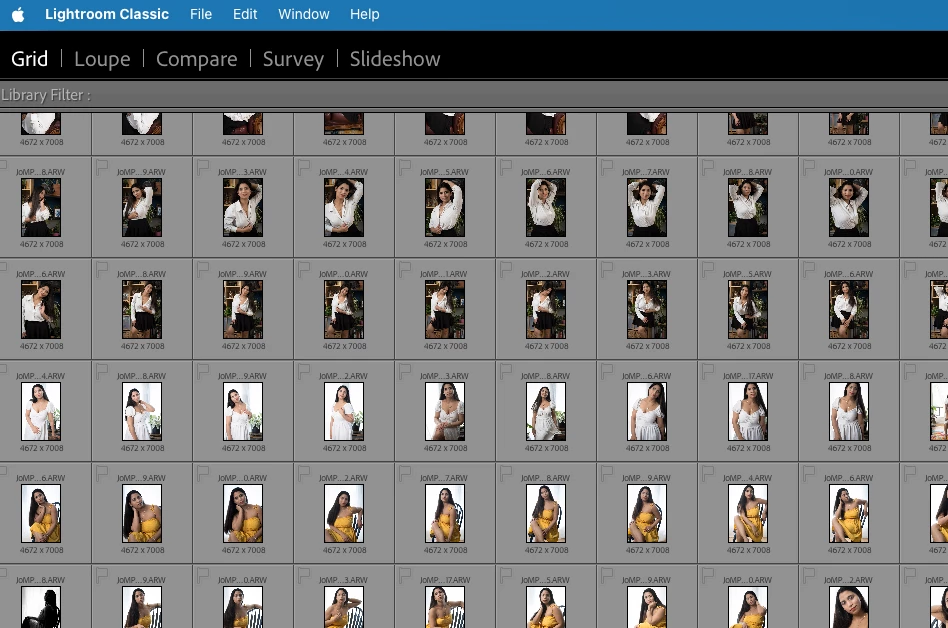
LR classic stuck in an unfamiliar view

  • June 3, 2026
  • 3 replies
  • 46 views

Hello everyone

I clicked something, and now LRC is stuck in an unfamiliar screen. How do I get out of this????

Thank you for your patience and help!

John
 

    Correct answer Conrad_C

    It looks like the Secondary Display window appeared on top of, and is now blocking, the usual application window. If you don’t see the usual red close button at the top left corner, then that means the Secondary Display window is also open in full screen mode*. Here are the ways to close it so that you can see the main application window again:

    • Choose the submenu Window > Secondary Display and then deselect the Show command. 
    • Press the Show command’s keyboard shortcut (Command+F11)

    *Secondary Display full screen mode is toggled by the menu command Window > Secondary Display > Full Screen


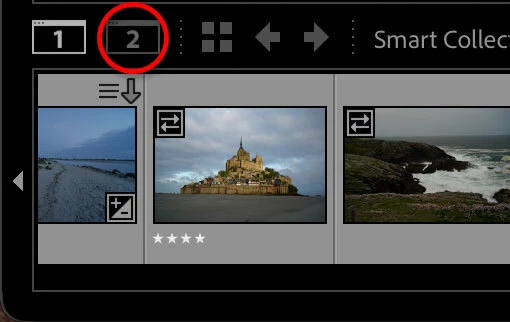
    As to how the Secondary Display window appeared accidentally, you might have unintentionally pressed that keyboard shortcut, or a stray click might have hit the Secondary Display icon in the filmstrip, circled in the picture below.


    3 replies

    Known Participant
    June 4, 2026

    Conrad and John R, you are right! Thanks for the help; all good now!

    Conrad_C
    Community Expert
    Conrad_CCommunity ExpertCorrect answer
    Community Expert
    June 3, 2026

    It looks like the Secondary Display window appeared on top of, and is now blocking, the usual application window. If you don’t see the usual red close button at the top left corner, then that means the Secondary Display window is also open in full screen mode*. Here are the ways to close it so that you can see the main application window again:

    • Choose the submenu Window > Secondary Display and then deselect the Show command. 
    • Press the Show command’s keyboard shortcut (Command+F11)

    *Secondary Display full screen mode is toggled by the menu command Window > Secondary Display > Full Screen


    As to how the Secondary Display window appeared accidentally, you might have unintentionally pressed that keyboard shortcut, or a stray click might have hit the Secondary Display icon in the filmstrip, circled in the picture below.


    johnrellis
    Legend
    June 3, 2026

    You’ve opened the Secondary Display window (normally used with a second display). To close it, do the menu command Window > Secondary Display > Show (unchecking the menu item Show). Or type the keyboard shortcut Cmd F11.