Participant
June 11, 2017
Answered

LR corrupting RAW files from 5Div - pink/white blocks obscuring areas of photo

  • June 11, 2017
  • 3 replies
  • 1539 views

I have been having trouble importing the Canon 5D mark iv raw files into LR.

A number of photos come out looking corrupted, with blocky pink and white areas in the image preview. (Usually when opening in PS or exporting direct as a JPG from LR shows the file completely intact, without the issue). The problem appears to be with LR and its handling of files from this particular camera, since the affected photos are different each time I import a CF card. The problem did not exist when using the same cards in the 5D mk iii using the same copy of LR.

I have attached a screen shot to show the issue. In the filmstrip below you can see the issue affecting other photographs.

Any suggestions on what might be wrong, and how to solve it, very welcome.
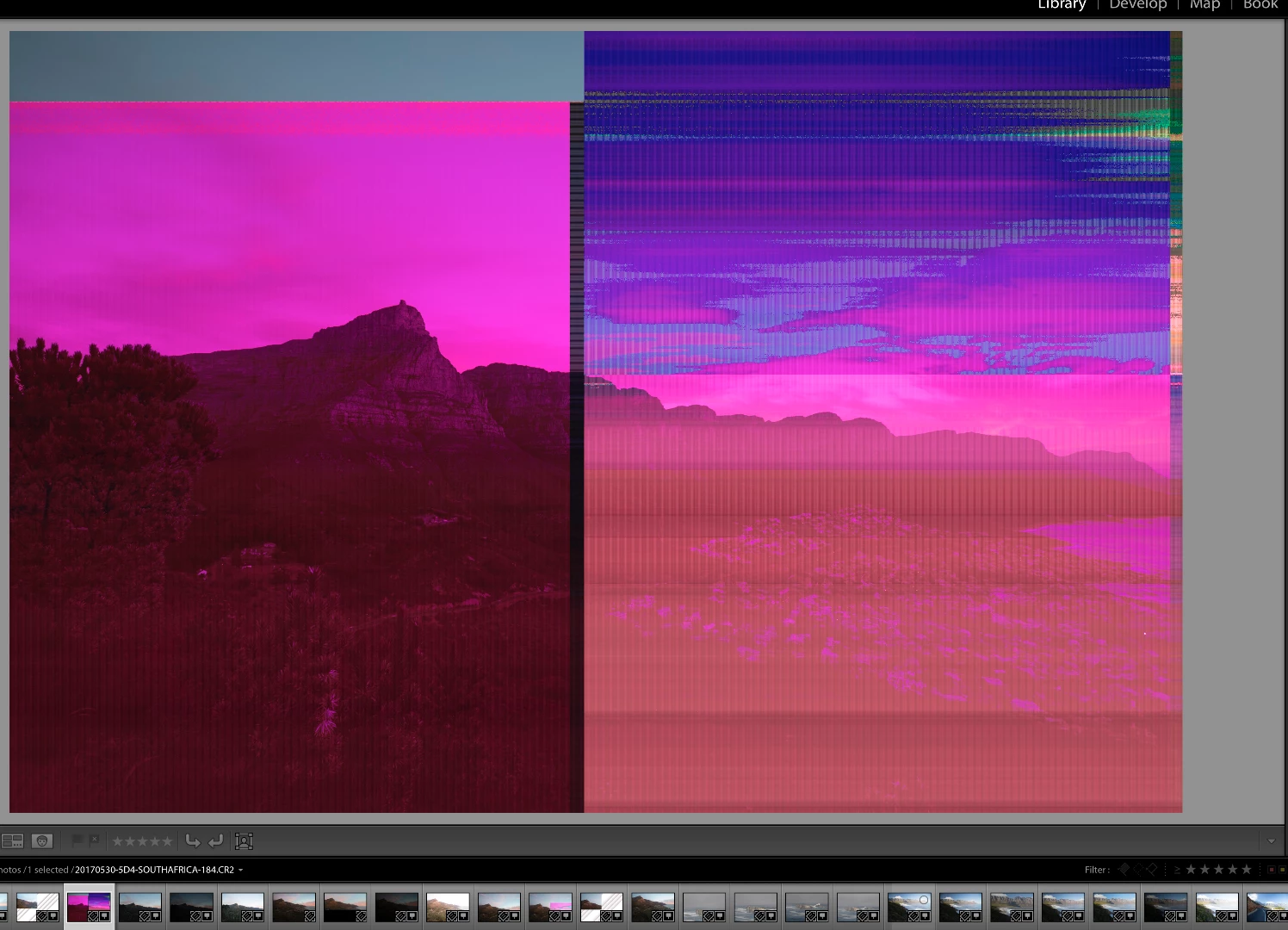
    This topic has been closed for replies.
    Correct answer dj_paige

    This is a corrupted file, caused by some hardware malfunction somewhere. It could be camera card, or transfer to computer, or hard disk or memory. You need to see if you can isolate the cause by trying different hardware.

    3 replies

    Participant
    March 10, 2020

    The issue is the card reader. The files are large on mark4 and even a newer lexpro reader  needs to be updated. if you still have the card and not formatted it yet, connect camera direct to computer and download and then check them and i bet the files are OK. its a lot of imformation especially if shooting raw and jpeg together. 90% of the time it will be the card reader and not the adobe programs.

    dj_paige
    dj_paigeCorrect answer
    Legend
    June 11, 2017

    This is a corrupted file, caused by some hardware malfunction somewhere. It could be camera card, or transfer to computer, or hard disk or memory. You need to see if you can isolate the cause by trying different hardware.

    Participant
    January 10, 2020


    I am having the same issue on two different cameras and cards. So, you all are saying it could be the card reader or my hardrive? 

    dj_paige
    Legend
    January 10, 2020

    It can be any piece of hardware. While card reader and hard disk are likely causes, it can also be computer memory, the cable that connects the camera/card reader to the computer or even the camera itself is malfunctioning. You need to test all of these.

    Just Shoot Me
    Legend
    June 11, 2017

    First thing to do is turn off the GPU option in the LR Preferences on the Performance tab. If that doesn't help then try a different, New, memory card. They do go bad over time and use

    Could be what you have is some type of hardware problem. Could be the card, card reader or cable used to connect the reader or camera to the computer.

    LR never touches the original files so what you are seeing is in the displaying of the images. If you go to the develop module do they look like your screen shot?

    Participant
    June 11, 2017

    Thanks a lot for the pointers. I will experiment with the GPU option.

    I don't think this is the cards - I have the same thing with three different cards. I've ordered a new card reader as well to see if this helps.