
PeterZed
Participating Frequently
November 23, 2018
Answered

LR corrupts bottom 25 pixels of DNG files from Samasung Galaxy S8+

  • November 23, 2018
  • 2 replies
  • 1301 views

I'm using stock camera app on Galaxy S8+, shooting RAW (in DNG format) + JPG.

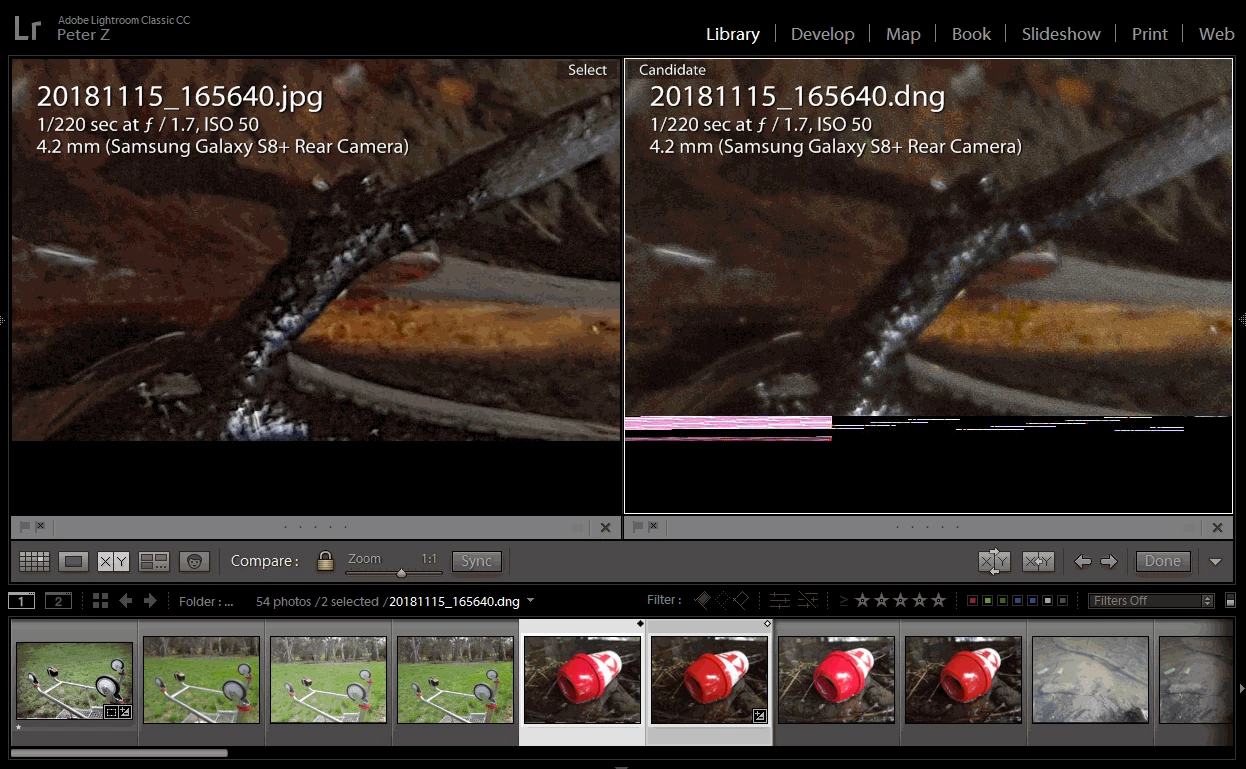
When I open the DNG in develop module, I notice the bottom 25 rows of pixels are corrupt/jumbled up with random colours.  This happens on all of my S8+ RAW files when opened in LR.  If I open the same DNG in a different viewer, such as XN View, the image is fine.

Here is a side-by-side comparison in LR. The in-camera JPG on the left, and DNG on the right:
When the DNG is exported to JPG, the corruption is also there (but the pattern is different):

And here is the same DNG opened in XN View (a free batch photo processing tool). The whole image is fine, the bottom 25 pixels are normal:
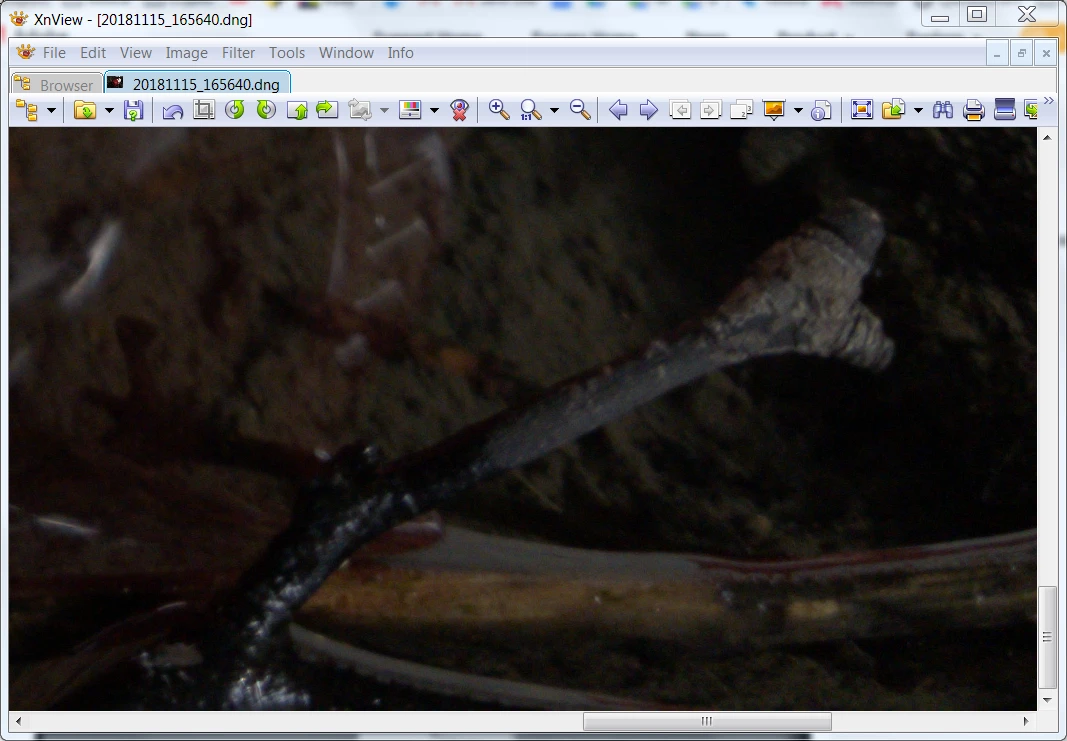
For now I'm just cropping the bottom 25 pixels off the images to get around the problem, but wanted to mention it here for the developers to look into as it might be a potential bug.  As a point of interest, my Canon RAW files are not affected by this problem.

I'm using Lightroom Classic CC (8.0) with Camera Raw (11.0) - both are the latest versions as of this writing, on a Windows 7 64bit PC.

This topic has been closed for replies.
Correct answer johnrellis

Adobe has acknowledged this bug: Lightroom/Camera Raw: Artifacts at Edges of Galaxy S7 raw/DNG Files | Photoshop Family Customer Community . Please add details of your issue to the bug report, including the first ten lines from Help > System Info and the exact camera model and app that produced the photo. Be sure to click Me Too and Follow in the upper-right corner, which will make it a little more likely Adobe will prioritize a fix, and you'll be notified when the bug's status changes.

2 replies

johnrellis
johnrellisCorrect answer
Legend
November 23, 2018

Adobe has acknowledged this bug: Lightroom/Camera Raw: Artifacts at Edges of Galaxy S7 raw/DNG Files | Photoshop Family Customer Community . Please add details of your issue to the bug report, including the first ten lines from Help > System Info and the exact camera model and app that produced the photo. Be sure to click Me Too and Follow in the upper-right corner, which will make it a little more likely Adobe will prioritize a fix, and you'll be notified when the bug's status changes.

PeterZed
PeterZedAuthor
Participating Frequently
November 25, 2018

johnrellis  wrote

Adobe has acknowledged this bug: Lightroom/Camera Raw: Artifacts at Edges of Galaxy S7 raw/DNG Files | Photoshop Family Customer Community . Please add details of your issue to the bug report....

Thanks for finding this and confirming it's a bug! I'll gladly add my details to the support case

dj_paige
Legend
November 23, 2018

This is a corrupted file, said corruption caused by a hardware malfunction in the transfer from the camera to the computer. The fact that Xnview doesn't see it is because XNView uses the JPG preview embedded in the DNG file, which is usually uncorrupted even when the DNG image itself is corrupted.

PeterZed
PeterZedAuthor
Participating Frequently
November 23, 2018

Thanks for your response dj_paige. To prove/disprove your theory, I opened the same DNG file in yet another editor, RawTherapee, and the file was completely fine (there was no evidence of corruption in either the editor window or exported JPG file).

Also why would only the DNG files become corrupt during the transfer from device to PC, and all the JPG files be intact (as per your theory)?

Just Shoot Me
Legend
November 23, 2018

Where are the image files stored?

On a Local drive or on a NAS?