
Known Participant
September 27, 2022
Question

Lr creates a new folder above mother folder when editing.

  • September 27, 2022
  • 4 replies
  • 1136 views

Another strange problem I'm having.


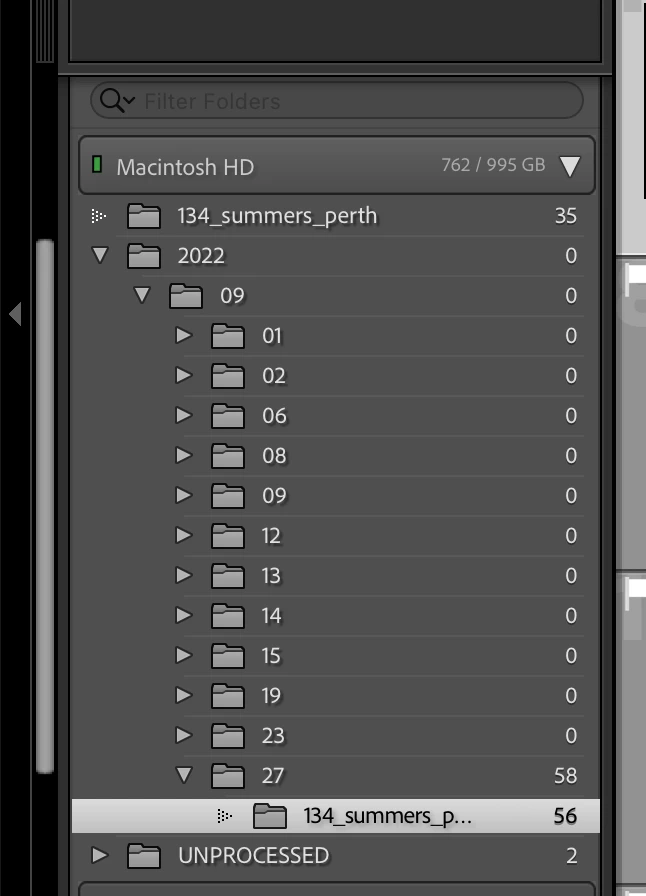
I have photos orgasnised by date i nested folders. Then I select those I want to edit further in Ps. Usually once I edit and go back to Lr, these photos are stacked with the original in the same folder. Now Lr is creating a new/duplicating folder above the mother folder with the newly edited photos. I'm not able to drag those photos back into the origianal folder as it says they are already there, but Lr is showiong this duplicate folder.


In the screen attached, you can see this with the "134_summers_perth" folder. The one on top was never created by me, it was created by Lr after I edited them in Ps. I do not want this mess to happen to my files.


Any ideas?

Give me a hammer.
 

This topic has been closed for replies.

4 replies

Bob Somrak
Legend
September 27, 2022

Right click the top folder and chose Show Parent

M4 Pro Mac Mini. 48GB
Community Expert
September 27, 2022

In a first step please try resetting the preferences of Lightroom Classic:   https://helpx.adobe.com/lightroom-classic/help/setting-preferences-lightroom.html


It's recommended to backup your preferences before you reset the preferences to the default settings: 

https://helpx.adobe.com/lightroom-classic/kb/preference-file-and-other-file-locations.html

My System: Intel i7-8700K - 64GB RAM - NVidia Geforce RTX 3060 - Windows 11 Pro 25H2 -- LR-Classic 15 - Photoshop 27 - Nik Collection 9 - PureRAW 6 - Topaz Photo AI
bidillinoAuthor
Known Participant
September 27, 2022

Hi Axel, had a quick read - are you sure this is the "first step" as it looks quite drastic? I don't want to reset the preferences and mess more things up unnecessarily.


Also just to make it clear - these duplicate folders are not of my making. Lightroom ois crearting them.


I suspect the problem lies with the catalog. Could it be corrupt or something? And is there a way to check or fix apart from checking the integrity before backup, which looks like it passes that test.

Community Expert
September 27, 2022
quote

...

Also just to make it clear - these duplicate folders are not of my making. Lightroom ois crearting them.

...

By @bidillino

I've had understand your problem. It can be that there's something wrong in the preferences. That can only check if you reset the preferences.


quote

...

I suspect the problem lies with the catalog. Could it be corrupt or something?

...
By @bidillino


I don't thing there's a corrupt catalog. 


What has been changed ion your system before the issue occur? 

My System: Intel i7-8700K - 64GB RAM - NVidia Geforce RTX 3060 - Windows 11 Pro 25H2 -- LR-Classic 15 - Photoshop 27 - Nik Collection 9 - PureRAW 6 - Topaz Photo AI
dj_paige
Legend
September 27, 2022

A possibility is that this is the capitalization error in LrC. It may be that the problem is not actually the folders that you show, but the names of the folder(s) above 2022

https://www.lightroomqueen.com/capitalization-catalog-error/

bidillinoAuthor
Known Participant
September 27, 2022

There are no capitals in these folders, everything lowercase.

dj_paige
Legend
September 27, 2022

As I said, it may be the parent folder(s) of the 2022 folder where the problem comes in. You need to check the parent folders in Lightroom Classic for possible mis-matched capitalization.

bidillinoAuthor
Known Participant
September 27, 2022

Also, when I go to Finder, everything is in order, no new folders created there, so this is just a stuff up of sorts at the Lr end.