Answered
LR export settings always show "pixels per cm"
Everytime I export using my template or even during normal export, resolution is set to "pixels per cm". How do I change this to pixels per in?


Everytime I export using my template or even during normal export, resolution is set to "pixels per cm". How do I change this to pixels per in?
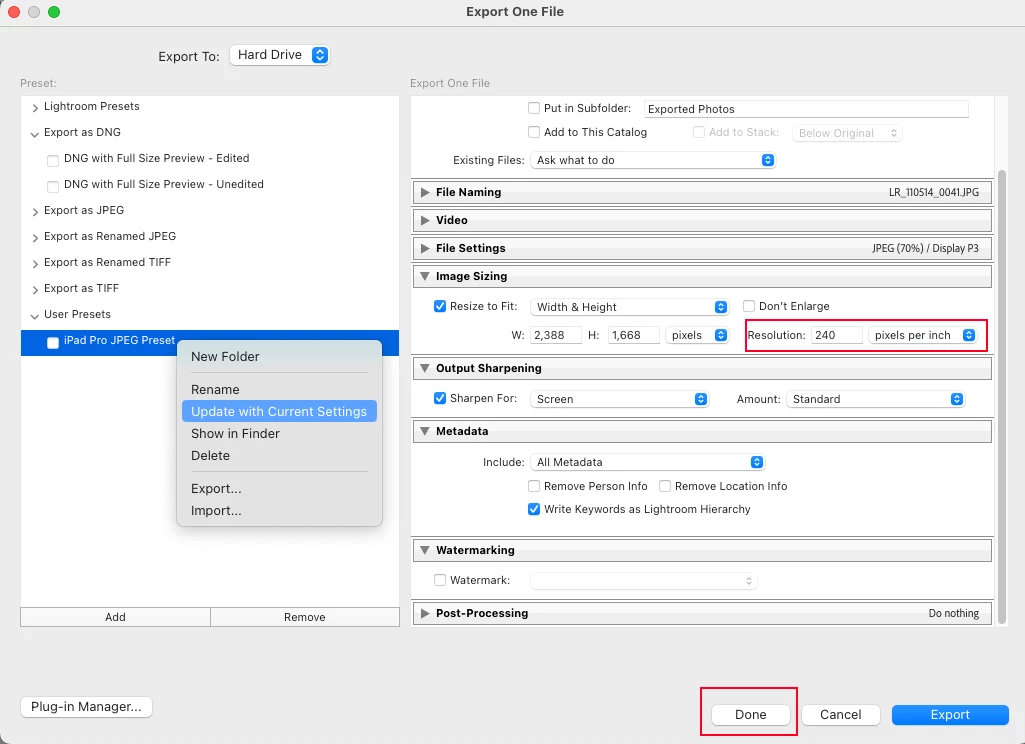
You may have inadvertently saved / updated the export preset with 'pixels per cm' enabled. However, it should be relatively simple to fix.
1. First open the Export dialog and select your template.
2. Change 'pixels per cm' to 'pixels per inch'
3. Right mouse click on your template to open context menu
4. Choose 'Update with Current Settings'
5. Click on the 'Done' button
I've attached a screenshot to illustrate above
Already have an account? Login
Enter your E-mail address. We'll send you an e-mail with instructions to reset your password.
 AdChoices