Participant
June 16, 2024
Question

LR exporting dark

  • June 16, 2024
  • 1 reply
  • 168 views

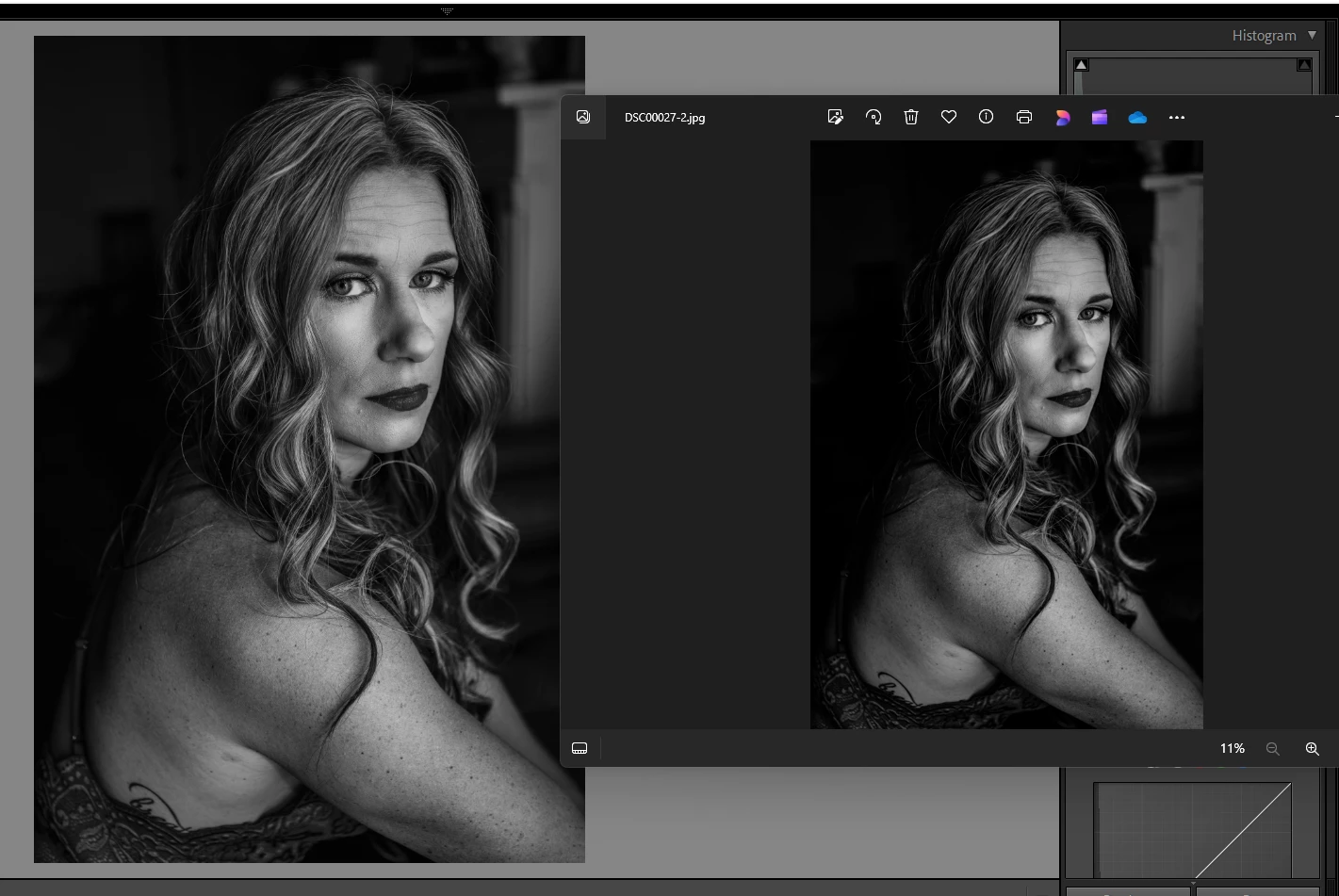
Any ideas why my photos are exporting darker than how I edit them in LR? Left is in LR and right is basic photo viewer on my Windows Laptop. When I open in PS it is displaying how it is on the right. 
 

This topic has been closed for replies.

1 reply

Per Berntsen
Community Expert
Community Expert
June 16, 2024

Does disabling the GPU in LrC make any difference? (Preferences > Performance > set Use graphics processor to Off)

If it does, make sure that your GPU driver is up to date. I you have an Nvidia card, make sure to install the studio driver, not the game ready driver.


Another possibility is a defective monitor profile.

As troubleshooting, and as a  possible temporary fix, try setting the monitor profile to sRGB (use Adobe RGB if you have a wide gamut monitor). If this fixes the issue, you should ideally calibrate your monitor with a hardware calibrator. This will also create and install a custom monitor profile that will be more accurate than sRGB or Adobe RGB.


Close all color manged software (LrC, PS, Windows Photos).

Press the Windows key + R, type colorcpl in the box and press Enter.

Add the sRGB profile, then set it as default.
