
Known Participant
June 5, 2018
Answered

LR fails to display Nikon D850 GPS metadata

  • June 5, 2018
  • 4 replies
  • 1246 views

This happened before with Nikon D800E when it was new. Then a LR update fixed the problem. Is anybody else having this problem? I am using the latest version of LR classic. If I take the image into PS and bring back to LR as a Tiff the GPS tag appears. This is my work around for now. Any better solutions?
    This topic has been closed for replies.
    Correct answer johnrellis

    As requested here is the link to file DSC0515.NEF. GPS coordinates are present when viewed in camera and this file is straight from the XQD card.

    https://www.dropbox.com/s/dmdp8rie0vnh3dr/_DSC0515.NEF?dl=0


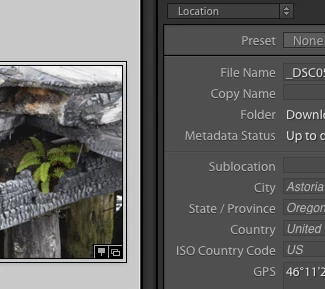
    When I import that .nef into my LR 7.3.1, it imports the GPS location too:

    which indicates the issue is particular to your LR.


    Perhaps something is screwy with metadata import presets.  Try setting Apply During Import > Metadata to None and importing a sample image -- does the GPS location import?

    4 replies

    johnrellis
    Legend
    June 5, 2018

    ...or try making a new preset from scratch.

    Known Participant
    June 5, 2018

    Thats the next thing.

    johnrellis
    Legend
    June 5, 2018

    In the Import window, in the Apply During Import panel on the right, is Metadata set to None?  If not, then you are applying a metadata preset to the photos when they get imported, and that metadata preset may be clearing the GPS field in the catalog.  Edit the preset and make sure Camera Info > GPS is unchecked.

    Known Participant
    June 5, 2018

    My Apply During Import does not have any GPS settings. In other words it is not checked

    johnrellis
    Legend
    June 5, 2018

    My Apply During Import does not have any GPS settings. In other words it is not checked

    Just to clarify, when editing an metadata develop preset, if the GPS field is blank (no GPS settings) but there is a check mark to the right, then that will clear the GPS field in the catalog:

    So your preset has no checkmark on the right?

    dj_paige
    Legend
    June 5, 2018

    Since I don't have a D850, I am guessing, but does the Lightroom menu  command Metadata->Read Metadata From Files work?

    Known Participant
    June 5, 2018

    Sorry, tried that. No go.

    johnrellis
    Legend
    June 5, 2018

    Please take a sample file straight from the camera (not imported into LR) and upload it to Dropbox or similar, and post the sharing link here. This will let us see if the problem occurs with all installations of LR or just yours, narrowing down the problem.

    Bani Verma
    Legend
    June 5, 2018